
How to Automate Tasks with AI: Step-by-Step Guide
Repetitive work rarely looks expensive one task at a time, but ten minutes spent copying data, sorting messages, creating summaries, or chasing approvals can quietly consume hours every week. This guide explains how to automate tasks with AI without turning a simple workflow into a fragile science project.
The goal is practical automation: identify a repeatable job, give AI a narrow role, connect it to the right tools, add safety checks, and measure whether the workflow actually saves time. By the end, readers will be able to design, test, launch, and maintain automations for email, documents, research, customer requests, reporting, data entry, and routine business operations.
How Do You Automate Tasks with AI?
| To automate tasks with AI, choose a repetitive low-risk task, map its trigger, inputs, decisions, and actions, then use an AI assistant or workflow tool to handle the judgment step. Test real examples, add human approval for sensitive actions, monitor failures, and improve the workflow over time. |
Essential Tools & Materials Breakdown
AI automation is a software project, so the “materials” are accounts, connectors, examples, rules, and a safe place to test. Most beginners can validate their first useful workflow with free tiers or tools they already pay for; costs rise when automations run frequently, call premium connectors, process large files, or use APIs at scale.
Use the table below as a planning range rather than a price quote. Provider pricing changes, and a $0 prototype can become a meaningful monthly expense if it processes thousands of records.
| Tool / Material | What it does | Estimated cost | Skill level |
| Task inventory sheet | Captures recurring tasks, volume, minutes, errors | Free | Beginner |
| AI assistant | Summarizes, classifies, extracts, drafts, and reasons over text | Free to ~$30+/month | Beginner |
| No-code automation platform | Connects triggers, apps, AI steps, and actions | Free tier to ~$30+/month | Beginner–Intermediate |
| Office/email/CRM connectors | Provides the systems where work begins or ends | Often existing subscription | Beginner |
| API access | Enables custom workflows, structured calls, and higher scale | Usage-based; ~$0–$50+ to start | Intermediate |
| Password / secret manager | Stores credentials and API keys safely | Free to ~$5+/month | Beginner |
| Test dataset/sandbox | Lets you validate without risking production data | Usually free | Beginner |
| Logging/monitoring | Tracks runs, failures, cost, and exceptions | Free to ~$20+/month | Intermediate |
Audit Repetitive Work Before Choosing a Tool
The fastest way to waste money on automation is to start with a shiny platform and then search for something to automate. Start with the work. For three to five days, write down tasks that repeat, especially work involving copying, sorting, summarizing, renaming, drafting, checking, routing, or moving information between apps.
When learning how to automate tasks with AI, prioritize jobs where the inputs are digital and the expected outcome can be described clearly. A task does not need to be perfectly identical each time, but the rules should be stable enough that a reasonable person could write a checklist for it.
High-value candidates: inbox triage, lead qualification, meeting-note summaries, invoice data extraction, support-ticket routing, product-description drafts, report generation, document tagging, competitor monitoring, and CRM updates.
Poor first candidates: one-off creative strategy, decisions with serious legal or financial consequences, workflows with no reliable source data, or tasks whose rules change every day.
Estimate the current cost. Multiply the average minutes per task by weekly frequency, then add time spent correcting errors or switching between systems. A six-minute task done 25 times a day is 12.5 hours per five-day week before rework.
💡 Quick Hack: Use a one-week “automation diary.” Add only four columns: task, frequency, minutes, and frustration level. The recurring task that is both frequent and annoying is often the best first automation because adoption is easy to prove.
Score Automation Candidates by Value and Risk
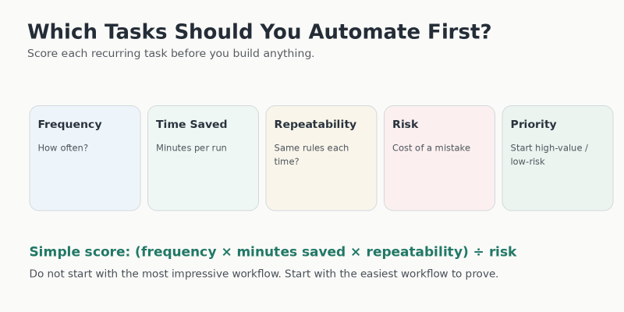
A task can be repetitive and still be a bad automation target. The next step in how to automate tasks with AI is to score each candidate on frequency, time saved, repeatability, data quality, and downside if the system makes a mistake.
A simple scoring method works well: multiply frequency, minutes saved, and repeatability, then divide by risk. Use a 1-to-5 scale for repeatability and risk. The math is not sacred; its purpose is to stop teams from automating a dramatic but risky process before an easy win.
Frequency: daily work usually beats monthly work.
Minutes saved: include handoffs and waiting time, not only typing time.
Repeatability: the same inputs and rules should usually lead to the same kind of output.
Risk: a wrong draft is cheaper than a wrong payment, deletion, access change, or customer promise.
Data readiness: structured fields, consistent file names, and clear source systems reduce failure rates.
Map the Workflow as Trigger → Input → Decision → Action
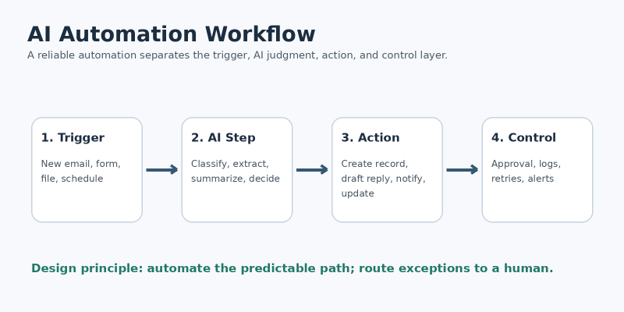
Before configuring any app, draw the workflow in plain English. This is where many “AI automation” projects become ordinary and manageable. The AI model usually handles one decision or transformation inside a larger deterministic process.
For anyone asking how to automate tasks with AI, the most useful template is: trigger, input, AI step, rules, action, and exception. If those six items are unclear, the workflow is not ready to build.
Example: AI-powered support ticket triage
Trigger: a new support email arrives.
Input: sender, subject, body, account tier, and recent order information.
AI step: classify the issue as billing, delivery, technical, cancellation, or other; produce a one-sentence summary.
Rule: if the message mentions legal threats, chargebacks, account security, or a low-confidence classification, route to a senior agent.
Action: add a label, assign the correct queue, and draft a reply using approved knowledge.
Exception: if required account data is missing, create a review task instead of sending anything.
This map separates AI judgment from system authority. The model can suggest a category while a rule decides whether an external action is allowed.
Pro-Tip: Write the manual process as if you were training a new employee on day one. Any sentence containing “usually,” “unless,” “except,” or “it depends” is a clue that you need an explicit branch or human-review rule.
Choose the Simplest Automation Pattern That Fits
The right architecture depends on how much authority, integration, and reliability the workflow needs. When deciding how to automate tasks with AI, choose the least complicated pattern that can complete the job safely.
Pattern A: AI assistant only
Use a conversational AI tool when the task begins and ends with information: summarize notes, transform text, create checklists, compare options, extract fields, or prepare a draft. This has the lowest setup cost but still requires a person to move the result into the next system.
For recurring briefings, reminders, or condition checks, the official OpenAI Scheduled Tasks guide describes how ChatGPT tasks can run later, recur, and notify users when work is complete or a monitored condition changes.
Pattern B: No-code workflow automation
Use a no-code platform when a trigger in one app should cause actions in one or more other apps. Examples include saving attachments, updating spreadsheets, creating CRM records, routing forms, posting approved content, or calling an AI model in the middle of a flow. Microsoft Power Automate documentation is a useful reference for cloud flows, scheduled flows, and desktop automation.
Pattern C: Desktop/RPA automation
Use robotic process automation when the target software has no usable API and a person normally clicks through a desktop interface. RPA can be effective for legacy systems, but it is more brittle because screen layouts, pop-ups, and timing changes can break the workflow.
Pattern D: API or agent-based automation
Use APIs when reliability, scale, structured data, or custom business logic matters. Developers can combine AI with databases, queues, webhooks, and software tools. OpenAI’s developer quickstart describes building agents that can use tools and take actions through application code.
💡 Quick Hack: Prototype the decision first. Paste 20 real examples into an AI assistant and see whether the classification or extraction is consistently useful. Only connect APIs and actions after the “thinking step” proves itself.
Design the AI Step with Clear Inputs and Structured Outputs
A reliable AI step has boundaries. In how to automate tasks with AI, the prompt should define the role, allowed source data, exact task, output format, decision rules, and what to do when information is missing.
Avoid prompts such as “read this and handle it.” They are hard to test because success is undefined. A better instruction says which fields to extract, which categories are allowed, whether the model may infer missing data, and how confidence should be represented.
A practical prompt structure
Role: “You classify inbound customer requests for a software company.”
Goal: “Choose exactly one category from the approved list and write a short summary.”
Source boundary: “Use only the email body and supplied account fields.”
Rules: “Do not invent an order number. If the request includes account security, set requires_human_review to true.”
Output: return fixed fields such as category, summary, confidence, and requires_human_review.
Fallback: if the message cannot be classified, use category = other and explain the uncertainty in the one-short-reason field.
Structured outputs reduce downstream breakage. A workflow that expects four fields should receive four fields, not a beautifully written paragraph that another step must guess how to parse.
Pro-Tip: Store the prompt as a versioned asset, not a sentence hidden inside a workflow. Name versions such as ticket_classifier_v1.3 and record what changed. Prompt versioning makes debugging much easier when quality shifts.
Build One End-to-End Workflow with a Safe Example
The best way to understand how to automate tasks with AI is to build a narrow workflow from trigger to completed result. Email triage is a strong starter because it combines unstructured text, classification, summarization, routing, and an optional draft without requiring autonomous financial or administrative authority.
Example build: inbound email triage
- Create a test inbox or use a folder/label that contains non-sensitive sample messages. Keep production email out of the first prototype.
- Set the trigger to run when a new message arrives in that test location.
- Pass only the fields the AI actually needs: subject, body, sender type, and perhaps a small amount of account context.
- Ask the AI to return a category, a one-sentence summary, a confidence value, and a human-review flag.
- Add deterministic routing rules. For example, billing goes to the billing queue; technical goes to support; messages with a human-review flag go to a review folder.
- Create a draft reply rather than sending automatically. Use a fixed response policy and approved reference text so the draft is constrained.
- Write an audit row to a spreadsheet or database with timestamp, message ID, category, confidence, route, and whether a human changed the result.
- Run the workflow against at least 20 sample messages before allowing it to touch live work.
Once the end-to-end path is stable, move from “draft-only” to selective automation. Low-risk categories can be processed automatically while sensitive categories continue to require review.
💡 Quick Hack: If a full platform feels expensive, validate with a spreadsheet as the control center. One sheet can hold sample inputs, expected outputs, actual outputs, review notes, and pass/fail status before you buy a larger automation stack.
Add Human Approval Where the Cost of Error Is High
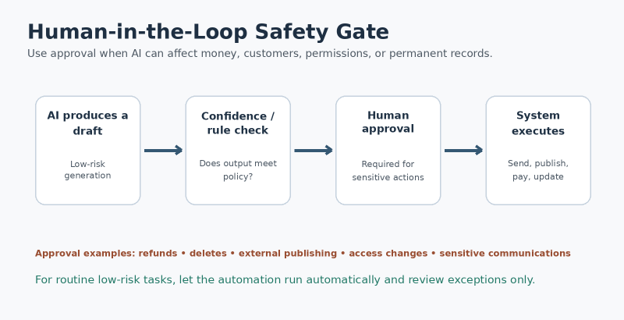
Automation does not need to mean removing people from the process. A mature approach to how to automate tasks with AI gives the system authority only where mistakes are cheap and reversible.
Use approval gates before actions that publish externally, move money, change access, delete data, make employment decisions, commit to pricing, or send sensitive customer communications. For routine classification, formatting, or internal summaries, post-run review may be enough.
The NIST AI Risk Management Framework is a useful governance reference because it emphasizes managing risks and incorporating trustworthiness considerations throughout the AI lifecycle. Even small teams can borrow the basic mindset: know the risk, define controls, measure outcomes, and keep accountability visible.
Connect Apps and Credentials Securely
A large share of automation failures have nothing to do with AI quality. They come from expired logins, overpowered credentials, changing permissions, missing fields, or connectors that silently stop working. Security therefore belongs inside how to automate tasks with AI, not in a later cleanup phase.
Use dedicated service accounts where practical instead of personal administrator accounts.
Grant the minimum permissions needed. A workflow that creates CRM notes does not need permission to delete the entire CRM database.
Store API keys in the automation platform’s secret manager or environment variables, not in prompts, spreadsheets, or shared documents.
Do not send confidential data to an AI service unless the organization has approved the data flow, retention policy, and account configuration.
Log IDs and decisions where possible, but avoid storing unnecessary raw sensitive content in debug logs.
Document who owns each connected account and what happens when that person leaves the organization.
Pro-Tip: Create a “kill switch.” One toggle, environment variable, or workflow status should be able to stop outbound actions without deleting the automation. During an incident, fast containment matters more than a perfect diagnosis.
Test Normal Cases, Edge Cases, and Deliberate Failures
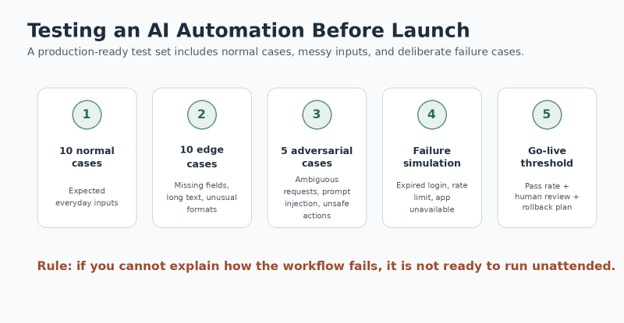
Testing is what separates a clever demo from a dependable workflow. A serious process for how to automate tasks with AI includes examples the system is likely to see, examples it will rarely see, and failures it should survive without doing damage.
Build a small golden test set
Collect 20 to 50 representative examples and write the expected outcome before running the automation. The expected result might be an exact category, required extracted fields, a route, or a rule such as “must require human review.”
Test edge cases
Empty or missing fields.
Very long messages or documents.
Typos, mixed languages, strange formatting, and forwarded email chains.
Contradictory instructions in the input.
Duplicate triggers and repeated events.
Unexpected attachments or unsupported file types.
Test system failures
Expired credentials or revoked permissions.
AI/API rate limits or temporary service errors.
A destination app being unavailable.
A downstream action succeeding even though the workflow times out before recording success.
A user resubmitting the same form after seeing a delay.
For actions that create or send something, design for idempotency: the same event should not create two invoices, send two emails, or open two support tickets just because a retry occurred.
Launch Gradually, Monitor Results, and Measure ROI
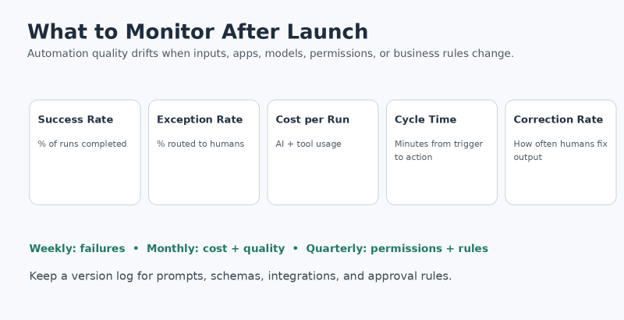
The final phase of how to automate tasks with AI is controlled rollout. Start with a small percentage of work, a single team, one category, or draft-only mode. Increase automation only when the measured error rate and exception rate remain acceptable.
Track business metrics, not just whether the workflow technically ran. A flow with a 99% completion rate can still be poor if employees correct half of its outputs.
Success rate: percentage of runs that complete the intended process.
Exception rate: percentage routed to human review.
Correction rate: percentage of AI results humans change.
Cycle time: time from trigger to completed action.
Time saved: estimated manual minutes avoided.
Cost per successful run: automation platform, AI/API usage, and human review time.
Business outcome: faster response, fewer errors, more leads processed, or another relevant result.
Use an ROI estimate that includes correction work. If a workflow saves 100 hours but creates 25 hours of review and cleanup, the net benefit is 75 hours, not 100.
💡 Quick Hack: Review failures before successes. Ten failed runs usually teach more about what to fix than 100 ordinary successful runs. Maintain a short failure log with cause, fix, and date deployed.
Common Mistakes to Avoid
- Automating a broken process
If employees use three unofficial workarounds because the underlying process is confusing, automation may simply make the confusion faster. Simplify the process first, remove duplicate steps, define the source of truth, and then automate the stable version.
- Giving AI too much authority too early
A model that drafts a refund explanation is different from a system that issues the refund. Separate recommendation from execution, then earn more autonomy with test results, confidence thresholds, and clear approval rules.
- Treating prompts as magic instead of specifications
Long prompts are not automatically good prompts. The important qualities are clear inputs, allowed outputs, decision rules, examples, and failure behavior. If a reviewer cannot tell whether an output passed or failed, the specification is incomplete.
- Ignoring duplicates, retries, and partial failures
Real systems retry. Networks fail. Users double-click. A workflow must know whether an action already happened before trying again. Store unique event IDs and check them before creating irreversible records or sending external messages.
- Measuring automation by activity instead of outcomes
“We automated 10 workflows” is not a useful KPI. Measure hours saved, response time, correction rate, customer satisfaction, revenue influenced, or error reduction. Delete or redesign automations that create maintenance work without producing a meaningful benefit.
Advanced Tips and Next-Level Hacks
Use confidence as a routing signal, not a truth score
A confidence field can help route uncertain work, but it should not be treated as proof that an answer is correct. Calibrate thresholds against your own test set. For example, only auto-route classifications above a validated threshold and send the rest to review.
Split complex jobs into small deterministic stages
One giant prompt that reads a file, decides a policy, writes a response, updates a database, and sends an email is difficult to debug. Split the process: extract → validate → classify → draft → approve → act. Each step then has a visible input and output.
Use retrieval instead of stuffing every policy into the prompt
For knowledge-heavy workflows, fetch only the relevant approved policy, product information, or customer record for each run. This reduces token cost and helps keep responses grounded in current source material.
Create an exception queue
Do not force the automation to solve every case. Route uncertain, unusual, or high-risk work into a dedicated queue that a human can process quickly. The exception queue becomes a training dataset for improving rules and prompts later.
Put budgets and limits around expensive loops
Agent-style workflows can call tools repeatedly. Set maximum steps, timeout limits, retry caps, and cost alerts. A loop that keeps searching for a missing answer should fail safely rather than consume unlimited time or API usage.
Re-use building blocks
Standardize common components such as “summarize document,” “extract contact fields,” “require approval,” “log run,” and “send alert.” Reusable components shorten build time and make governance consistent across workflows.
Pro-Tip: Create a small internal automation catalog. For each workflow, record owner, purpose, trigger, connected apps, data used, prompt version, approval rules, cost, last review date, and kill-switch location. This becomes invaluable when the number of automations grows.
Troubleshooting & Maintenance Guide
AI automations fail in patterns. Troubleshooting is faster when the workflow logs the trigger ID, important inputs, AI output, branch taken, action result, and error message. Avoid logging secrets or unnecessary sensitive content.
| Problem | Likely cause | Fix |
| AI output is inconsistent | Prompt is vague; inputs vary; no fixed schema | Tighten instructions, use allowed categories/fields, add examples, and test a golden dataset. |
| Wrong action or routing | AI judgment directly controls authority | Insert deterministic rules and a human-review branch for high-impact cases. |
| Duplicate emails / records | Retries or repeated triggers | Store an event ID and check whether the action already completed before retrying. |
| Workflow stopped suddenly | Expired token, connector change, permission revocation | Reconnect the account, use a service account, and add authentication-failure alerts. |
| Costs spike | Large prompts, repeated loops, excessive retries, high volume | Trim context, cap steps/retries, cache stable data, and monitor cost per successful run. |
| Sensitive data appears in logs | Debug logging captures full inputs | Redact fields, log IDs instead of raw content, and apply retention limits. |
| Model misses policy details | Prompt relies on memory or stale text | Retrieve the current approved policy for each run and require citation/source IDs where practical. |
| Automation works in tests but fails live | Test data was too clean | Add messy real-world samples, missing fields, long inputs, and system-failure simulations. |
A practical maintenance schedule
Weekly: review failed runs, duplicate events, unusually slow runs, and items sent to the exception queue.
Monthly: sample successful runs for quality, review correction rate, check cost per run, and confirm key connectors still have the right permissions.
Quarterly: revalidate business rules, approval thresholds, data-retention choices, service accounts, and ownership. Remove automations that no longer save meaningful time.
After any major app or model change: rerun the golden test set before trusting the new configuration with the same level of authority.
Maintenance should be proportional to risk. A workflow that renames internal files needs less oversight than one that communicates with customers or changes production records.
Frequently Asked Questions
What tasks are easiest to automate with AI?
The easiest tasks are repetitive, text- or data-heavy, low risk, and governed by stable rules. Good examples include classification, summarization, field extraction, first-draft writing, document tagging, inbox routing, report preparation, and moving structured information between systems.
Can I automate tasks with AI without coding?
Yes. Many useful workflows can be built with an AI assistant and no-code automation platform. Coding becomes more valuable when the workflow needs custom APIs, complex authentication, high scale, strict data schemas, custom user interfaces, or advanced reliability controls.
What is the difference between AI automation and traditional automation?
Traditional automation follows explicit rules such as “if status equals paid, send receipt.” AI automation adds a probabilistic step that can interpret language, extract meaning, classify messy inputs, or create a draft. The strongest systems combine both: AI handles ambiguity while deterministic rules control authority.
How can a beginner learn how to automate tasks with AI safely?
Start with one low-risk internal task, keep the first version draft-only, test it against real examples, and add a human approval step before any sensitive action. Once error patterns are understood, expand the workflow gradually rather than giving it full access on day one.
Do AI automations need human review forever?
Not every run needs review forever. Mature teams often review only exceptions or random samples. However, high-impact actions should keep stronger controls, and every automation needs an accountable owner who can inspect results, stop the workflow, and update rules when the environment changes.
How much does AI task automation cost?
A simple prototype can cost little or nothing if it uses existing subscriptions and free tiers. Production cost depends on workflow volume, AI usage, premium connectors, storage, monitoring, and human-review time. Measure cost per successful run rather than subscription price alone.
Conclusion: Automate the Right Work, Not Every Task
The most effective automation programs are selective. They target repetitive work, keep AI inside a clearly defined role, use deterministic rules for authority, and treat monitoring as part of the product rather than an afterthought.
Once a team understands how to automate tasks with AI, the next opportunity is not to automate everything. It is to build a repeatable method for finding high-value work, proving the workflow on a small test set, and expanding only when the results justify more autonomy.
editor's pick
latest video
news via inbox
Nulla turp dis cursus. Integer liberos euismod pretium faucibua


