
How to Use ChatGPT for Daily Tasks: 15 Easy Ways in 2026
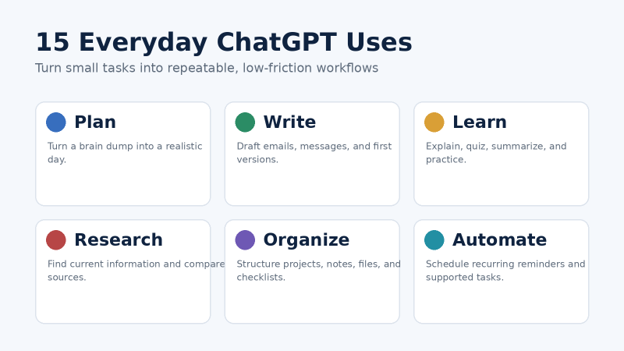
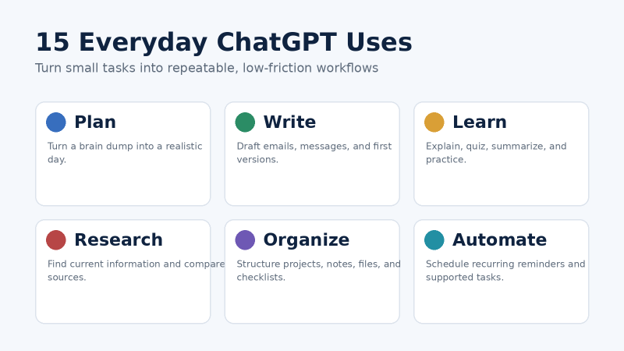
You do not need to become a prompt engineer to make AI useful. The real payoff comes from using ChatGPT for the small, repetitive decisions that quietly consume your day: deciding what to do first, rewriting a message, understanding a document, planning meals, comparing options, or turning a messy idea into a clear next step.
This guide explains how to use ChatGPT for daily tasks without turning your life into an automation experiment. You will learn 15 practical workflows, beginner-safe prompt patterns, privacy checks, troubleshooting methods, and a simple weekly system that can save time while keeping you in control of important decisions.
Quick Answer: What Is the Best Way to Use ChatGPT Every Day?
Use ChatGPT as a flexible assistant for planning, drafting, summarizing, learning, researching, organizing, and routine follow-ups. Give it a clear goal, enough context, useful constraints, and a specific output format. For important facts or decisions, verify the result rather than treating the first response as automatically correct.
Essential Tools and Materials: What You Actually Need
Before learning How to use ChatGPT for daily tasks, keep the setup simple. Most of the workflows below can be tested with a basic ChatGPT account, a browser or mobile app, and the information you already use to run your day.
| Tool / Material | Typical Cost | Skill Level | Best Use |
| ChatGPT account | Free tier available; paid plans optional | Beginner | Planning, drafting, learning, summaries and general assistance |
| Web or mobile app | $0 | Beginner | Quick access during work, study, errands or travel |
| Your calendar / task list | $0 or existing subscription | Beginner | Provide deadlines, time windows and priorities |
| Notes or documents | $0 | Beginner | Turn rough notes into checklists, summaries or drafts |
| PDF, DOCX, image or spreadsheet | $0 with supported access; limits vary | Beginner to intermediate | File summaries, extraction, analysis and organization |
| Web Search / research tools | Availability varies by plan and account | Beginner | Current prices, schedules, news, rules and source-backed research |
| Projects | Availability varies by account/workspace | Beginner | Keep related chats, files and instructions together |
| Scheduled tasks / Work features | Availability and limits vary | Intermediate | Recurring reminders, monitoring and multi-step work |
Feature access can differ by plan, region, device, workspace settings and product updates. If a feature mentioned here is not visible in your account, use the manual version of the workflow instead of assuming something is broken.
The Four-Part Prompt Formula That Makes Daily Tasks Easier
The fastest way to improve How to use ChatGPT for daily tasks is to stop writing vague commands. A reliable everyday prompt has four parts: your goal, the context, the constraints, and the output format.
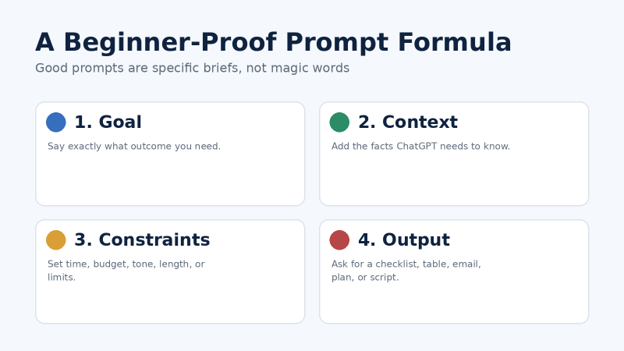
- Goal
Say what you want to accomplish. “Help me with my day” is weak; “Build a realistic plan for the next six hours” is specific enough to act on.
- Context
Give only the facts that matter: deadlines, available time, audience, budget, energy level, ingredients, file contents, or the decision you are trying to make.
- Constraints
Add limits that prevent impractical answers. Useful constraints include “under $50,” “no more than 20 minutes,” “friendly but professional,” “use ingredients I already have,” or “do not schedule meetings before 10 a.m.”
- Output
Tell ChatGPT how you want the answer delivered: a checklist, table, email, timeline, shopping list, two options, decision matrix, or step-by-step plan.
| 💡 Quick Hack: Add “Ask me up to three questions if information is missing” to complex prompts. It prevents ChatGPT from filling important gaps with guesses. |
15 Easy Ways to Use ChatGPT for Daily Tasks in 2026
The examples below are designed for beginners who want a repeatable system. As you practice How to use ChatGPT for daily tasks, start with one or two workflows you perform every week and improve those before adding more.
- Build a Realistic Daily Plan in 10 Minutes
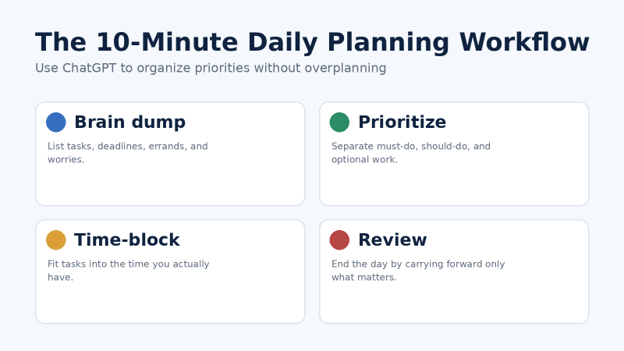
Instead of asking ChatGPT to “make a schedule,” give it your actual commitments, deadlines and available time. The goal is not to create a perfect calendar. The goal is to make the next few hours obvious.
Write a brain dump of everything competing for your attention.
Mark fixed commitments such as meetings, school pickup, prayer, commute, exercise or appointments.
Add deadlines and rough duration estimates.
Ask ChatGPT to separate must-do, should-do and optional tasks.
Request a time-blocked plan with buffers and one catch-up block.
Prompt example: “I have six hours available today. Fixed commitments: 1:00–1:45 meeting and 4:30 school pickup. Tasks: proposal 90 min due today, invoices 30 min, gym 45 min, groceries 35 min, three non-urgent calls. Create a realistic plan with breaks and tell me what to postpone if I fall one hour behind.”
| 💡 Quick Hack: Tell ChatGPT your energy pattern. “I focus best before noon” is enough for it to put demanding work earlier and lighter admin later. |
- Draft Emails and Messages Without Sounding Robotic
One of the easiest examples of How to use ChatGPT for daily tasks is turning rough notes into a polished message. Paste the key facts, describe the relationship, and specify the tone. You can ask for a shorter version, a warmer version, or a version that is more direct without being rude.
Prompt example: “Turn these notes into a concise client email. Tone: calm, professional and accountable. Explain that the delivery will move from Tuesday to Thursday because final testing found an issue. Offer a 20-minute review call and avoid corporate jargon.”
For sensitive messages, write the facts yourself first. Then use ChatGPT to improve clarity. That keeps the substance under your control.
- Summarize Long Documents, Notes and PDFs
A 30-page report may contain only five things you need. If file upload is available, ask ChatGPT to summarize the document for a specific purpose instead of requesting a generic summary.
“List the five decisions I need to make.”
“Extract deadlines, owners and open questions into a table.”
“Explain this contract section in plain English, but do not give legal advice.”
“Compare the executive summary with the detailed findings and flag contradictions.”
OpenAI currently supports working with common file types, but limits and tools vary. If the file is critical, verify quoted numbers, names and dates against the original.
- Create Meal Plans and Grocery Lists
Meal planning works best when ChatGPT knows your household size, budget, dietary requirements, available ingredients and how much cooking time you can tolerate.
Prompt example: “Plan five weekday dinners for two adults and two children. Budget-conscious, no seafood, 30 minutes maximum, use chicken, lentils and rice already in the pantry. Reuse ingredients to reduce waste. Return a dinner table plus one consolidated grocery list grouped by aisle.”
If allergies or medical nutrition needs are involved, treat AI suggestions as ideas to review with a qualified professional, not personalized medical guidance.
- Turn ChatGPT Into a Study Partner
Students can learn How to use ChatGPT for daily tasks by using it as an active tutor rather than an answer machine. Ask it to explain a concept, test you, reveal the answer only after you attempt it, and increase difficulty gradually.
Prompt example: “Teach me photosynthesis at high-school level. Start with a 150-word explanation, then ask five questions one at a time. Do not give the answer until I respond. After each answer, explain what I missed and end with a two-minute recap drill.”
For factual subjects, verify important claims against your textbook, instructor materials or reliable sources. AI can explain confidently even when a detail is wrong.
- Build a Simple Personal Budget
ChatGPT is useful for organizing spending categories and scenarios, especially if you provide a sanitized table rather than sensitive account information. You can ask it to group expenses, identify irregular costs and model “what if” changes.
Prompt example: “Here is my monthly spending by category. Build a needs/wants/savings view, flag categories that changed more than 15% from last month, and show three realistic ways to free up $150 without assuming I can change rent.”
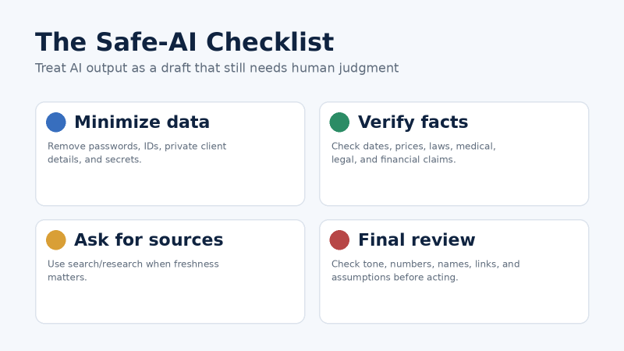
Do not paste banking passwords, full account numbers, card details or identity documents. For investment, tax or debt decisions, use professional or official guidance where appropriate.
- Research Current Information With Sources
A normal conversation is not always enough when the answer depends on today’s facts. For prices, opening hours, laws, software features, travel restrictions, product availability or news, use ChatGPT search or research features when available and inspect the sources.
A strong habit when practicing How to use ChatGPT for daily tasks is to add a freshness instruction: “Use current sources, state the date, and separate verified facts from your interpretation.”
For major purchases or high-stakes choices, open the most important sources yourself. A citation is useful evidence, but it is not a guarantee that every conclusion is correct.
- Compare Products or Services Before Buying
Instead of asking “Which is best?”, give ChatGPT your criteria and let it build a comparison framework. That keeps your priorities visible and reduces the chance that a generic ranking drives the decision.
Prompt example: “Compare these three laptops for a university student. Priorities: battery life, portability, 16 GB RAM, reliable warranty and a total budget under $1,000. Create a table, explain trade-offs, and list what I should verify on the retailer page before buying.”
Prices and availability change quickly, so current web research matters. Avoid relying on an old model comparison for a purchase you are making today.
- Brainstorm Ideas Without Getting Generic Lists
Brainstorming improves when you give ChatGPT constraints and ask it to explore different directions rather than produce 50 variations of the same idea.
Try: “Give me 12 birthday ideas for a 10-year-old who likes science, drawing and outdoor activities. Split them into at-home, day-out and low-cost options. Avoid screens. For each, explain why it fits and what preparation is needed.”
| Pro-Tip: Ask for “three safe ideas, three unconventional ideas, and three ideas that combine two categories.” The deliberate diversity produces better options than “give me more ideas.” |
- Rewrite, Edit and Improve Your Own Writing
Use ChatGPT as an editor rather than handing over authorship. Give it your draft and ask for specific improvements: tighter sentences, clearer headings, fewer clichés, simpler language, stronger examples or a more professional tone.
Prompt example: “Edit this draft for clarity and flow. Keep my meaning and voice. Remove repetition, flag any claim that needs evidence, and show the three biggest changes you made.”
For important public writing, fact-check any claim the model introduces during editing. A smoother sentence is not useful if it quietly changes the meaning.
- Organize Household Maintenance and Errands
Another practical way to learn How to use ChatGPT for daily tasks is to give it a messy maintenance list and ask for a sequence based on urgency, location and tools required. This works for cleaning, minor home upkeep, car reminders, shopping runs and recurring chores.
Prompt example: “Organize these weekend tasks into a two-day plan: replace HVAC filter, buy light bulbs, deep-clean fridge, book car service, return package, clean balcony, test smoke alarms. Group errands by location, put safety-related tasks first, and keep each work block under 90 minutes.”
For electrical, gas, structural or other hazardous work, use ChatGPT for preparation and questions—not as a substitute for qualified professionals or official safety instructions.
- Prepare for Meetings, Calls and Interviews
Before a meeting, provide the agenda, your objective and the audience. Ask for a one-page briefing with key questions, risks and desired outcomes. Afterward, paste sanitized notes and ask for action items with owners and dates.
For job interviews, ask ChatGPT to play the interviewer one question at a time. After each answer, request feedback on structure, evidence and clarity instead of asking it to invent a “perfect” answer that does not reflect your experience.
- Plan Trips, Routes and Busy Days Out
ChatGPT can help structure a trip around time windows, interests, mobility needs and budgets. For a same-day plan, tell it when you leave, when you must return, your starting point and which stops are mandatory.
Current information matters for transport, weather, opening hours and ticket availability. Recheck those details before leaving, especially for attractions, flights and reservations.
- Use Reminders and Scheduled Tasks for Repetitive Follow-Ups
When scheduled tasks are available in your account, ChatGPT can handle one-time or recurring reminders and supported monitoring tasks. The most useful automations have a clear future trigger: a deadline, weekly review, price threshold, delivery update or recurring briefing.
Examples include “Remind me every Friday afternoon to review outstanding invoices” or “Check each morning for a meaningful change to this tracked item and notify me only if something changed.” Availability, notification settings and task capabilities can differ by account.
| 💡 Quick Hack: Automate the reminder, not the judgment. For example, schedule a weekly review of expenses, then decide yourself what to cut after you see the numbers. |
- Keep Long-Running Work Organized With Projects and Memory
If you want How to use ChatGPT for daily tasks to become a habit, stop rebuilding context from scratch. Projects can keep related chats, reference files and instructions together for ongoing work such as a course, house move, content plan, business project or event.
Memory can also help ChatGPT use relevant preferences and recurring context when it is enabled. Because memory behavior and controls can vary, review your personalization settings and do not rely on it as the only place to store critical information.
A good project instruction is short: “Keep responses practical, ask before making assumptions about budget, use tables for comparisons, and always separate deadlines from optional ideas.”
Common Mistakes Beginners Make — and How to Avoid Them
Mistake 1: Asking Vague Questions
“Plan my week” gives ChatGPT almost nothing to work with. Add your available time, fixed commitments, deadlines, priorities and desired output. Specific input creates specific output.
Mistake 2: Trusting the First Answer
The first response is a draft. Ask follow-up questions, challenge assumptions, request alternatives and verify important facts. If the topic is current, use current sources.
Mistake 3: Sharing More Personal Data Than Necessary
Do not paste secrets just because they make the prompt easier. Replace names with roles, remove account numbers, crop sensitive screenshots and summarize private information when exact details are unnecessary.
Mistake 4: Asking AI to Make the Decision Instead of Clarifying It
For meaningful decisions, ask ChatGPT to organize criteria, surface trade-offs and identify missing information. You should still choose based on your goals and risk tolerance.
Mistake 5: Automating a Bad Process
If a task is unclear when done manually, automation usually makes the confusion faster. First define what “done” means, then automate the repetitive part.
Advanced Tips and Next-Level Hacks
Create a Personal Prompt Library
When a prompt works, save it. Organize a small library by recurring task: daily plan, client email, meeting summary, study quiz, shopping comparison, weekly review and content editing. The goal is not hundreds of prompts; it is ten dependable ones.
| Pro-Tip: Save the structure, not the private data. Use placeholders such as [deadline], [budget] and [audience] so a good prompt can be safely reused. |
Use a “Draft → Critique → Improve” Loop
For writing and planning, do not request perfection in one step. Ask for a draft, then ask ChatGPT to critique it against your requirements, then produce a revised version. This is especially useful for emails, proposals, study notes and checklists.
Ask for Assumptions
Add “List your assumptions before the answer.” This exposes where ChatGPT is guessing and gives you a chance to correct the premise before wasting time on the output.
Use Files as Context Instead of Re-Pasting Information
For recurring work, a project with the relevant documents is often cleaner than repeatedly copying the same background into new chats. Still verify that the file version is current before using it for a decision.
Separate Fast Tasks From Deep Tasks
Use short chats for rewrites, checklists and small decisions. Use a project or deeper research workflow for work that depends on many sources, files or steps. Matching the workflow to the complexity keeps ChatGPT efficient.
Troubleshooting: What to Do When ChatGPT Is Not Helping
Problem: The Answer Is Too Generic
Add the audience, goal and constraints.
Include one example of what “good” looks like.
Ask for a decision-ready output such as a table or prioritized checklist.
Tell it what to exclude.
Problem: The Answer Is Too Long
Specify a limit: “Give me five bullets,” “under 150 words,” or “one screen of text.” You can also ask for “answer first, explanation second” so the action is immediately visible.
Problem: It Keeps Missing Your Intent
Stop adding corrections to a messy prompt chain. Restate the task in one clean message with the final requirements. If necessary, start a fresh chat or move the work into a focused project.
Problem: It Gives Outdated Information
Ask for current web research, the date checked, and source links. For prices, policy, software features, schedules and availability, prefer primary sources where possible.
Problem: A File Summary Looks Wrong
Ask ChatGPT to quote the exact page, section or row supporting the claim. Then inspect the source yourself. Scans, complicated layouts, tables and low-quality images can cause extraction errors.
Problem: Scheduled Tasks Are Missing
Task features can depend on account, app version, plan, region and workspace settings. Update the app, check supported surfaces and notifications, or use your calendar/task manager as the fallback.
A 15-Minute Weekly Maintenance Routine
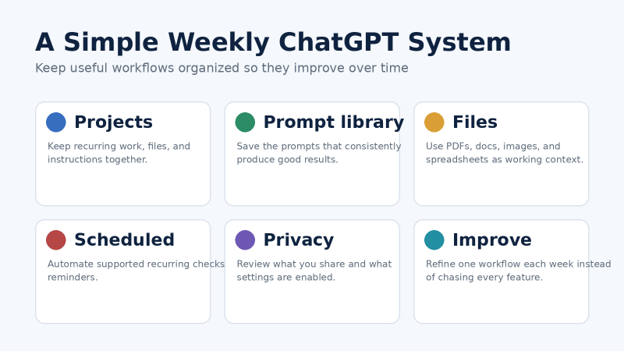
The biggest improvement in How to use ChatGPT for daily tasks comes from maintaining your system, not collecting new prompts. Once a week, spend 15 minutes cleaning up what you already use.
Delete or archive prompt experiments you will never reuse.
Save one prompt that worked especially well.
Move recurring work into a dedicated project if it has ongoing files or context.
Review scheduled tasks and remove noisy or unnecessary ones.
Check privacy-sensitive chats, files and personalization settings.
Pick one repeated annoyance from the past week and design a better workflow for it.
Frequently Asked Questions
Can beginners really use ChatGPT for everyday tasks?
Yes. Beginners get the most value by starting with low-risk tasks such as planning, rewriting, summarizing and brainstorming. The simplest way to learn How to use ChatGPT for daily tasks is to improve one recurring task at a time rather than trying every feature in a single week.
What are the best ChatGPT prompts for beginners?
The best beginner prompts clearly state the goal, context, constraints and output. For example: “I have 45 minutes and these five tasks. Prioritize them by urgency and impact, then give me a 45-minute action plan in checklist format.”
Can ChatGPT manage my schedule?
It can help you plan a schedule and, where supported, create or run scheduled tasks. It should not be your only record of critical appointments or deadlines. Keep important commitments in a dependable calendar or task system.
Is it safe to use ChatGPT for personal information?
Use data-minimization habits. Share only what is necessary, remove secrets and identifiers when possible, review your account privacy and memory settings, and avoid pasting passwords or sensitive financial credentials.
Can ChatGPT replace Google Search?
They are different tools. ChatGPT is useful for synthesis, explanation and structured help; current web search is important when freshness and source verification matter. For important research, inspect the original sources rather than relying only on a generated summary.
Should I pay for ChatGPT to use it every day?
Start with the access you already have and identify which limits actually slow you down. A paid plan is worthwhile only when the extra models, usage limits, tools or workflows save enough time or produce enough value for your needs. Check current official pricing before deciding.
Final Takeaway
Learning How to use ChatGPT for daily tasks is less about memorizing clever prompts and more about building a few dependable habits. Give clear context, ask for a usable format, keep sensitive data to a minimum, verify high-impact facts, and save the workflows that genuinely reduce effort.
Start with one task you already do every day—planning, email, study, research or meal preparation—and improve that workflow for a week. That is the simplest way to practice How to use ChatGPT for daily tasks without creating extra complexity. Which daily task would you most like ChatGPT to make easier? Share it in the comments.
editor's pick
latest video
news via inbox
Nulla turp dis cursus. Integer liberos euismod pretium faucibua


