
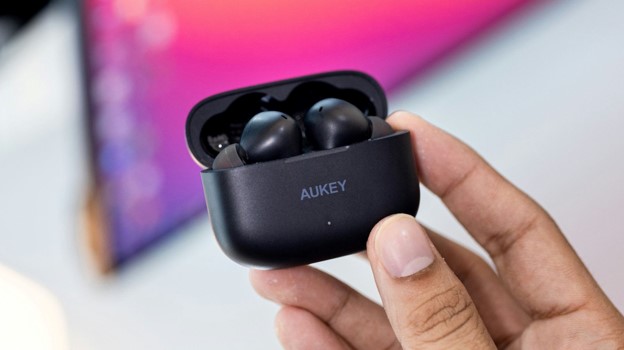
Best Wireless Earbuds 2026: The Definitive Buyer’s Guide
Wireless earbuds can look nearly identical on a product page while behaving completely differently in real life. One pair may block a train beautifully but loosen during a run; another may sound excellent in a quiet room yet turn every phone call into a muffled argument with the wind.
This guide to the best wireless earbuds 2026 cuts through that confusion. It compares the strongest current choices by use case, explains the specifications that matter, and gives you a practical setup and return-window testing plan so the pair you buy still feels right after the excitement of unboxing wears off.
The ranking is not built around one artificial winner for every person. It separates sound quality, noise cancellation, ecosystem features, workout security, call quality, battery life, and price because those priorities often conflict.

What Are the Best Wireless Earbuds to Buy in 2026?
| Featured snippet answer: The best wireless earbuds 2026 are the Sony WF-1000XM6 for most buyers, Bose QuietComfort Ultra Earbuds (2nd Gen) for maximum noise cancellation, AirPods Pro 3 for iPhone users, Technics EAH-AZ100 for sound quality, Powerbeats Pro 2 for workouts, and Sony WF-C710N for budget value. |
Quick Verdict: The Eight Picks That Make Sense
| Pick | Best for | ANC battery | Water rating | Typical tier | Main trade-off |
| Sony WF-1000XM6 | Best overall | 8 hr | IPX4 | $300–$330 | Premium price |
| Technics EAH-AZ100 | Sound and multipoint | 10 hr AAC / 7 hr LDAC | IPX4 | $280–$300 | Less aggressive ANC than Bose |
| Bose QC Ultra Earbuds 2 | Strongest isolation | 6 hr | IPX4 | $280–$300 | Shorter battery |
| AirPods Pro 3 | iPhone ecosystem | 8 hr | IP57 | $240–$260 | Best features require Apple devices |
| Galaxy Buds3 Pro | Samsung phones | 6 hr | IP57 | $190–$250 | Ecosystem-dependent features |
| Pixel Buds Pro 2 | Google/Android | 8 hr | IP54 | $200–$230 | Less useful on iPhone |
| Powerbeats Pro 2 | Running and training | 8 hr | IPX4 | $220–$250 | Large charging case |
| Sony WF-C710N | Budget ANC | 8.5 hr | IPX4 | $100–$130 | No premium codec |
Bottom line: The best wireless earbuds 2026 shortlist works because every model has a clear job. Do not pay flagship money for features your phone cannot use, and do not accept poor fit simply because a review praises the sound.
Essential Tools, Accessories & Buying Materials
You do not need laboratory equipment to choose earbuds well. A small test kit and a disciplined return-window checklist reveal more than a long specification sheet.
| Item | Purpose | Estimated cost | Skill level |
| Compatible phone and laptop | Tests pairing, codec support, calls, and multipoint | Already owned | Beginner |
| Included ear-tip set | Creates the acoustic seal needed for bass and ANC | Included | Beginner |
| Optional third-party tips | Improves seal, comfort, or stability when stock tips fail | $10–$25 | Beginner |
| USB-C cable and suitable charger | Verifies charging speed and case behavior | $0–$20 | Beginner |
| Soft dry brush and microfiber cloth | Cleans vents, microphones, and charging contacts | $5–$12 | Beginner |
| Reference playlist | Checks vocals, bass control, treble fatigue, and stereo imaging | $0 | Beginner |
| Voice recorder or second phone | Evaluates microphone quality in quiet, traffic, and wind | $0 | Beginner |
| Return-window test log | Prevents emotion from replacing evidence | $0 | Beginner |
| 💡 Quick Hack: Try one ear-tip size larger in the ear that feels loose, even if the other ear uses the default size. Human ears are often asymmetrical; matching tip sizes is not a requirement. |
How This Guide Chose the Shortlist
Official specifications were checked for battery claims, charging, codecs, water resistance, compatibility, and multipoint support.
Current expert-review consensus was used to separate marketing claims from repeatable real-world strengths, particularly for ANC, microphone behavior, and tuning.
Each recommendation had to solve a distinct problem. A product was not included merely because it was new or expensive.
Long-term usability mattered: replacement tips, charging reliability, app quality, firmware support, controls, and ecosystem limitations all affect ownership.
The list favors products that can be explained honestly in one sentence—who should buy them and what compromise they must accept.
That process is important because a list of the best wireless earbuds 2026 should be useful after a sale ends. The buying framework below remains valid even when prices move or a new model enters the market.
- Sony WF-1000XM6 — Best Overall
Sony’s latest flagship is the safest premium recommendation for buyers who want strong performance in nearly every category without locking themselves into one phone brand. The WF-1000XM6 combines excellent noise cancellation, detailed sound, improved microphone performance, LDAC support, multipoint pairing, wireless charging, and an eight-hour ANC battery claim.
The tuning is polished enough for everyday listening but still flexible through Sony’s app. Bass has weight without turning vocals into background decoration, and the upper range is controlled enough for long sessions. Sony also keeps useful controls—volume, playback, noise modes, and assistant access—within reach instead of forcing constant phone interaction.
The main concern is fit. Sony’s noise-isolating tips can feel denser than soft silicone, and the compact shell will not suit every ear. Give the seal test more attention than the first five minutes of sound. A weak seal can make a flagship pair sound ordinary and can cut ANC performance dramatically.
Why it leads the best wireless earbuds 2026: it offers the strongest balance of sound, ANC, calls, battery, app control, and cross-platform compatibility. It is not the cheapest or the absolute winner in every single category, but it creates the fewest reasons for most premium buyers to regret the purchase.
| Best reasons to buy | Watch-outs |
| • Excellent all-round sound | • Expensive |
| • Top-tier ANC and calls | • Foam-style tips divide opinion |
| • LDAC and multipoint | • IPX4 is adequate, not rugged |
| • Eight-hour ANC battery | • Small controls require practice |
| • Wireless charging |
- Technics EAH-AZ100 — Best for Sound Quality and Multi-Device Work
The Technics EAH-AZ100 is the audiophile-leaning choice that still behaves like a modern productivity tool. Its 10 mm magnetic-fluid driver is designed to reduce distortion, while codec support includes SBC, AAC, LDAC, and LC3. The standout practical feature is three-device multipoint, which can keep a phone, laptop, and tablet in the same workflow.
Sound is spacious, controlled, and articulate. Bass reaches low without smearing the midrange, voices remain natural, and percussion has clean edges rather than brittle sharpness. The app gives enough adjustment to correct taste without making the default tuning feel unfinished.
Battery depends heavily on codec. Technics rates the earbuds around ten hours with ANC using AAC, but about seven hours with ANC using LDAC. That difference is a useful reminder: premium codecs consume more power, and the audible benefit depends on the source, recording, environment, and listener.
Choose the AZ100 when music quality and device switching matter more than achieving the strongest possible cabin-pressure-style silence. Its ANC is very good, but Bose remains the more specialized answer for relentless low-frequency noise.
| Best reasons to buy | Watch-outs |
| • Refined, detailed sound | • Premium price |
| • Three-device multipoint | • LDAC reduces battery |
| • LDAC and LC3 | • IPX4 only |
| • Long AAC battery | • ANC not the single strongest |
| • Strong app and EQ |
- Bose QuietComfort Ultra Earbuds (2nd Gen) — Best Noise Cancellation
Frequent flyers, train commuters, and open-office workers should put Bose near the top of the audition list. The second-generation QuietComfort Ultra Earbuds focus on adaptive noise cancellation and a stable acoustic seal, with improved voice pickup and wireless charging built into the case.
Bose is especially effective against steady low-frequency noise such as engines, ventilation systems, and the dense rumble of public transport. Its aware mode also sounds natural enough to use when crossing streets or speaking briefly without removing an earbud.
The trade-off is endurance. Bose rates the earbuds for up to six hours with Immersive Audio off and less with the spatial processing enabled. That is enough for many commutes and flights, but it trails the longest-lasting alternatives. The fit kit uses separate tips and stability bands, so setup takes longer but offers more control.
Buy Bose for silence first. Buyers who care equally about codec flexibility, maximum battery, and the smallest possible case may find Sony or Technics more balanced.
| Best reasons to buy | Watch-outs |
| • Outstanding ANC | • Six-hour battery |
| • Secure stability-band system | • Immersive Audio costs battery |
| • Natural aware mode | • Bulky buds for small ears |
| • Wireless charging | • No LDAC |
| • Useful app presets |

- Apple AirPods Pro 3 — Best for iPhone Users
AirPods Pro 3 are the easiest recommendation for people whose daily devices are already Apple products. Pairing, device switching, Find My integration, spatial audio, call handling, adaptive modes, and system-level controls work with less friction than a cross-platform alternative can usually match.
Apple improved the practical fundamentals as well. The earbuds claim up to eight hours with ANC, use five ear-tip sizes, add heart-rate sensing for workouts, and carry an IP57 rating for dust, sweat, and water resistance. The redesigned fit and foam-infused tips are intended to improve both security and acoustic sealing.
The limitation is not that AirPods cannot connect to Android; they can. The limitation is that many of the reasons to pay the premium are tied to Apple software and hardware. Android buyers can get better app control, codec choices, and ecosystem integration elsewhere.
For iPhone users, however, the convenience is not a small bonus. Earbuds are handled dozens of times each week. Fast pairing, reliable switching, precise finding, and clear battery status can matter more over two years than a minor difference in frequency response.
| Best reasons to buy | Watch-outs |
| • Best Apple integration | • Limited value on Android |
| • Eight-hour ANC claim | • No LDAC |
| • IP57 durability | • White-only aesthetic |
| • Heart-rate sensing | • Premium features depend on recent Apple software |
| • Excellent transparency and calls |
- Samsung Galaxy Buds3 Pro — Best for Samsung Galaxy Phones
Galaxy Buds3 Pro makes the most sense beside a recent Samsung phone. The two-way speaker design, dual amplifier, adaptive noise control, 360 audio, high-resolution Samsung codec support, and Galaxy AI features are strongest inside that ecosystem.
The IP57 rating is a major advantage for daily durability. It provides more confidence around sweat, dust, and sudden rain than the IPX4 rating found on many premium rivals. The stem controls also support pinch and swipe gestures, which are easier to operate accurately than tiny tap zones for many users.
Outside Samsung hardware, the earbuds still work as standard Bluetooth earbuds, but the value equation weakens. Some advanced audio and AI features depend on compatible Galaxy devices and software. Owners should check their exact phone model and regional feature availability before buying.
This is a strong choice for Samsung users who want a polished system rather than a generic accessory. For mixed-device households, Sony and Technics remain more neutral.
| Best reasons to buy | Watch-outs |
| • Deep Samsung integration | • Best features require Galaxy devices |
| • IP57 rating | • Stem design may not appeal |
| • Clear pinch and swipe controls | • Six-hour ANC battery |
| • Two-way driver system | • Codec advantages are ecosystem-specific |
| • Good adaptive features |
- Google Pixel Buds Pro 2 — Best for Pixel and Android Convenience
Pixel Buds Pro 2 is the Android-friendly answer for buyers who value comfort, clear calling, hands-free assistant features, and Find Hub support. Google’s Tensor A1 chip powers ANC and voice features, while a twist-to-adjust stabilizer helps users move between a relaxed office fit and a tighter workout fit.
The official battery claim is competitive: up to eight hours with ANC and up to thirty hours with the case. The earbuds are IP54-rated and the case is IPX4, while Qi charging and a case speaker improve daily convenience.
These earbuds pair with standard Bluetooth devices, including iOS, but full features require Android and a Google account. The best experience is with a Pixel phone, where setup, assistant access, Find Hub, and clear-calling tools feel built into the operating system.
Choose Pixel Buds Pro 2 for Android usability rather than codec collecting. Listeners who prioritize LDAC and extensive EQ may prefer Sony or Technics, but many Android users will value the lighter, simpler workflow.
| Best reasons to buy | Watch-outs |
| • Comfortable adjustable fit | • Full value requires Android |
| • Eight-hour ANC battery | • No LDAC |
| • Strong Android integration | • Fit stabilizer needs adjustment |
| • Case speaker and Qi charging | • Less compelling for iPhone |
| • IP54 earbuds |
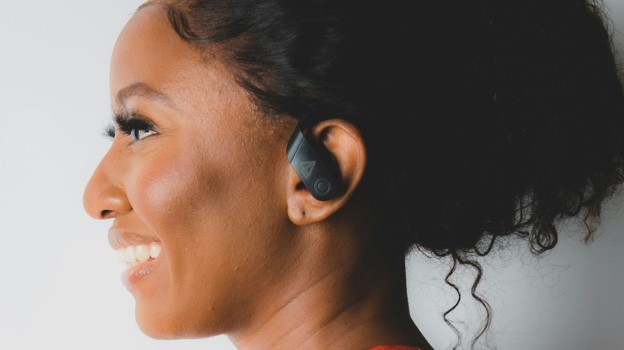
- Powerbeats Pro 2 — Best for Running and Training
Powerbeats Pro 2 is built around physical security. The ear-hook design remains in place during sprints, lifting, and sharp movement better than most compact buds, while five ear-tip sizes help create the seal needed for bass and heart-rate accuracy.
The second generation adds ANC, transparency, wireless charging, and heart-rate monitoring. Battery is a strength: up to eight hours with ANC or transparency and up to thirty-six hours including the case; with those modes off, the claim rises to ten hours per charge and forty-five hours total.
The case is still larger than a pocket-friendly lifestyle case, and the hooks take longer to put on. That inconvenience is the price of stability. Runners who constantly push regular buds back into place may consider the trade worthwhile after one workout.
Android support is better than many buyers assume. The Beats app enables one-touch pairing, battery information, controls, locating, and workout heart-rate features on compatible devices.
| Best reasons to buy | Watch-outs |
| • Most secure fit here | • Large case |
| • Heart-rate monitoring | • Ear hooks take longer to wear |
| • Long battery | • IPX4 only |
| • ANC and transparency | • Not discreet |
| • Works with iPhone and Android |
- Sony WF-C710N — Best Budget Noise-Cancelling Earbuds
The WF-C710N is the sensible value pick for listeners who want real ANC, dependable battery, app support, and clear calls without paying flagship prices. Sony rates the buds for up to 8.5 hours with noise cancellation and thirty hours including the case.
The trade-offs are deliberate. Codec support is limited to SBC and AAC, materials feel simpler, and the sound is less layered than the WF-1000XM6. None of those limitations prevents enjoyable daily use, especially for podcasts, streaming music, calls, and commuting.
Budget buyers should focus on fit and controls instead of chasing every premium feature. If the C710N seals properly and the microphone works in the user’s normal environment, it can deliver more practical value than a discounted older flagship with a tired battery or poor return policy.
Sales can make this category volatile. Compare the C710N against last-generation premium models, but buy old stock only from a seller with clear warranty and return terms.
| Best reasons to buy | Watch-outs |
| • Strong value | • SBC and AAC only |
| • 8.5-hour ANC battery | • No wireless charging |
| • Thirty hours total | • Simpler build |
| • Sony app and EQ | • ANC and detail below flagships |
| • Clear calls for the price |
Comprehensive Step-by-Step Buying and Setup Guide
The right way to choose from the best wireless earbuds 2026 is to move through the decision in order. Starting with brand or sound signature often leads to an expensive pair that fails on fit, phone compatibility, or daily routine.
Define the Job Before the Budget
Write down the three situations in which the earbuds will be used most. Examples: a one-hour commute, three hours of video calls, gym training, quiet late-night listening, or frequent device switching.
Rank the failure you dislike most. For some people it is loose fit; for others it is cabin noise, wind on calls, short battery, or harsh treble. A product that avoids the worst failure is usually a better purchase than one that wins an abstract sound score.
Set a full ownership budget, not only a sticker price. Include replacement tips, a protective case, possible warranty coverage, and the chance that a missing charger or incompatible wireless pad becomes an extra cost.
| Pro-Tip: Use a two-column note titled “must have” and “nice to have.” Limit must-haves to four. When every feature becomes mandatory, the shortlist stops being useful and the budget expands without control. |
Check Phone, Codec, and Ecosystem Compatibility
iPhone users should value AAC performance, Apple switching, Find My, spatial audio, and system controls more than LDAC, which iPhones do not support.
Android users should check the exact phone’s codec support. A pair advertising LDAC or a proprietary high-resolution codec does not guarantee that the phone can use it.
Samsung-specific and Apple-specific features can be excellent, but they reduce flexibility when the buyer changes phone brands. Cross-platform owners should prioritize standard multipoint and a strong companion app.
For laptop use, confirm whether multipoint can keep two or three devices connected and whether calls reliably take priority over music. Some systems connect widely but switch slowly.
For a broader device setup, see MyFlexBots’ best laptops for work and travel guide, especially when earbuds will move between a phone and computer all day.
| 💡 Quick Hack: Do not enable the highest-quality codec on day one. First test stability with the default setting, then enable LDAC or another premium mode and repeat the same route. Keep the higher codec only if the connection remains reliable and the audible benefit is meaningful. |
Get the Fit Right Before Judging Sound
Insert the earbud, then twist or seat it according to the manufacturer’s guide. A tip should seal the canal without creating sharp pressure.
Run the app’s fit test when available. Repeat it after walking, talking, and moving the jaw, because a seal that works while sitting can loosen during real use.
Play a bass-rich track at moderate volume. If bass changes when the earbud is gently pressed inward, the seal is incomplete.
Wear the pair for at least forty-five minutes. Pressure, heat, and cartilage pain often appear later than the first demo.
Test each ear independently and try mixed sizes. Comfort, ANC, and left-right balance all depend on sealing both ears correctly.
Fit is the most underestimated variable in the best wireless earbuds 2026. A cheaper earbud with a stable seal can produce deeper bass and stronger isolation than a premium model that moves every time the user smiles or speaks.
| 💡 Quick Hack: Take a photo of the final left and right tip sizes before storing the spare tips. Months later, you will not have to guess which combination worked. |
Test Sound With a Short Reference Playlist
Use one vocal track to check whether voices sound natural or recessed.
Use one acoustic or piano recording to reveal metallic treble and unnatural resonance.
Use one bass-heavy track to judge depth, control, and whether bass masks words.
Use one dense rock, electronic, or orchestral track to see whether instruments collapse into a wall of sound.
Use a podcast episode to test speech clarity at low volume.
Keep volume matched between products. Louder usually sounds more exciting in a quick comparison, even when it is not more accurate. Start with the default EQ, then make small adjustments of one or two decibels rather than drawing extreme curves.
| Pro-Tip: When comparing two pairs, switch every sixty to ninety seconds. Long listening lets the brain adapt to each tuning and makes differences harder to judge accurately. |
Test ANC and Transparency Where They Matter
Use a fan, air conditioner, road, train, or café—not only a quiet bedroom. ANC is strongest against steady noise and less predictable against voices and sudden sounds.
Check whether ANC creates pressure discomfort, pulsing, or instability when walking. Maximum cancellation is not useful if the mode causes fatigue.
Test transparency while speaking. A good mode should make the user’s own voice and nearby conversation sound natural, not hollow or electronically amplified.
Check wind performance outdoors. Some earbuds reduce wind automatically; others require a specific mode or perform better with ANC lowered.
Record Calls in Three Environments
Record thirty seconds in a quiet room to judge natural voice tone.
Record near a fan or open window to expose noise-reduction artifacts.
Record while walking beside traffic to test wind and changing background noise.
Listen through speakers and headphones. A microphone can sound acceptable on a phone speaker but harsh and processed through better playback.
Ask one real call partner whether words remain clear when both people speak at once.
| 💡 Quick Hack: Use the phone’s voice recorder and speak the same twenty-second script for every pair. A repeated script makes microphone comparisons far more reliable than memory. |
Measure Real Battery, Not Ideal Battery
Manufacturer battery figures are controlled estimates. Real endurance changes with volume, ANC, spatial audio, calls, codec, temperature, and connection quality.
Start at 100 percent and use normal settings for one typical session.
Record the percentage after one hour and extrapolate cautiously.
Check whether the left and right buds drain evenly.
Confirm that both buds seat and charge every time the case closes.
Test quick charge before a trip rather than trusting the claim at the last minute.
Phone settings can also affect total endurance. MyFlexBots’ guide to extend phone battery life explains how background activity, wireless radios, and display use can reduce the battery available for long listening days.
| 💡 Quick Hack: Turn off spatial audio and high-resolution codecs during travel days when battery matters more than marginal sound improvements. Re-enable them at home. |
Step 8: Use the Return Window Like a Test Period
Keep all packaging, protective films, spare tips, and receipts until the decision is final.
Test the earbuds during the exact commute, workout, and call routine they were purchased for.
Write down one irritation each day. Small annoyances—loose controls, case size, painful pressure, slow switching—grow over months.
Return a pair that needs constant adjustment. Fit rarely fixes itself after the return window closes.
Common Mistakes to Avoid
Most disappointing purchases in the best wireless earbuds 2026 category come from five preventable errors rather than defective hardware.
- Buying for the codec instead of the complete system
LDAC, LC3, and proprietary high-resolution modes can be valuable, but they do not repair poor tuning, weak fit, unstable Bluetooth, or bad microphones. Confirm that the source supports the codec and that the listening environment is quiet enough to benefit.
- Judging ANC with the wrong ear tips
A leak around the tip allows outside sound to bypass electronic cancellation. Before concluding that ANC is weak, repeat the fit test, clean the tip, and try a different size or material.
- Treating water resistance as waterproofing
IPX4 handles splashes and sweat, but it does not mean swimming or showering is safe. Even IP57 ratings have time and depth limits, and resistance can decline as seals age.
- Ignoring the case
The case determines pocket comfort, wireless charging, findability, hinge durability, and whether the buds actually charge. A great earbud with an awkward case can become a poor everyday product.
- Buying old stock without checking battery and warranty
A large discount can hide a product that has spent years at a low charge in storage. Lithium batteries age even when unused. Buy from a seller with a clear return policy and verify both earbuds discharge evenly.
Advanced Tips and Next-Level Hacks
Create Two Listening Profiles
Build one neutral profile for podcasts, calls, and focused listening, then a second energetic profile for workouts and outdoor use. The environment changes perceived bass and treble; one EQ curve does not have to serve every situation.
Prioritize Connection Stability Before Maximum Fidelity
Crowded stations, airports, and offices can expose weak radio behavior. If high-bitrate audio stutters, step down the codec quality or switch to AAC/SBC for that location. A stable medium-quality stream sounds better than a premium stream that drops every thirty seconds.
Use Multipoint Deliberately
Multipoint can become annoying when three devices compete for attention. Disable Bluetooth on unused tablets, turn off aggressive auto-play, and set the work laptop and primary phone as the only active pair during office hours.
| Pro-Tip: When a laptop keeps stealing the connection, close browser tabs that can play media and disable communication-app auto-start. The earbud is often responding correctly to a hidden audio request. |
Protect Hearing Without Sacrificing Detail
Good ANC can reduce the urge to overpower background noise with volume. Follow the World Health Organization’s safe listening guidance, use volume-limit or exposure notifications where available, and give the ears quiet breaks during long sessions.
Understand LE Audio Without Buying for a Logo
The Bluetooth SIG’s explanation of Bluetooth LE Audio describes features such as the LC3 codec and broadcast audio. Support still depends on both ends of the connection and the operating system, so confirm actual device compatibility instead of assuming every Bluetooth 5.x product has every LE Audio feature.
Advanced users can squeeze more value from premium earbuds by matching settings to the environment instead of leaving every feature on permanently. The goal is not to use the maximum setting; it is to use the right setting with the fewest side effects.
Troubleshooting and Maintenance Guide
Problem: Weak Bass or Poor Noise Cancellation
Remove and reseat the earbuds, then run the fit test again.
Inspect the tips for tears, hardening, oil, or debris.
Try one size larger or a different material.
Disable personalized profiles temporarily to rule out a software issue.
Compare left and right ears separately; one poor seal can make the whole image feel thin.
Problem: One Earbud Is Quieter
Check the phone’s left-right accessibility balance.
Clean the acoustic mesh with a dry soft brush; do not push debris inward.
Swap tips and test whether the problem follows the tip.
Forget the Bluetooth pairing, reset the earbuds, and update firmware.
If the imbalance remains across devices, use warranty support rather than increasing volume to compensate.
Problem: Earbuds Do Not Charge Reliably
Wipe the case contacts and earbud contacts with a dry microfiber cloth.
Confirm that tips or wings are not preventing the buds from seating fully.
Watch the case indicator for each bud before closing the lid.
Try a known-good cable and a standard charger.
Let wet or sweaty earbuds dry completely before returning them to the case.
| 💡 Quick Hack: After a workout, leave the case open and the earbuds outside it for ten to fifteen minutes in a dry room. Trapping moisture in a closed charging case encourages corrosion and odor. |
Problem: Bluetooth Dropouts
Move the phone from a rear pocket or bag pocket to the same side as the primary earbud antenna.
Disable the highest-bitrate codec temporarily.
Disconnect unused multipoint devices.
Update the earbud app, firmware, phone operating system, and laptop Bluetooth driver.
Reset network settings only after simpler steps fail because it can remove saved Wi-Fi and Bluetooth connections.
Problem: Microphone Sounds Robotic
Clean microphone ports and confirm that hair, hats, or collars are not rubbing them.
Turn away from direct wind and test the manufacturer’s wind-reduction setting.
Switch the call from laptop to phone to identify whether the computer’s Bluetooth profile is the cause.
Disable simultaneous high-quality media playback during calls if the system is struggling with profile switching.
Record locally. If the local recording is clear but the call is poor, network or app processing may be responsible.
Monthly Maintenance Routine
Remove silicone tips and clean them according to the manufacturer’s instructions; dry them fully before reattaching.
Brush meshes and microphone openings gently with a dry, clean brush.
Wipe the case interior and charging contacts.
Check for tip tears, loose stability bands, hinge damage, and uneven battery drain.
Install firmware updates after reading the release notes and ensuring both buds and case are well charged.
Regular care preserves the fit, microphones, charging contacts, and ANC performance that made the best wireless earbuds 2026 worth buying in the first place. Dirt around a vent can change sound and noise control long before the device fails completely.
End-of-Life and Recycling
True wireless earbuds contain small lithium batteries and electronic components. Do not place them in ordinary household trash where local rules prohibit it. Use manufacturer take-back programs or follow the U.S. EPA’s electronics recycling guidance to locate responsible options, then apply equivalent rules in the reader’s country.
Frequently Asked Questions
Which wireless earbuds have the best noise cancellation in 2026?
Bose QuietComfort Ultra Earbuds (2nd Gen) is the specialist pick for maximum isolation, while Sony WF-1000XM6 provides a stronger all-round balance of ANC, sound, calls, codecs, and battery. The better choice depends on whether silence is the only priority.
Are AirPods Pro 3 worth it for Android?
They can pair with Android, but much of their value comes from Apple integration, Find My, spatial features, system controls, and seamless switching. Android users usually receive better value from Sony, Google, Samsung, Technics, or Beats, depending on the phone and use case.
What are the best wireless earbuds for phone calls?
Sony WF-1000XM6, AirPods Pro 3, Pixel Buds Pro 2, and the second-generation Bose QuietComfort Ultra are strong current choices. Call quality still changes with wind, hair, hats, network quality, and the connected device, so a return-window microphone test is essential.
How much should I spend on wireless earbuds?
Around $100–$150 can buy capable ANC and good daily sound. The $200–$330 range adds better noise control, calls, tuning, materials, ecosystem features, wireless charging, and codec options. Spend more only when those improvements solve a real daily problem.
Do expensive earbuds last longer?
Not automatically. Battery aging, moisture, charging contacts, tip availability, case damage, and firmware support affect lifespan. Premium models may have better support, but tiny sealed batteries remain wear items. Good maintenance and warranty terms matter as much as price.
Is LDAC better than AAC?
LDAC can carry more data under ideal conditions, but it uses more power and can be less stable in crowded wireless environments. AAC may perform extremely well on Apple devices. Tuning, fit, recording quality, and environment often matter more than the codec label.
Conclusion: Buy for the Routine, Not the Spec Sheet
The best wireless earbuds 2026 are not one universal model. Sony WF-1000XM6 is the strongest all-round recommendation, but Bose is better for buyers chasing maximum quiet, Technics for detailed sound and three-device work, AirPods Pro 3 for Apple integration, Powerbeats Pro 2 for training, and WF-C710N for disciplined value.
The final decision should happen in the ears and in the actual routine. Check compatibility, establish a seal, test calls and ANC outside, measure battery with normal settings, and use the return window without hesitation.
Which matters most in your next pair—sound quality, silence, call clarity, workout security, or price? Share the priority in the comments so MyFlexBots can compare future models against the problems readers actually need solved.
editor's pick
latest video
news via inbox
Nulla turp dis cursus. Integer liberos euismod pretium faucibua


