
Best CRM for Small Business in 2026: Top Picks
A growing business can lose sales without realizing it. Leads sit in personal inboxes, follow-ups depend on memory, customer notes live in scattered spreadsheets, and the owner cannot see which deals are truly moving.
This guide explains how to choose, test, set up, and maintain the best crm for small business without buying a bloated platform or creating extra admin work. You will learn what features matter, how to compare total cost, how to run a realistic trial, how to migrate data safely, and how to build a system your team will actually use.
What Is the Best CRM for a Small Business?
| The best crm for small business is the platform that your team can use every day to capture contacts, manage a clear sales pipeline, schedule follow-ups, connect email and calendars, automate routine work, and produce useful reports at a sustainable total cost. Ease of adoption matters more than the longest feature list. |
What a CRM Should Actually Do for a Small Business
A customer relationship management system is a shared operating record for prospects, customers, conversations, tasks, deals, and service history. It should answer basic questions quickly: Who needs a follow-up today? Which proposals are waiting for a decision? Where did the strongest leads come from? Which customers may buy again?
The U.S. Small Business Administration notes that CRM systems can help businesses track leads, close sales faster, manage support issues, and improve follow-on marketing. That value only appears when the system reflects the way the business works and when staff keep the records current.
For owners comparing the best crm for small business, a useful platform normally handles five jobs:
Contact management: one reliable profile for each person and company.
Pipeline control: clear stages showing where every opportunity stands.
Activity tracking: calls, emails, meetings, notes, tasks, and next actions.
Automation: reminders, lead routing, email sequences, status updates, and handoffs.
Reporting: conversion rates, sales activity, forecast value, lead sources, and lost-deal reasons.
The best crm for small business is not automatically the cheapest option. It is the lowest-friction system that prevents missed revenue, improves accountability, and remains affordable as users, contacts, and automation needs increase.
Essential Tools, Inputs, and Cost Breakdown
Buying CRM software is only one part of the project. A successful setup also needs clean data, clear decisions, a responsible owner, and time for testing. The table below shows the practical inputs most businesses need.
| Input / Tool | Typical Cost | Skill Level | Why It Matters |
| CRM subscription | $0-$100+ per user/month | Beginner | Core contact, pipeline, task, and reporting platform. |
| Data cleanup workbook | $0-$30 | Beginner | Standardizes and deduplicates records before import. |
| Migration help | $0-$2,000+ | Intermediate | Useful for complex fields, notes, histories, or several systems. |
| Integration connector | $0-$100+ per month | Intermediate | Links forms, email, accounting, support, and other tools. |
| Training and documentation | 2-8 staff hours | Beginner | Reduces inconsistent use and repeated questions. |
| CRM owner time | 1-3 hours per week initially | Intermediate | Maintains fields, rules, reports, and adoption. |
| Security controls | Usually included; some are premium | Intermediate | Protects customer data and limits inappropriate access. |
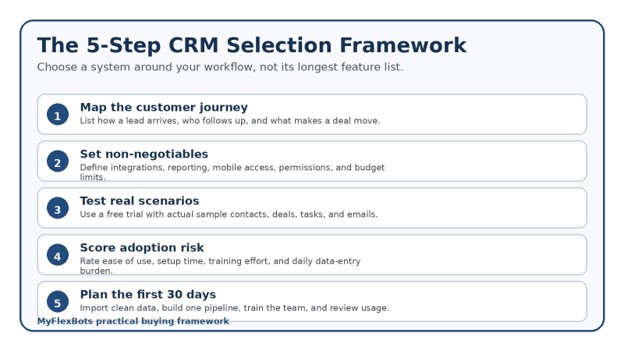
Map Your Customer Journey Before Comparing Software
Do not begin with vendor feature pages. Begin with one sheet of paper and map how a stranger becomes a paying customer.
Write down every entry point: website form, phone call, WhatsApp message, referral, walk-in, marketplace inquiry, trade show, social message, or advertising lead. Then identify who receives the inquiry, how quickly a response should happen, what information is collected, how qualification works, when a proposal is created, and what event counts as a win or loss.
For each stage, define an observable customer action. “Interested” is vague. “Discovery call completed” is measurable. “Hot lead” depends on opinion. “Budget and decision date confirmed” can be checked.
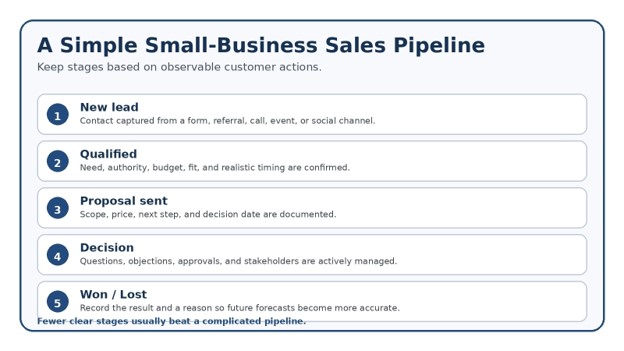
A practical first pipeline might be:
New lead
Contacted
Qualified
Proposal sent
Decision pending
Won
Lost
Keep the first version simple. A pipeline with 14 stages creates arguments about status and makes reports harder to trust.
💡 Quick Hack: Review your last 20 won and lost deals. Build the initial pipeline from what actually happened, not from an ideal process imagined in a meeting.
Define Non-Negotiable Requirements
Create three columns: must have, useful later, and unnecessary. This prevents a persuasive demo from shifting your priorities.
Most small businesses should test these requirements:
Two-way email sync or reliable email logging
Calendar connection and meeting activity
Simple contact and company records
Custom sales stages
Tasks, reminders, and overdue alerts
Mobile access
Import and export tools
User permissions
Duplicate management
Basic dashboards and conversion reports
Forms or lead-capture integration
Automation limits
Customer support quality
Data backup, security, and account controls
Also document the tools that already run the business. These may include Gmail or Microsoft 365, accounting software, website forms, call systems, e-commerce platforms, customer support tools, proposal software, and marketing automation.
An integration listed in a marketplace is not proof that it works well. During the trial, test whether data syncs in the correct direction, how quickly it appears, what happens to duplicates, and whether failed syncs are visible.
Pro-Tip: Ask every department for its top three daily actions. The best crm for small business should make those actions faster, not force staff to open six extra screens.
Set a Realistic Total-Cost Budget
CRM pricing can look simple while the final bill is not. Calculate the annual cost rather than focusing only on a low monthly headline.
Include:
Base subscription
Number of paid users
Required plan tier
Additional contact or storage charges
Email sending or calling add-ons
Automation limits
Data migration
Setup or consulting
Training time
Premium support
Integration tools
Renewal increases
The cost of replacing the system later
A $20-per-user plan for five users appears to cost $100 per month. If the team needs a higher tier for automation, a paid connector, and ten hours of setup, the real first-year cost can be much higher.
Compare this total with the cost of the current problem. Estimate the value of lost leads, slow follow-up, duplicated work, inaccurate forecasts, and time spent building manual reports.
💡 Quick Hack: Negotiate after the trial, not before it. Vendors are more flexible when you can explain exactly which plan, user count, and competing option you are considering.
Build a Shortlist by Business Model
Different businesses need different strengths. A consulting firm may care about deal value, relationship history, and proposals. A home-services company may need mobile access, rapid lead response, scheduling, and call tracking. An online retailer may prioritize customer segmentation, order history, support, and campaign automation.
Use these starting profiles:
Service businesses
Prioritize lead source tracking, estimates, follow-up tasks, appointment history, and repeat-service reminders.
B2B sales teams
Prioritize company records, multiple contacts per account, pipeline forecasting, sales sequences, meeting notes, and approval workflows.
Local businesses
Prioritize mobile usability, call and form capture, simple tasks, customer history, and integration with local marketing tools.
E-commerce businesses
Prioritize order and customer sync, segmentation, lifecycle messaging, support visibility, and repeat-purchase reporting.
Solo operators
Prioritize speed, low maintenance, email integration, contact history, templates, and a clear daily task list.
The best crm for small business should support the business model you have now while leaving room for the next two years. Paying for enterprise territory management, complex quoting, or advanced data warehouses usually creates cost without immediate value.
Run a Real-World CRM Trial
Never judge software from a polished demo account. A vendor demo contains clean data, perfect dashboards, and workflows designed to look impressive. Your trial should contain realistic messiness.
Import a small sample of 25 to 50 contacts. Include duplicate names, two people from the same company, missing phone numbers, old customers, a new lead, and an active opportunity. Connect one email account and one calendar. Create at least five deals in different stages.
Then complete these tasks without help:
Add a lead from a website inquiry.
Find the contact and review the full communication history.
Schedule a call and assign a follow-up task.
Move a deal to another stage.
Send or log an email.
Create a filtered list of overdue opportunities.
Build a report showing deals by stage and source.
Export your records.
Change a user permission.
Merge a duplicate.
Time each task. Count clicks. Note where a normal employee would hesitate.
💡 Quick Hack: Invite the least technical person on the team to the trial. If that person can complete the core workflow after a 20-minute explanation, adoption risk is much lower.
Score Candidates With Weighted Criteria
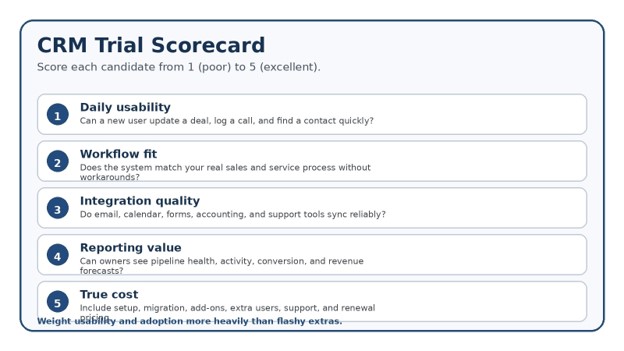
When evaluating the best crm for small business, use a scorecard instead of relying on memory. Rate each system from one to five, then apply weights based on importance.
A sensible weighting for many small teams is:
Daily usability: 25%
Workflow fit: 20%
Email and calendar integration: 15%
Reporting: 10%
Automation: 10%
Mobile experience: 5%
Security and permissions: 5%
Support and learning resources: 5%
Total cost: 5%
Cost deserves attention, but a cheap system nobody updates is expensive. Likewise, advanced automation has little value when the contact records are incomplete.
The best crm for small business often wins on consistency rather than brilliance. It performs the daily basics well, requires little explanation, and gives the owner trustworthy visibility.
Clean and Prepare Data Before Migration
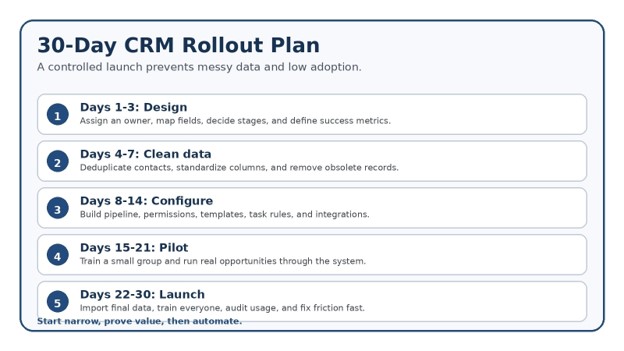
Even the best crm for small business will fail with careless migration, because CRM migration is where many projects become messy. Do not upload every old spreadsheet just because it exists.
Create a master file with agreed columns such as first name, last name, company, job title, email, phone, owner, lifecycle stage, lead source, last contact date, and notes. Standardize country codes, date formats, capitalization, and company names.
Remove obvious junk. Archive contacts that have no business purpose. Merge duplicates using email address, phone number, and company as matching clues. Decide how to handle shared inbox contacts and people who changed companies.
Keep a copy of the original files. Export a test batch first and verify that fields map correctly, notes remain readable, owners are assigned, and dates are not reversed.
The Federal Trade Commission recommends keeping only the sensitive personal information a business needs, protecting what it keeps, disposing of information securely, and planning for incidents. CRM migration is a good time to reduce unnecessary data rather than carrying old risk into a new platform.
Pro-Tip: Add a “migration source” field during import. It lets you trace questionable records back to the original spreadsheet or system.
Configure the Minimum Viable CRM
A minimum viable CRM is the smallest useful configuration that supports real work from lead capture to closed sale.
Set up:
One main sales pipeline
Clear stage definitions
Required fields only where they support a decision
Lead and account ownership
Task types
Lost-deal reasons
Email templates for common replies
Basic dashboards
User roles and permissions
Website form or inbox capture
A simple naming convention
Avoid adding dozens of custom fields. Every field creates a maintenance obligation. Ask: Who will use this data? What decision will it improve? How will it be kept accurate?
Start automation with low-risk rules. Examples include creating a task when a new lead arrives, alerting an owner when no activity occurs for three days, or sending an internal notification when a proposal reaches its decision date.
💡 Quick Hack: Make “next action” and “next action date” visible on every open deal. These two fields prevent more stalled opportunities than a complicated dashboard.
Train the Team Around Jobs, Not Features
Feature tours are forgettable. Role-based training is practical.
A salesperson needs to know how to add a lead, update a deal, log an interaction, create a task, and prepare for the day. A manager needs to review the pipeline, coach stalled deals, check data quality, and forecast. An administrator needs to manage users, imports, integrations, and automation.
Use a short live session with real examples. Record a five-minute screen video for each critical task. Create a one-page rules sheet covering required fields, stage definitions, note standards, and response expectations.
During the first two weeks, hold a 10-minute daily check-in. Ask what felt slow, what was unclear, and which records were difficult to update. Fix friction quickly.
The best crm for small business becomes useful when the CRM is the easiest place to complete the work. If employees must update another spreadsheet “for management,” they will see the CRM as duplicate administration.
Launch in Phases and Measure Adoption
Roll out one workflow before adding marketing automation, support processes, advanced scoring, or custom reporting.
Track these early metrics:
Percentage of active users each week
New leads entered
Open deals with a next action
Overdue tasks
Deals missing an owner
Duplicate rate
Average lead response time
Stage conversion
Stale opportunities
Closed-lost reasons completed
Do not punish low usage before understanding the cause. A user may be avoiding the system because the mobile app is slow, required fields do not make sense, or email sync is unreliable.
Assign one CRM owner with authority to make small improvements. Without ownership, field requests, data cleanup, and broken automations remain unresolved.
Common Mistakes to Avoid
- Buying for future complexity
A five-person business often buys features designed for a 500-person sales organization. The result is confusing navigation, longer setup, and low adoption. Buy for current workflows plus reasonable growth.
- Recreating a bad spreadsheet
Importing messy columns into custom fields does not improve the process. Simplify the data model before migration.
- Making every field mandatory
Too many required fields encourage fake values. Require only information that supports qualification, ownership, compliance, or reporting.
- Automating before the process is stable
Automation speeds up both good and bad processes. Run the workflow manually for several weeks, then automate repeated steps.
- Treating launch day as the finish line
CRM quality declines without maintenance. Schedule ownership, audits, refresher training, and reporting reviews.
The best crm for small business cannot fix unclear responsibilities or weak follow-up habits by itself. The software makes a good process visible and repeatable; it does not replace management.
Advanced Tips and Next-Level Hacks
Use lead scoring carefully
Begin with a simple score based on fit and behavior. Fit may include industry, location, budget, or company size. Behavior may include a booked call, pricing-page visit, reply, or repeated engagement. Review whether high scores actually convert before adding complexity.
Build a no-response sequence
Create a short, respectful follow-up sequence after a proposal or inquiry. Mix email, calls, and manual tasks. Stop the sequence immediately when the customer replies.
Create a lost-deal learning loop
Use a short required list of lost reasons: price, timing, competitor, no decision, poor fit, missing feature, or no response. Review the pattern quarterly.
Separate lifecycle from deal stage
A contact can be a customer while also having a new renewal opportunity. Keep customer lifecycle status separate from the stage of an individual deal.
Track source at the first touch
Do not overwrite original source when a lead returns through another channel. Keep both original source and latest source for better marketing decisions.
💡 Quick Hack: Build a “pipeline hygiene” view showing deals with no next task, no activity in seven days, or a past decision date. Review it every Monday.
Pro-Tip: Use automation to surface exceptions, not to create noise. One meaningful alert is better than 20 notifications everyone ignores.
Troubleshooting and Long-Term Maintenance
Problem: The team is not using the CRM
Interview users individually. Look for slow screens, unclear fields, duplicate entry, missing integrations, and weak training. Remove unnecessary steps and make the daily task view useful.
Problem: Reports do not match reality
Check stage definitions, close dates, deal values, duplicates, and whether lost deals remain open. Add a weekly manager review for stale opportunities.
Problem: Duplicate contacts keep appearing
Identify the source. Duplicates may come from forms, imports, email sync, integrations, or different formatting. Establish matching rules and merge records monthly.
Problem: Email history is incomplete
Confirm permissions, mailbox connection status, shared inbox rules, and whether users are sending outside the connected account. Test with internal messages.
Problem: Automations fire at the wrong time
Document each trigger, condition, action, and exception. Test with a sandbox record. Add naming conventions such as “Lead – New Form – Assign Owner.”
Problem: The CRM feels too expensive
Audit unused seats, premium features, contacts, add-ons, and integrations. Archive inactive users, remove redundant tools, and compare annual renewal terms.
Monthly maintenance routine
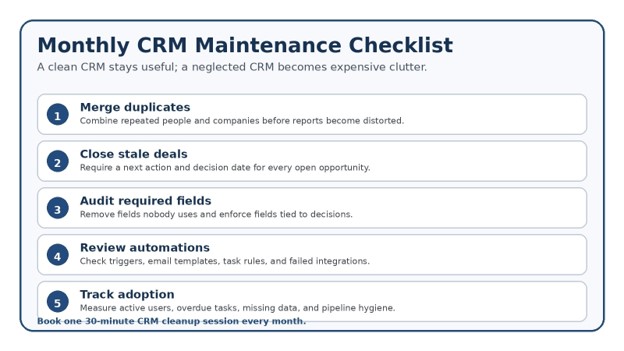
Spend 30 minutes on duplicates, stale deals, failed automations, missing owners, unused fields, and adoption metrics. Quarterly, review pipeline stages, permissions, integrations, exports, security settings, and training materials.
The FTC emphasizes physical security, electronic security, employee training, and service-provider practices when protecting business information. The NIST Cybersecurity Framework also offers a structured way to manage cybersecurity risk. Apply those principles to CRM access: enable multi-factor authentication, remove former employees promptly, use least-privilege permissions, review integrations, and keep a tested export or backup plan.
The best crm for small business should become more valuable as its data improves. A monthly maintenance habit protects that value and keeps reports trustworthy.
Frequently Asked Questions
What is the easiest CRM for a small business?
The easiest option is the one that matches the team’s daily workflow, connects to existing email and calendar tools, and requires minimal manual data entry. Test common tasks with real users rather than relying on vendor claims.
How much should a small business spend on CRM?
Budget for the full annual cost, including user licenses, setup, migration, integrations, training, support, and renewal. A lower price is not a saving when the platform causes missed follow-ups or requires extra tools.
Does a very small business need a CRM?
A solo operator may benefit once leads come from multiple channels, follow-ups are being missed, repeat customers matter, or a spreadsheet no longer shows the next action clearly.
Can a spreadsheet replace CRM software?
A spreadsheet can work for a simple contact list, but it becomes fragile when several people need activity history, reminders, permissions, email sync, automation, and reliable reporting.
How long does CRM implementation take?
A focused small-team rollout can often launch in two to four weeks. Complex migrations and integrations take longer. Start with one pipeline and expand after adoption is stable.
What security features should a CRM have?
Look for multi-factor authentication, role-based permissions, encryption, audit logs, data export, backup practices, account recovery controls, and clear vendor security documentation.
The best crm for small business is therefore not a universal brand name. It is the platform that scores highest against your workflow, adoption needs, security requirements, and total cost.
Conclusion: Choose for Adoption, Then Improve
A CRM purchase should remove uncertainty, not add another layer of software. Map the customer journey, define the few features that truly matter, test real work, clean the data, launch a minimum viable setup, and measure adoption before expanding.
When selected and managed well, the best crm for small business gives every lead an owner, every active opportunity a next action, and every manager a clearer view of revenue.
Which part of your current sales process creates the most missed follow-ups or manual work?
editor's pick
latest video
news via inbox
Nulla turp dis cursus. Integer liberos euismod pretium faucibua


