

Best VPN Apps 2026: The Definitive Guide to Privacy, Speed
A VPN should make your internet connection safer without making every website slower, every streaming app unreliable, or every device harder to use. The problem is that the app stores are packed with VPNs that all promise “military-grade encryption,” “total anonymity,” and “blazing speeds,” while the details that actually matter are buried in privacy policies and renewal terms.
This guide compares the best vpn apps 2026 for everyday privacy, streaming, travel, public Wi-Fi, families, and free use. You will learn which services are worth paying for, which settings to change immediately after installation, how to test for leaks, and how to avoid expensive long-term plans that look cheap only on the checkout page.
What Are the Best VPN Apps in 2026?
The best vpn apps 2026 combine independently verified privacy practices, modern protocols such as WireGuard or Lightway, a reliable kill switch, strong mobile and desktop apps, fast nearby servers, and transparent pricing. NordVPN is the strongest all-rounder, Surfshark is best for unlimited devices, Proton VPN leads for transparency, ExpressVPN is easiest to use, Mullvad is excellent for privacy minimalists, and PrivadoVPN is a practical free option.
A VPN creates an encrypted tunnel between your device and a VPN server. NIST describes VPNs as a way to provide a secure communications mechanism over existing networks, including the public internet. That protection is useful, but it does not make you invisible, stop phishing, fix weak passwords, or make a dishonest website trustworthy. See the NIST Guide to IPsec VPNs for the underlying security concept.
A VPN encrypts traffic between your device and the VPN server, reducing what a local network or ISP can observe.
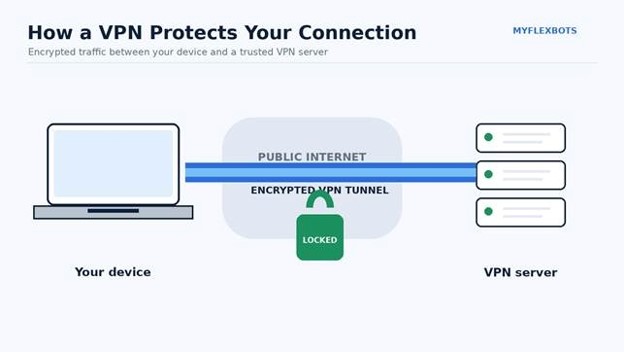
A VPN is most useful when you need a consistent encrypted tunnel on shared or untrusted networks.
Essential VPN Selection Toolkit and Cost Breakdown
You do not need specialist hardware to use a VPN. You need a compatible device, a trustworthy VPN subscription, a browser for testing, and ten minutes to configure the app properly. The table below turns the usual “tools and materials” section into a practical VPN buying checklist.
| Item / Service | What You Need It For | Typical Cost in 2026 | Skill Level |
| NordVPN | Best all-round balance of speed, privacy, streaming, and usability | From about $3.49/month on a long-term introductory plan | Beginner |
| Surfshark | Families and households with many devices | From about $2.49/month on a long-term introductory plan | Beginner |
| Proton VPN | Privacy transparency and a strong unlimited-data free tier | Free; paid plans vary by term | Beginner–Intermediate |
| ExpressVPN | Simple setup, polished apps, and easy multi-device use | Promotional long-term pricing varies; current tiers support 10–14 devices | Beginner |
| Mullvad VPN | Privacy-first use with minimal account information | €5/month flat rate | Intermediate |
| PrivadoVPN Free | Light free use, travel backup, or occasional public Wi-Fi protection | Free for 10 GB of high-speed data per month | Beginner |
| IP/DNS leak test | Confirm your VPN is not exposing your normal IP or DNS resolver | Free | Beginner |
| Speed test | Compare VPN vs. non-VPN performance | Free | Beginner |
| Password manager | Protect the VPN account itself with a unique password | Free–paid | Beginner |
Pricing note: VPN promotions change constantly. Prices above reflect publicly listed or widely advertised August 2026 offers and should be checked before publication. Long-term introductory rates often renew at a much higher annual price.
What We Looked For Before Ranking Any VPN
The best vpn apps 2026 are not simply the apps with the largest server count or the loudest advertising. A good VPN has to perform well in six areas at the same time:
- Privacy: A clear no-logs policy matters more when it is backed by independent audits, open-source code, court history, or technical design that reduces retained account data.
- Security: A kill switch, DNS leak protection, modern protocols, secure authentication, and well-maintained apps are basic requirements.
- Speed: Every VPN adds overhead. The question is whether the slowdown is small enough that browsing, calls, gaming, and 4K streaming still feel normal.
- Usability: The fastest VPN in the world is useless if family members disable it because the app is confusing or unreliable.
- Device coverage: Windows, macOS, Android, iOS, Linux, smart TVs, browsers, and routers all matter if you want one subscription to protect an entire household.
- Pricing honesty: We look at the full upfront bill, the renewal price, device limits, and refund window rather than the “per month” number alone.
💡 Quick Hack: Before buying any two-year plan, set a calendar reminder for 30 days before renewal. VPN renewal prices can be dramatically higher than the introductory rate, so a two-minute reminder can save more money than coupon hunting.
The Best VPN Apps for 2026 Compared
For most readers searching for the best vpn apps 2026, the right choice depends on what you actually do online. A remote worker on hotel Wi-Fi has different needs from a family protecting twelve devices, and both are different from a privacy-focused user who wants to minimize account data.
| VPN | Best For | Devices | Standout Strength | Main Trade-Off |
| NordVPN | Best overall | 10 | Excellent speed + mature security tools | Renewal cost can jump |
| Surfshark | Families / value | Unlimited | Unlimited simultaneous connections | Feature-rich app can feel busy |
| Proton VPN | Privacy + free use | 1 free / 10 paid | Open-source apps, audits, unlimited free data | Free tier has limited location choice |
| ExpressVPN | Simplicity + travel | 10–14 by tier | Very polished apps and Lightway | Usually costs more than budget rivals |
| Mullvad | Privacy minimalists | 5 | Anonymous numbered accounts, flat pricing | Smaller network and weaker streaming focus |
| PrivadoVPN Free | Best free backup | 1 active free connection | 10 GB high-speed data monthly | Free data cap is easy to hit with video |
1. NordVPN: Best Overall VPN App for Most People
NordVPN is the easiest recommendation when somebody wants one service that does nearly everything well. Its current plans support up to 10 simultaneous devices, and the company emphasizes its NordLynx protocol, threat-blocking features, obfuscated servers, a kill switch, and a large global network.
Among the best vpn apps 2026, NordVPN stands out because it balances speed, security, streaming performance, and beginner-friendly setup better than most specialist options. Independent 2026 comparison testing has also placed it near the top for throughput and connection reliability, although any single benchmark should be treated as one data point rather than universal proof.
Why NordVPN Works Well
- Fast everyday performance: NordLynx is based on WireGuard-style technology and is designed to keep encryption overhead low.
- Good travel toolkit: Obfuscated servers can help when normal VPN connections are restricted or detected.
- Useful safety features: The kill switch can block traffic if the VPN drops, while threat filtering can reduce exposure to malicious domains and trackers.
- Strong device support: One account covers Windows, macOS, Android, iOS, Linux, browsers, TVs, and compatible routers.
Who Should Skip It?
Skip NordVPN if you hate long introductory contracts, want to pay month-to-month without a pricing penalty, or prefer a provider that collects as little account information as technically possible. Mullvad is a cleaner fit for that last use case.
Pro-Tip: Start on NordVPN’s automatic protocol setting. Only force OpenVPN TCP or obfuscated servers when a network blocks the normal connection. Using a heavier protocol all the time can add unnecessary latency.
Official source: NordVPN features
2. Surfshark: Best VPN for Unlimited Devices and Families
A VPN subscription becomes expensive when every family member has a phone, laptop, tablet, TV, and work machine. Surfshark solves that problem with unlimited simultaneous VPN connections on its main plans.
That makes Surfshark one of the best vpn apps 2026 for larger households, freelancers with many devices, and small teams that want a simple consumer VPN rather than enterprise remote-access software. The company also reports RAM-only servers, independent audits, WireGuard support, obfuscated connections, MultiHop routing, and an expanding cybersecurity bundle.
Why Surfshark Is Strong Value
- Unlimited simultaneous connections: The simplest answer for households that routinely exceed the 5- or 10-device limits of rivals.
- Low introductory pricing: The long-term Starter plan was publicly listed at about $2.49/month in late August 2026, before taxes and renewal pricing.
- Good streaming compatibility: Apps cover common TVs and streaming devices as well as phones and computers.
- Privacy audits: Surfshark’s trust center lists Deloitte no-logs assurance reports and infrastructure audits by third parties.
What to Watch
Unlimited devices do not mean unlimited account sharing with strangers or reselling access. Surfshark maintains a fair-use policy. More importantly, its long-term promotional price is not the same thing as the renewal cost.
💡 Quick Hack: If you have more than ten devices, calculate the household cost per protected device, not the advertised monthly subscription price. Surfshark often becomes dramatically cheaper on that metric.
Official sources: Surfshark features and Surfshark trust center
Unlimited-device VPN plans are useful when a household has phones, laptops, tablets, TVs, and other connected devices.
Multi-device plans are especially valuable when your VPN needs to cover laptops, phones, and streaming screens at the same time.
3. Proton VPN: Best for Transparency and the Best Unlimited Free Tier
Proton VPN has a rare advantage: its free plan is useful even if you never upgrade. The company states that Proton Free has no ads, no activity logs, and no data cap. Current documentation says the free tier connects one device at a time and automatically selects from servers in a limited set of countries.
For privacy-conscious readers comparing the best vpn apps 2026, Proton VPN is unusually transparent. Its apps are open source, its no-logs policy is independently audited, and it publishes technical information about its infrastructure, protocols, and privacy model.
What You Get on Proton Free
- Unlimited data rather than a 5 GB or 10 GB monthly cap.
- No advertising inside the VPN product.
- A kill switch and strong encryption.
- Access to a smaller, automatically selected set of free locations.
- One active device at a time.
Why the Paid Plan Is Better for Heavy Use
Paid Proton VPN plans add more location control, streaming support, P2P servers, Secure Core, NetShield, faster server access, and up to 10 simultaneous connections. Proton’s public documentation currently advertises more than 20,000 servers across 140+ countries for VPN Plus, although network counts can change frequently.
Pro-Tip: Use Proton Free as an emergency travel VPN even if you pay for another service. Having a second trusted app installed can save you when a hotel, airport, ISP, or country blocks your primary provider.
Official sources: Proton VPN plans and Proton VPN no-logs policy
4. ExpressVPN: Best for Beginners, Travel, and Low-Friction Setup
ExpressVPN remains one of the most polished consumer VPNs. Its main strength is not that it has the cheapest plan or the largest headline server count; it is that the apps are consistent and easy to understand across phones, laptops, and streaming devices.
ExpressVPN earns a place among the best vpn apps 2026 because its Lightway protocol is designed for fast reconnection and mobile network changes. The company now supports different subscription tiers with 10, 12, or 14 simultaneous VPN connections, depending on the plan, and its Lightway protocol has been reimplemented in Rust with post-quantum protections enabled by default.
Why Travelers Like ExpressVPN
Travel exposes a VPN to constant changes: airport Wi-Fi, hotel networks, cellular data, captive portals, sleep/wake cycles, and blocked protocols. Lightway is designed to reconnect quickly when the underlying network changes.
That matters more in practice than a tiny advantage in a synthetic speed test. A VPN that reconnects reliably after your phone switches from Wi-Fi to 5G protects you more consistently than a slightly faster service you keep finding disconnected.
The Main Downside
ExpressVPN is usually not the cheapest serious VPN. The company introduced more subscription tiers in 2026, so shoppers should compare which security extras they actually need rather than automatically buying the most expensive bundle.
💡 Quick Hack: For parents or non-technical relatives, prioritize the VPN they will actually leave turned on. A clean one-button interface can be more valuable than twenty advanced settings nobody understands.
Official sources: ExpressVPN Lightway and ExpressVPN device limits
Travelers benefit from VPN apps that reconnect quickly as devices move between airport Wi-Fi, hotel networks, and mobile data.
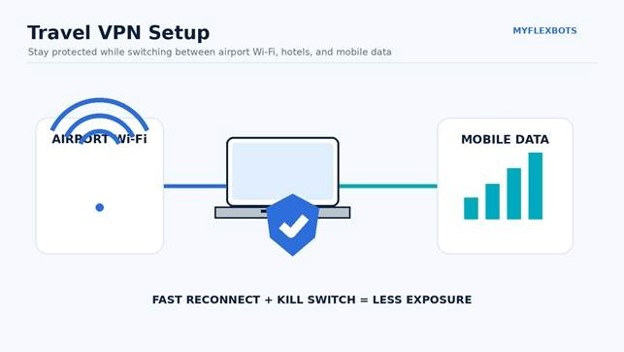
Reliable reconnection matters when your device constantly switches between airport Wi-Fi, hotel networks, and cellular data.
5. Mullvad VPN: Best for Privacy Minimalists
Mullvad looks different because it deliberately avoids the marketing patterns common across the VPN industry. It charges a flat €5 per month whether you buy one month or years of service, and it uses numbered accounts rather than requiring a traditional email-and-password account.
That privacy-minimalist design makes Mullvad one of the best vpn apps 2026 for users who care more about reducing account metadata than unlocking every streaming catalog. It supports up to five devices, uses modern protocols, and has a reputation for unusually direct privacy communication.
Why Mullvad Is Different
- Flat price: €5 per month, with no “80% off” countdown timer.
- Anonymous account model: You generate an account number rather than signing up with a normal username or email.
- Privacy-first product decisions: Mullvad often chooses privacy simplicity over bundle features.
- Straightforward refund window: The company lists a 14-day refund policy, with exceptions for certain payment methods.
Where Mullvad Falls Behind
Its network is smaller than the mass-market leaders, device coverage is less generous than Surfshark, and it is not built primarily around streaming unblocking. If your family wants one easy subscription for TVs, tablets, and gaming consoles, Surfshark or ExpressVPN will be less frustrating.
Official sources: Mullvad pricing and Mullvad FAQ
6. PrivadoVPN Free: Best Free VPN for Light Use and Backup
PrivadoVPN’s free plan gives users 10 GB of high-speed data every 30 days, one active connection at a time, and access to a smaller set of global locations. That is enough for secure browsing, email, maps, and occasional travel use, but video can burn through 10 GB quickly.
For readers who need a no-cost backup among the best vpn apps 2026, PrivadoVPN Free is practical because it does not require a payment card to get started and includes core VPN protection rather than functioning only as a browser proxy.
Best Use Cases for the Free Plan
- A backup VPN installed before international travel.
- Occasional coffee-shop or airport browsing.
- Testing whether a VPN solves a regional routing problem.
- Securing one device for light browsing without a subscription.
If you stream daily, download large files, or protect several devices, Proton Free’s unlimited data or a paid multi-device service will usually make more sense.
Official source: PrivadoVPN Free
Step-by-Step: How to Choose, Install, and Configure a VPN Properly
Buying the right VPN is only half the job. A poorly configured premium VPN can expose more information than a correctly configured mid-range service. Use this workflow instead of installing the app and immediately forgetting about it.
Define Your Real Use Case
Write down your top two reasons for using a VPN. Do not choose a service until you can complete this sentence: “I need a VPN mainly for ______ and ______.”
Common answers include:
- Protecting traffic on public or shared Wi-Fi.
- Hiding your normal IP address from websites.
- Reducing ISP visibility into browsing destinations.
- Streaming while traveling.
- Accessing work tools from restrictive networks.
- Protecting a family’s many devices.
- Improving privacy when torrenting legal files.
A VPN should not be purchased as a vague “security” product. Specific use cases make the trade-offs obvious.
Pick Two Candidates, Not One
Choose your first choice and one backup. Compare them on the device you use most, not on a feature spreadsheet.
For example:
- NordVPN vs. Surfshark for most families.
- Proton VPN vs. Mullvad for privacy-first users.
- ExpressVPN vs. NordVPN for frequent travelers.
- Proton Free vs. PrivadoVPN Free if you refuse to pay.
Take advantage of a legitimate refund window instead of trusting a review site’s speed number. Your ISP, router, location, and device matter more than a global average.
Download Only From the Official Source
Install the VPN from the provider’s official website, Apple App Store, Google Play, Microsoft Store, or another officially documented channel. Avoid “modded,” cracked, or repackaged VPN installers.
This matters because a VPN app receives enormous network privileges. Installing a malicious VPN is worse than installing no VPN at all because the software sits directly in the path of your traffic.
Turn On the Kill Switch
A kill switch blocks internet access if the encrypted tunnel unexpectedly drops. This is especially useful on unstable hotel Wi-Fi, mobile connections, and laptops that sleep and wake frequently.
Some apps offer two versions:
- System-wide kill switch: Blocks the entire internet connection until the VPN reconnects.
- App-level kill switch: Closes or blocks only selected applications.
For privacy-sensitive work, use the system-wide option. For everyday home use, the default may be enough.
Keep the Protocol on Automatic First
Modern VPNs often choose between WireGuard, OpenVPN, IKEv2, or a proprietary protocol. WireGuard is widely used because it is fast and has a relatively compact design. The official WireGuard protocol documentation explains the cryptographic components and handshake model.
Use Automatic unless you have a reason to change it. If the VPN will not connect:
- Try WireGuard or the provider’s modern protocol.
- Try OpenVPN UDP.
- Try OpenVPN TCP on restrictive networks.
- Try an obfuscated or stealth mode where available.
Pro-Tip: TCP-based VPN modes are often a “works almost anywhere” fallback, not the fastest everyday option. Switch back to the normal high-speed protocol when you leave the restrictive network.
Step 6: Connect to a Nearby Server First
Distance creates latency. If privacy is your priority and you do not need a specific country, choose the nearest low-load server.
A server on the other side of the world may add hundreds of milliseconds of latency. That can make websites feel sluggish even when the raw download speed still looks good.
Step 7: Test Your Normal IP and DNS
Before connecting, note your public IP and DNS resolver using a reputable test site. Connect the VPN, refresh the test, and verify that:
- Your visible IP changed.
- Your apparent location matches the VPN server region.
- Your normal ISP DNS servers are not appearing unexpectedly.
- IPv6 is either safely routed or disabled by the VPN if unsupported.
Do this on both Wi-Fi and mobile data. Mobile VPN behavior can differ from desktop behavior.
A quick privacy check should verify IP address, DNS resolver, protocol, and kill-switch behavior before you trust a new VPN.
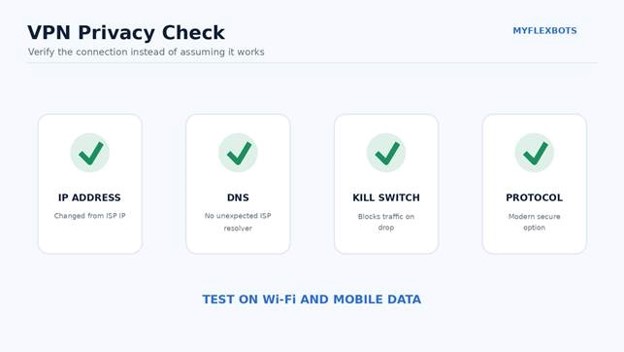
Verify the VPN rather than assuming it works—check your IP, DNS, kill switch, and protocol on each major device.
Test the Kill Switch Instead of Assuming It Works
Start a continuous connection, then force the VPN to disconnect or switch servers. Your real IP should not become visible during the transition.
If traffic continues outside the tunnel, check whether the app’s kill switch is disabled, limited to selected apps, or unavailable on that platform.
Configure Auto-Connect for Risky Networks
The best mobile setup is not necessarily “VPN always on.” A smarter configuration may be:
- Auto-connect on unknown Wi-Fi.
- Auto-connect on hotel and airport networks.
- Stay disconnected on your trusted home network if you prefer maximum speed.
- Always-on for privacy-sensitive users who do not want to remember to connect manually.
The FTC notes that modern HTTPS has made public Wi-Fi much safer than it was in the early internet era, but account security, software updates, and scam awareness still matter. See the FTC public Wi-Fi security guidance.
Use Split Tunneling Carefully
Split tunneling lets selected apps bypass the VPN. That is useful for:
- Local printers.
- Banking apps that dislike VPN IP addresses.
- Games where latency matters more than privacy.
- Streaming apps that must use your normal region.
The danger is forgetting which apps bypass the tunnel. Keep the exclusion list short and review it after major app updates.
Public Wi-Fi: What a VPN Helps With—and What It Does Not
A VPN encrypts traffic between your device and the VPN server. That reduces what people on the local network, the hotspot operator, or your ISP can inspect directly.
But HTTPS already encrypts the content of most modern web sessions. A VPN adds another layer and hides more network metadata from the local network, but it cannot protect you from entering your password into a fake bank website.
A VPN Helps With
- Encrypting traffic before it leaves your device.
- Hiding your normal public IP from websites.
- Reducing local network visibility into DNS and connection destinations, depending on the setup.
- Keeping the same security posture across many untrusted networks.
A VPN Does Not Fix
- Phishing.
- Malware you install yourself.
- Weak or reused passwords.
- Account takeover after stolen session cookies.
- Unsafe browser extensions.
- Data you intentionally give to a website.
💡 Quick Hack: Pair your VPN with a password manager and two-factor authentication. That combination prevents more real-world account damage than obsessing over whether one VPN protocol is 3% faster than another.
Streaming: How to Get Better Reliability Without Constant Server-Hopping
Streaming services detect VPN traffic for licensing and anti-abuse reasons. A server that works today can fail tomorrow, so no serious reviewer should promise permanent access to a specific catalog.
Use this troubleshooting order:
- Disconnect and reconnect to get a different server.
- Use the provider’s recommended streaming location.
- Clear the streaming app’s cache or fully restart the app.
- Disable location permissions if the service does not require them.
- Check whether your device is leaking DNS outside the tunnel.
- Try the provider’s smart-DNS feature only if you understand that smart DNS does not provide the same encryption as a VPN.
Do not install random browser extensions that claim to “unblock everything.” Many are proxies, not full VPNs, and may have weaker privacy practices.
Gaming: Optimize for Latency, Not Maximum Distance
A VPN can occasionally improve a bad route to a game server, but it usually adds latency because your traffic takes an extra hop.
For the best result:
- Choose a VPN server geographically close to the game server.
- Use WireGuard, NordLynx, Lightway, or another modern low-overhead protocol.
- Avoid MultiHop or double-VPN modes while gaming.
- Compare ping with and without the VPN.
- Keep the VPN only if the route is actually better.
A VPN will not magically lower ping from Pakistan to a server in North America below the physical limits of distance and routing.
Common VPN Mistakes to Avoid
The biggest problems with top VPN apps usually come from setup or buying decisions, not encryption failures. Avoid these five mistakes.
Mistake 1: Buying Based Only on the Discount Percentage
“Save 80%” sounds impressive until you notice the plan requires 27 months upfront and renews at three or four times the introductory rate.
Fix: Compare total first-term cost, effective monthly rate, renewal price, and refund window.
Mistake 2: Using a Random Free VPN With No Business Model
VPN infrastructure costs money. If a free provider has no paid tier, no transparent funding model, no credible privacy policy, and no independent scrutiny, ask how the service pays its bills.
Fix: Use a reputable freemium service such as Proton VPN or PrivadoVPN rather than an unknown app with millions of installs and no accountable company behind it.
Mistake 3: Assuming “No Logs” Means “No Data at All”
A provider may avoid activity logs while still processing billing information, device diagnostics, crash reports, or account metadata.
Fix: Read the privacy policy and audit scope. The important question is which data exists, why it exists, and how long it is retained.
Mistake 4: Leaving the Kill Switch Off
If your privacy use case is serious, a dropped VPN tunnel can expose your normal IP instantly.
Fix: Enable the kill switch and test it on every platform you use.
Mistake 5: Routing Everything Through a Faraway Server
A distant server can make video calls, gaming, and browsing unnecessarily slow.
Fix: Use the nearest server unless you specifically need a different country.
Advanced Tips and Next-Level VPN Hacks
1. Build Two VPN Profiles
Create one profile called Fast and another called Private.
- Fast: nearest server, WireGuard/Lightway/NordLynx, no MultiHop.
- Private: kill switch on, tracker blocking on, privacy-focused server or MultiHop if your threat model justifies it.
This prevents you from overusing slow privacy features when you only need basic protection.
2. Put the VPN on the Router Only When It Solves a Real Problem
Router VPNs can protect devices that do not support apps, but they also make troubleshooting harder. Some routers have weak CPUs and dramatically reduce encrypted throughput.
Use a router-level VPN for smart TVs, consoles, or a dedicated privacy network—not simply because it sounds more advanced.
3. Keep a Clean Browser Profile for Sensitive Sessions
A VPN changes your IP address, but websites can still recognize you through cookies, logins, browser storage, and fingerprinting.
Create a separate browser profile for privacy-sensitive sessions. Avoid signing into the same Google, Meta, or Microsoft accounts if your goal is to reduce cross-site identity linking.
4. Test After Major OS Updates
Windows, Android, iOS, and macOS updates can change network permissions, DNS behavior, and background restrictions. After a major update, re-check:
- VPN auto-connect.
- Kill switch behavior.
- DNS leaks.
- Split tunneling exclusions.
- Battery optimization settings on Android.
5. Use Your VPN Less When It Adds No Value
A VPN is a tool, not a ritual. If you are on a trusted home network, using HTTPS, and do not care about IP masking or ISP metadata, you may prefer the direct connection for maximum speed.
The advanced move is not “VPN on at all costs.” It is understanding when the VPN changes your risk in a meaningful way.
Troubleshooting and Long-Term Maintenance Guide
Most VPN problems can be solved by checking the server, protocol, DNS settings, firewall, and application cache in a consistent order.
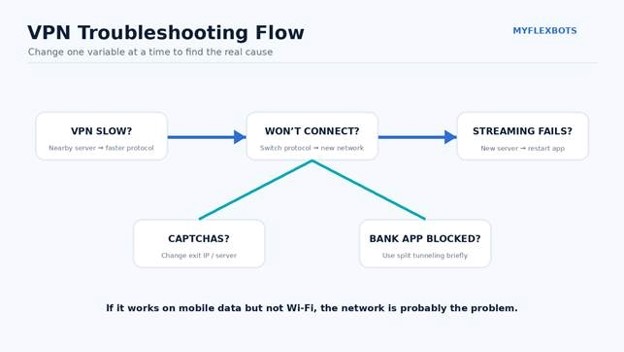
Troubleshoot VPN problems in a fixed order so you change one variable at a time instead of randomly reinstalling everything.
Problem: The VPN Is Too Slow
Work through these fixes in order:
- Connect to a physically closer server.
- Switch to WireGuard, NordLynx, Lightway, or the provider’s fastest modern protocol.
- Disable MultiHop, Secure Core, or double-VPN temporarily.
- Test with Ethernet instead of Wi-Fi.
- Restart the router.
- Compare the same speed test server with and without the VPN.
- Check whether your device is using battery saver or low-power mode.
If your non-VPN connection is already slow, the VPN cannot repair the underlying internet line.
Problem: The VPN Will Not Connect
Try:
- Switching servers.
- Switching protocols.
- Moving from Wi-Fi to cellular data to isolate the network.
- Signing out and back in.
- Checking whether the subscription expired.
- Disabling another VPN, proxy, or security app temporarily.
- Using an obfuscated or stealth protocol on restrictive networks.
If the VPN works on mobile data but not Wi-Fi, the Wi-Fi network is the likely problem.
Problem: Websites Keep Showing CAPTCHAs
Shared VPN IP addresses can accumulate suspicious traffic reputations because many people use the same exit server.
Fixes:
- Switch to a less crowded server.
- Use a dedicated IP if your provider offers one and your use case justifies the privacy trade-off.
- Pause the VPN for low-risk sites where privacy is not important.
Problem: Banking or Payment Apps Refuse to Work
Banks often block known data-center or VPN IP ranges to reduce fraud.
Try a nearby server first. If that fails, use split tunneling to route only the banking app outside the VPN, then remove the exclusion after you finish.
Problem: Streaming Stops Working
Use the provider’s support page for the specific streaming service, change servers, restart the app, and clear cached location data. If a VPN worked yesterday and fails today, the service may have blocked that specific IP range.
Problem: The VPN Disconnects on Android
Android battery optimization can suspend VPN apps in the background.
Open the app’s battery settings and allow unrestricted or optimized background use according to the VPN provider’s instructions. Also verify “Always-on VPN” and “Block connections without VPN” if you use those Android features.
Monthly VPN Maintenance Checklist
Once a month:
- Update the VPN app.
- Update your operating system.
- Review split tunneling.
- Check that auto-connect still works.
- Test IP and DNS behavior.
- Review new devices signed into the VPN account.
- Confirm the next billing date and renewal price.
That ten-minute routine catches most silent configuration drift.
Frequently Asked Questions
What is the best VPN app for iPhone in 2026?
For most iPhone users, NordVPN, Proton VPN, Surfshark, and ExpressVPN are all strong choices. Pick NordVPN for the best all-round balance, Proton VPN for transparency and a strong free plan, Surfshark for unlimited devices, or ExpressVPN for the simplest travel-friendly experience.
What is the best free VPN app in 2026?
Proton VPN Free is the strongest choice for users who need unlimited data and can accept one active device plus limited location choice. PrivadoVPN Free is a useful alternative when 10 GB of high-speed monthly data is enough and you want a second backup service.
Are VPNs legal?
VPNs are legal in many countries, but laws and enforcement vary. Some governments restrict or regulate VPN services, and using a VPN does not make illegal activity legal. Travelers should check current local rules before relying on a VPN in a restricted jurisdiction.
Does a VPN make public Wi-Fi completely safe?
No. A VPN encrypts traffic between your device and the VPN server, but it cannot stop phishing, malicious downloads, fake websites, stolen passwords, or unsafe browser extensions. Use HTTPS, software updates, strong unique passwords, and multi-factor authentication as well.
Will a VPN slow down my internet?
Usually, yes, because encryption and the extra routing hop add overhead. A high-quality VPN on a nearby server may reduce speed only modestly, while distant servers, congested routes, or double-VPN modes can cause a much larger slowdown.
Which of the best vpn apps 2026 is best for families?
Surfshark is the easiest family recommendation because it allows unlimited simultaneous VPN connections. NordVPN and Proton VPN are also strong if your household stays within their 10-device limits, while ExpressVPN supports 10 to 14 connections depending on the subscription tier.
Final Verdict: Which VPN Should You Choose?
There is no universal winner for every user. The best choice is the VPN that matches your actual threat model, devices, budget, and tolerance for setup complexity.
For most people, NordVPN is the safest all-round recommendation. Surfshark is the value champion for large households. Proton VPN is the strongest transparency-first option and the easiest free service to recommend for unlimited data. ExpressVPN is ideal when polished apps and reliable reconnection matter more than the lowest price. Mullvad is built for users who want minimal account data and flat pricing. PrivadoVPN Free is a solid backup for light use.
The smartest way to shop for the best vpn apps 2026 is to shortlist two providers, install them on your real devices, test speed and reliability on your own networks, verify the kill switch and DNS behavior, and keep the service that creates the fewest compromises.
What matters most to you in a VPN—privacy, speed, streaming, travel reliability, or the lowest possible price? Share your priority in the comments so other MyFlexBots readers can compare real-world use cases.
editor's pick
latest video
news via inbox
Nulla turp dis cursus. Integer liberos euismod pretium faucibua


