
Best Habit Tracker Apps for Beginners in 2026 Apps
Most people do not quit a new routine because they lack motivation; they quit because the system asks too much attention at the wrong time. The Best habit tracker apps for beginners remove that friction with fast check-ins, realistic reminders, visible progress, and just enough reward to make tomorrow’s action easier. This guide compares 12 practical options for 2026 and shows exactly how to set one up without turning self-improvement into another full-time project.
Related on MyFlexBots: Best Productivity Apps 2026 · Best AI Tools 2026
What Are the Best Habit Tracker Apps for Beginners?
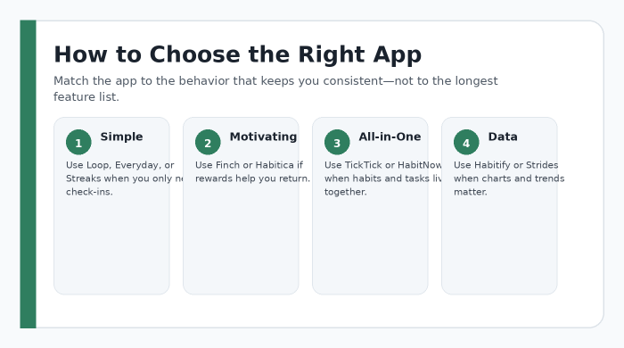
| The Best habit tracker apps for beginners are simple enough to check in within seconds, flexible enough for non-daily goals, and motivating without punishing missed days. Start with Loop or Everyday for simplicity, Finch or Habitica for motivation, TickTick or HabitNow for all-in-one planning, and Habitify or Strides when you want deeper progress data. |
Essential Habit-Tracking Tools & Setup Breakdown
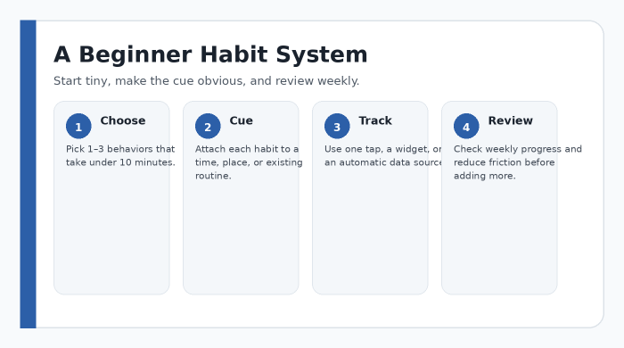
You do not need a complicated productivity stack to begin. Treat the setup like a small toolkit: one tracking app, a reliable cue, a realistic minimum action, and a weekly review. Most beginners can start at no cost.
| Tool | Purpose | Estimated Cost | Skill | Buying / Setup Rule |
| Habit tracker app | Logs repetitions and shows patterns | $0 to optional premium | Beginner | Choose one app for 14 days before switching. |
| Phone / tablet | Primary check-in device | Already owned | Beginner | Put the app or widget where you see it. |
| Reminder / cue | Prompts action at the right moment | $0 | Beginner | Prefer a real-life cue over repeated alerts. |
| Calendar | Protects time for scheduled habits | $0 | Beginner | Use only for habits that truly need time blocks. |
| Wearable (optional) | Auto-tracks compatible activity | Optional | Beginner | Useful only when automatic data is reliable. |
| Weekly review note | Captures one adjustment per week | $0 | Beginner | Keep review under 10 minutes. |
💡 Quick Hack: Use the free tier for two weeks before paying. A premium feature is valuable only when you can name the exact friction it removes from a routine you are already following.
How We Chose the Apps
A beginner does not need the app with the most charts. You need an app that reduces the distance between a real-world action and a trustworthy record of that action. We evaluated setup time, logging speed, reminder control, schedule flexibility, progress visibility, platform fit, data portability, and how aggressively each product pushes upgrades.
The strongest beginner tools share four traits: you can create a habit in under a minute, you can choose a realistic frequency, a missed day does not destroy the whole system, and the progress screen tells you something useful at a glance. Privacy and export options matter too, especially when you are logging health, mood, or personal routines.
12 Habit Tracker Apps Compared at a Glance
| App | Platforms | Cost Model* | Best For | Learning Curve |
| Loop | Android | Free / open-source | Minimal tracking | Very low |
| Finch | iOS, Android | Core free; optional Plus | Gentle self-care motivation | Low |
| Habitica | Web, iOS, Android | Free; optional subscription | Gamification + accountability | Low–Medium |
| TickTick | Web, desktop, iOS, Android | Free tier; premium available | Habits + tasks + calendar | Low–Medium |
| HabitNow | Android | Free / in-app purchases | Routine planning | Low |
| Habitify | Multi-platform | Free tier; premium available | Cross-device data | Medium |
| Everyday | Web, iOS, Android | Free tier / premium options | Visual streaks | Low |
| Way of Life | iPhone | Free / in-app purchases | Pattern awareness | Low |
| Strides | Apple platforms | Free tier / premium options | Flexible goal types | Medium |
| Streaks | Apple platforms | Paid app | Focused streak tracking | Low |
| Productive | iPhone, iPad, Apple Watch | Free / in-app purchases | Guided routines | Low |
| Fabulous | iOS, Android | Free entry / premium options | Guided rituals | Low |
*Pricing, regional availability, plan limits, and store terms can change. Confirm the current listing in your app store or the developer’s official site before paying.
- Loop Habit Tracker — Best for a Clean, Free Android Setup
Loop is the classic minimalist choice for Android users who want habit tracking without a social layer, virtual pet, or productivity suite. Its appeal is restraint: create a habit, pick a schedule, mark it complete, and review the history. For a beginner, that low cognitive load is a feature, not a limitation.
Choose Loop when you want a private, focused tracker and do not need cross-platform collaboration. It is especially good for binary habits such as reading, stretching, taking vitamins, practicing a language, or completing a shutdown routine. Because the interface is simple, you spend more time doing the habit than configuring the app.
- Finch — Best for Gentle Motivation and Self-Care
Finch turns daily goals into care for a virtual bird. Completing goals gives your birb energy, while reflections, breathing activities, focus tools, seasonal events, and friendly encouragement make the routine feel warmer than a plain checkbox. Finch says its core self-care features are free, with Finch Plus remaining optional.
This is one of the Best habit tracker apps for beginners for people who respond better to encouragement than pressure. Keep the first goal list tiny: drink water, step outside, make the bed, or write one sentence. The goal is to create a positive loop between action and reward before you add ambitious targets.
- Habitica — Best for Gamification and Social Accountability
Habitica treats your habits and tasks like a role-playing game. Complete real-world actions and you earn experience, gold, gear, and progress; skip responsibilities and the game can reflect that loss. Parties, quests, and community challenges add a social accountability layer that ordinary streak apps do not have.
Use Habitica if games reliably motivate you and if visible rewards make repetitive tasks more interesting. Avoid overloading it with every task in your life during week one. Build a small character loop around three to five actions, then expand only when checking in feels automatic.
-
Best habit tracker apps for beginners
TickTick combines tasks, calendar views, focus tools, and a dedicated habit module. Its habit gallery includes dozens of starter ideas, while custom habits can use different frequencies and check-in methods. That makes it useful for users who dislike maintaining one app for tasks and another for personal routines.
Among the Best habit tracker apps for beginners, TickTick is especially practical for students, freelancers, and busy professionals because habits can sit beside deadlines and daily planning. The risk is feature creep. Turn on only the habit tab, task list, and calendar features you actually need; ignore everything else until your routine is stable.
💡 Quick Hack: If you already use TickTick for tasks, test its habit module before paying for a separate tracker. Fewer systems usually means fewer forgotten check-ins.
- HabitNow — Best Android All-in-One Routine Planner
HabitNow blends habit tracking, a to-do list, routine planning, reminders, and calendar organization in one Android app. Its Google Play listing emphasizes flexible scheduling and the ability to manage school, work, chores, and recurring routines together. That combination works well when your habits depend on a busy daily schedule.
Pick HabitNow when you want more structure than Loop but still prefer a mobile-first experience. Use color and categories sparingly. A beginner setup should have one morning section, one evening section, and a maximum of three active habits until you know the reminders are appearing at useful times.
- Habitify — Best for Cross-Platform Data and Trends
Habitify is designed around structured tracking and progress data, and it runs across iOS, Android, macOS, Windows, watches, and other supported devices. It can track good habits, bad habits, repeat schedules, goals, reminders, areas, checklists, and longer-term progress.
It belongs on a list of Best habit tracker apps for beginners when you want a system that can grow with you. Start with its simplest view and one measurement style per habit. If you track meditation, for example, decide whether success means ‘did it’ or ‘minutes completed’—not both. Consistent data is more useful than elaborate data.
- Everyday — Best Visual “Don’t Break the Chain” Tracker
Everyday is built around a simple visual board of streaks. The product emphasizes doing the habit daily, keeping the chain alive, and viewing progress across devices. Its straightforward grid makes patterns obvious: one look tells you whether the routine is becoming consistent or fading.
Use Everyday if visual momentum works on you. It is particularly strong for small repeatable actions such as reading ten pages, writing 200 words, practicing guitar, or walking after lunch. Keep the board short enough that you can understand it without scrolling through a wall of ambitions.
- Way of Life — Best for Spotting Positive and Negative Patterns
Way of Life is designed for very fast daily logging and trend spotting. Instead of only celebrating successful streaks, it helps you see patterns in behaviors you want to build and behaviors you want to reduce. The iPhone app can be useful for users who want a visual journal without a complex planning system.
For beginners, use a neutral label rather than a moral one. Track ‘dessert after 9 p.m.’ or ‘phone in bed’ instead of labeling yourself as disciplined or undisciplined. Good tracking describes behavior. It should not become a scorecard for your character.
9. Strides — Best for Goals That Need More Than Yes/No
Strides supports multiple tracker types, including habits, targets, averages, and projects. That flexibility matters when your goal is not simply ‘done today.’ You might want to reach a target by a date, maintain an average, or finish milestones inside a larger project.
Strides is a strong option once a beginner realizes that not every goal should be measured as a streak. Use it for savings targets, workout volume, study hours, or project milestones. The discipline is to choose one measurement that reflects the outcome you actually care about.
- Streaks — Best for Apple Users Who Want a Focused Experience
Streaks is an Apple-focused habit app built around maintaining chains of completed tasks. It supports flexible schedules, Apple Health integration for compatible goals, statistics, widgets, and Apple Watch access. The app allows a limited set of tasks by design, which can keep a beginner from building an unmanageable dashboard.
If your habits already generate data through Apple Health—such as walking or certain fitness metrics—automation can remove manual check-ins. That is valuable because the easiest habit to track is the one your phone or watch can record accurately without asking you to remember another tap.
- Productive — Best for Guided Routines and Structured Motivation
Productive combines habit management, reminders, statistics, programs, challenges, and guided content. You can create, pause, and stop habits, add notes, customize reminders, and review chains of completed days. Some advanced features are part of its premium offering, so review the current store terms before subscribing.
Productive fits beginners who want more coaching than a blank tracker provides. Treat programs and challenges as optional scaffolding. If a recommended routine contains ten actions, copy only the one or two that solve a real problem in your day instead of adopting the entire template.
- Fabulous — Best for Guided Morning and Evening Routines
Fabulous focuses on guided routines, behavior-change journeys, and step-by-step rituals rather than a bare spreadsheet of checkmarks. It can be helpful when your hardest problem is deciding what to do first, because the experience nudges you toward small routines and repeatable sequences.
Use it when you prefer coaching and ritual design. If the onboarding feels too ambitious, ignore the urge to build a perfect morning. One anchor action—drink water after waking, prepare tomorrow’s clothes, or read for five minutes before bed—is enough to begin.
Verified product references: Habitica features · Finch overview · TickTick habit guide · HabitNow Google Play listing · Habitify downloads · Everyday · Strides · Streaks
Comprehensive Step-by-Step Guide: Build a Habit System That Sticks
Choose One Behavior, Not a New Identity
Write the behavior in a way a camera could verify. ‘Become healthy’ is vague; ‘walk for 10 minutes after lunch’ is trackable. ‘Read more’ is vague; ‘read five pages after I plug in my phone at night’ contains a clear action and cue.
For your first seven days, choose one habit that matters and one habit that is almost too easy. This creates a useful contrast: the meaningful habit tests your system, while the easy habit teaches you how checking in feels.
Pick the App That Matches Your Motivation Style
If you hate clutter, choose a minimal tracker. If rewards make you return, choose a gamified app. If your calendar drives the day, choose a planner with habits built in. If numbers motivate you, choose an app with strong trend views. The Best habit tracker apps for beginners differ mainly in what kind of friction they remove.
Do not migrate your entire life on day one. Install two candidates at most, create the same two habits in each, and use both for three days. Keep the one that requires less thought at the moment of completion.
💡 Quick Hack: Run a three-day “same habits, two apps” test. The winner is not the prettier app; it is the one you open and log with the least resistance.
Set a Frequency You Can Actually Defend
Daily is convenient for software, but it is not automatically correct for humans. Strength training may belong three days per week. Meal preparation may happen twice. A weekly finance review only needs one recurring slot. Configure the real cadence so the app does not manufacture failure.
When possible, define a minimum version. If your normal target is a 20-minute walk, the fallback might be five minutes. If your writing target is 500 words, the fallback might be opening the document and writing 50. This protects continuity when the day becomes chaotic.
Attach the Habit to a Cue
A reminder that fires at 7:00 p.m. is useful only if 7:00 p.m. is a stable moment in your life. Stronger cues often come from an existing event: after brushing your teeth, after lunch, when you close your laptop, or when you put the kettle on.
Put the cue in the habit name if the app allows it: ‘After lunch: walk 10 minutes.’ This is more actionable than ‘Walk.’ The tracker then becomes a prompt for a complete behavior script instead of a vague aspiration.
Pro-Tip: Write the cue directly into the habit title. “After lunch — walk 10 minutes” is more actionable than “Exercise.”
Design Reminders That Do Not Become Wallpaper
Use one primary reminder at the moment the behavior can happen. A second reminder should be a deliberate rescue, not a repeated nag. If you routinely swipe notifications away, move the cue to a widget, lock-screen surface, watch complication, or physical environment.
Disable promotional notifications and generic motivation messages if they compete with the reminder that matters. Notification overload trains you to ignore the app, which defeats the entire tracking system.
Make Check-In Faster Than Avoidance
The ideal check-in takes one to three seconds. Put the widget on your home screen, use a watch if the app supports it, enable automatic health data when appropriate, or keep the app in the first screen of your phone during the first month.
If logging requires opening the app, navigating three screens, typing a note, choosing a mood, and confirming a value, simplify the habit. Detailed journaling can happen separately. The tracker should capture the minimum evidence needed to trust the record.
💡 Quick Hack: Put the tracker widget beside an app you already open daily. You are borrowing an existing phone habit instead of trying to create two new behaviors at once.
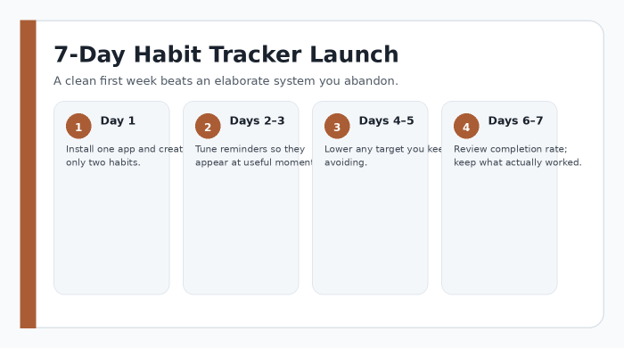
Run a Seven-Day Calibration Period
Treat week one as setup, not judgment. At the end of each day, ask whether the reminder appeared at a useful time, whether the target was realistic, and whether checking in was effortless. Do not add more habits just because the first two days went well.
At the end of seven days, keep a habit unchanged if it worked at least five times without stress. If it failed repeatedly, change the cue, lower the target, or reduce frequency before blaming motivation.
Review Weekly, Not Obsessively
A tracker becomes useful when the record changes your next decision. Once per week, look for patterns: which days work, which times fail, whether weekends behave differently, and whether the habit is becoming easier. A missed day is data about the system.
The Best habit tracker apps for beginners make this review easier by showing streaks, calendars, heat maps, or trend charts. Use those visuals to choose one adjustment for the coming week. Constantly redesigning five things at once destroys your ability to learn what caused improvement.
5 Common Habit-Tracking Mistakes to Avoid
- Tracking Too Many Habits at Once
Ten new habits create ten reminders, ten opportunities to fail, and ten data streams to interpret. Start with one to three. Add another only after the current set feels ordinary.
- Choosing Streak Length Over Real Results
A long streak can become meaningless if the minimum action is disconnected from the goal. Track the behavior that matters, and occasionally review whether it is producing the result you wanted.
- Using Unrealistic Daily Frequencies
Not every useful behavior belongs every day. Build schedules around recovery, work shifts, classes, family obligations, and the actual frequency required for the outcome.
- Letting Notifications Replace Cues
A notification is only one kind of cue. If you cannot act when it arrives, connect the habit to a stable event or change the environment so the next action is visible.
- Treating a Miss as Failure
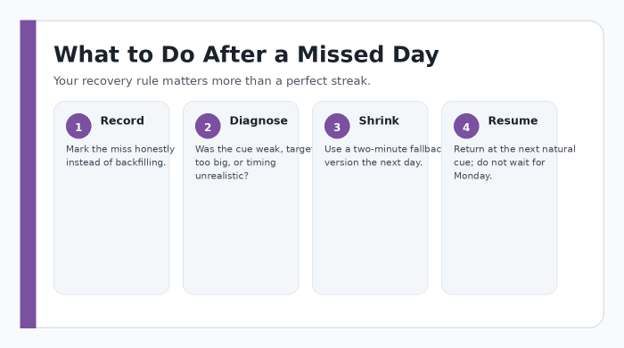
One missed day should trigger diagnosis, not abandonment. Record it, identify the obstacle, use the smallest fallback on the next opportunity, and continue. Perfection is a fragile strategy.
Advanced Tips and Next-Level Habit Hacks
Use Habit Stacking
Pair the new behavior with a reliable routine: after coffee, review your top task; after lunch, walk; after plugging in your phone, read. The existing behavior becomes the cue.
Track Leading Indicators
If the outcome is distant, track the action that drives it. For example, track planned workouts rather than body weight, or focused study sessions rather than exam results.
Separate Build Habits From Break Habits
Positive habits are easier to check as completed. Behaviors you want to reduce often need event counts or yes/no logging. Use the measurement style that matches the behavior.
Automate Only Trustworthy Data
Steps, workouts, sleep, or focus sessions may be imported automatically in compatible apps. Automation is useful when the source is accurate; bad automatic data creates false confidence.
Create a Recovery Rule Before You Need It
Write one sentence: “If I miss, I will do the two-minute version at the next cue.” A preset recovery rule prevents an emotional decision after a bad day.
Pro-Tip: Measure consistency over four weeks, not one emotional day. A system that survives travel, deadlines, weekends, and low-energy days is more valuable than a perfect seven-day streak.
Troubleshooting & Long-Term Maintenance Guide
Even the Best habit tracker apps for beginners cannot rescue a habit whose target, cue, or schedule does not fit your life. When tracking breaks down, troubleshoot the system in this order: timing, difficulty, reminder, check-in friction, then app choice. Switching apps should be the last move, not the first.
I keep ignoring reminders
Move the reminder to a moment when you can act immediately. If that still fails, replace time-based alerts with an event cue and add a home-screen widget.
My streak makes me anxious
Hide streaks if the app allows it, switch to a weekly target, or use a tracker that emphasizes totals and trends rather than consecutive days.
I forget to log even when I do the habit
Move logging closer to the action: widget, watch, lock screen, or immediate check-in. Avoid reconstructing an entire week from memory.
The app feels like work
Delete unused habits, categories, tags, and notes. A beginner dashboard should fit on one screen. If it still feels heavy, move to a simpler app.
I stop after missing two or three days
Reduce the target until restarting feels almost trivial. The goal is not to repay missed work. It is to restore the cue-action loop.
My data looks good but my life is not improving
Revisit the purpose behind the metric. You may be tracking easy activity instead of meaningful progress. Change the habit definition, not the chart theme.
After a missed day, diagnose the obstacle, shrink the next action, and resume at the next natural cue.
💡 Quick Hack: Create a “minimum viable day.” Pick the smallest version of each essential habit that you can complete during travel, illness, deadlines, or family disruption. This preserves the routine without pretending every day has equal capacity.
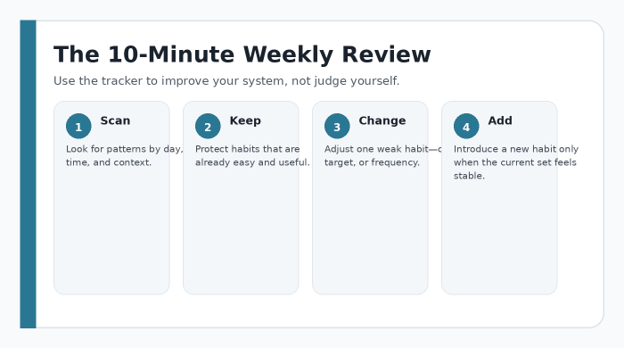
The 10-Minute Weekly Maintenance Routine
Open the progress view and scan the last seven days.
Circle one habit that is working with almost no effort. Do not change it.
Choose one weak habit and identify the most likely friction: cue, size, timing, or environment.
Change one variable only for the next week.
Archive any habit you no longer care about instead of letting it become permanent guilt.
Add a new habit only if the current dashboard still feels simple.
A weekly review converts tracking data into one practical adjustment for the next seven days.
What Habit Science Suggests About Tracking
Habit formation is not a fixed 21-day or 30-day countdown. Repetition in a stable context helps behavior become more automatic, but the pace varies by behavior and person. That is why a tracker should make repetition easier and reveal context—not pressure you into an arbitrary deadline.
For background, see research on habit formation and automaticity via PubMed Central. For exercise-related habits, the CDC physical activity guidance provides a useful evidence-based reference for activity recommendations.
A practical implication is to reward repetition, not intensity. A five-minute version performed at the correct cue can strengthen the routine more reliably than an occasional heroic session that is impossible to repeat on an ordinary Tuesday.
Frequently Asked Questions
What is the easiest habit tracker app for a complete beginner?
For pure simplicity, Loop on Android and Everyday across multiple platforms are easy starting points. If you prefer gentle motivation, Finch is approachable. The right choice among the Best habit tracker apps for beginners is the one you can check in without thinking about the software.
Should beginners use a free or paid habit tracker?
Start free whenever a free tier covers the habit, reminders, and history you need. Pay only when a specific limitation blocks a proven routine—such as more habits, advanced statistics, cross-device syncing, or additional reminder controls.
How many habits should I track at once?
One to three is a strong starting range. When those behaviors feel stable for several weeks and the tracker itself requires almost no effort, add one more. Adding five habits because you had one productive day usually creates a short-lived burst rather than a durable routine.
Are streaks actually useful for building habits?
Streaks can create visible momentum, but they are a tool rather than the goal. Weekly completion rate, total repetitions, and whether the behavior is getting easier can be more useful than a perfect chain. Use streaks if they motivate you; downplay them if they create anxiety.
How long does it take to build a habit?
There is no universal number of days that guarantees automatic behavior. Repetition in a stable context matters more than chasing a fixed countdown. Use the tracker to reduce friction, reinforce cues, and observe whether the action begins to require less deliberate effort over time.
Can I use a to-do list instead of a habit tracker?
Yes, especially for simple recurring actions. A dedicated habit tracker becomes more useful when you want streaks, completion rates, trend charts, flexible frequencies, or a separate view that distinguishes routines from one-time tasks.
Final Verdict: Start Smaller Than You Think
The Best habit tracker apps for beginners do not succeed because they make you more disciplined overnight. They succeed when they make a useful behavior easier to remember, easier to record, and easier to restart after real life interrupts the plan. Minimalists should begin with Loop or Everyday; people who want encouragement can try Finch or Habitica; users who want habits beside tasks can test TickTick or HabitNow; data-oriented users can grow into Habitify or Strides.
Pick one app, create two habits, run the system for seven days, and change only what the data tells you to change. That approach is less exciting than downloading six trackers, but it is far more likely to produce a routine you are still using three months from now.
editor's pick
latest video
news via inbox
Nulla turp dis cursus. Integer liberos euismod pretium faucibua


