
What Is Cloud Computing? Explained Simply for Beginners 2026
Buying servers, installing software on every machine, and guessing how much storage you will need can turn a simple technology project into an expensive maintenance job. For anyone searching for “what is cloud computing explained,” the useful answer is not a pile of jargon: it is a clear explanation of how rented, internet-accessible computing resources replace some or all of the hardware and software you would otherwise run yourself.
This guide shows how cloud computing works, how SaaS, PaaS, and IaaS differ, what public and private clouds actually mean, how costs behave, and how to test a cloud service without risking important data. You will also get a migration plan, security checklist, troubleshooting guide, and long-term maintenance routine.
What Is Cloud Computing?
| DIRECT ANSWER: For readers asking what cloud computing is, explained in plain English: cloud computing delivers software, storage, databases, processing power, and other IT resources over a network instead of requiring you to own every server. You select resources when needed, scale them up or down, and pay by subscription or measured use. |
The formal NIST definition of cloud computing describes on-demand access to a shared pool of configurable resources. NIST organizes the model around five essential characteristics, three service models, and four deployment models. That framework remains a practical way to separate a true cloud service from ordinary remote hosting.
The Five Characteristics That Make a Service “Cloud”
On-demand self-service: A user or administrator can create storage, computing capacity, or an application account without waiting for the provider to install physical equipment manually.
Broad network access: The service is reachable through standard network methods from supported phones, laptops, desktops, browsers, apps,s or automated systems.
Resource pooling: A provider shares large pools of equipment among customers while keeping accounts and workloads logically separated.
Rapid elasticity: Capacity can expand or contract quickly. To the customer, resources may appear almost unlimited, even though the provider manages a finite physical estate.
Measured service: Usage is monitored. Billing may be based on time, users, requests, storage, data trans,fer or another measurable unit.
| 💡 Quick Hack: When evaluating a product marketed as “cloud,” ask how quickly you can add or remove capacity, how usage is measured, and how data can be exported. Vague answers often expose a basic hosted product wearing a cloud label. |
How Cloud Computing Works Behind the Screen
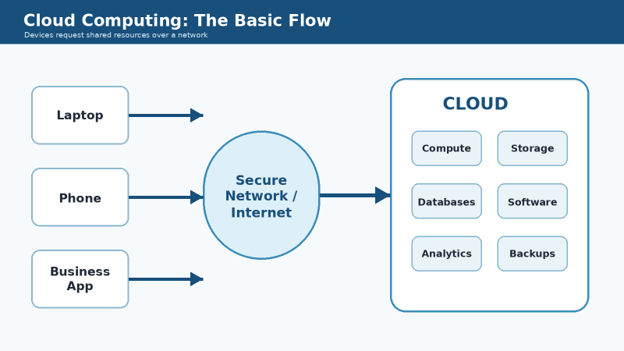
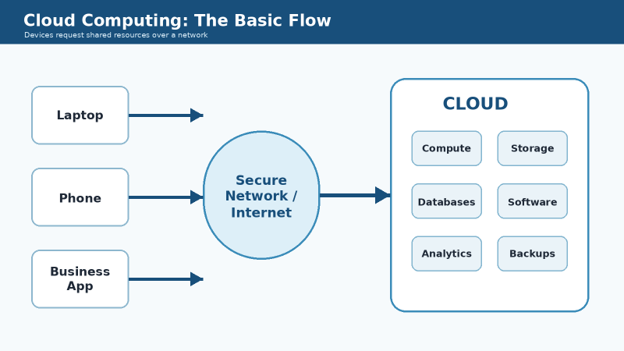
A practical what is cloud computing explained guide should connect the user’s click to the physical systems doing the work. When you open a cloud application or request a server, software routes the request to provider infrastructure inside one or more data centers. Virtualization, containers,ners and orchestration divide physical equipment into controlled, reusable resources.
The provider handles the data-center building, power, cooling, physical security, hardware replacement and much of the network. Software layers then create virtual machines, managed databases, storage buckets, application services or finished business tools. Customers receive an account, permissions, configuration choices and a bill rather than a rack of equipment.
Cloud does not mean data floats in the air. Files and applications still run on physical computers. The difference is ownership, location, automation and operating responsibility. A provider can spread workloads across many systems, replace failed hardware behind the scenes and offer capacity to customers through a dashboard or application programming interface.
SaaS, PaaS and IaaS Compared
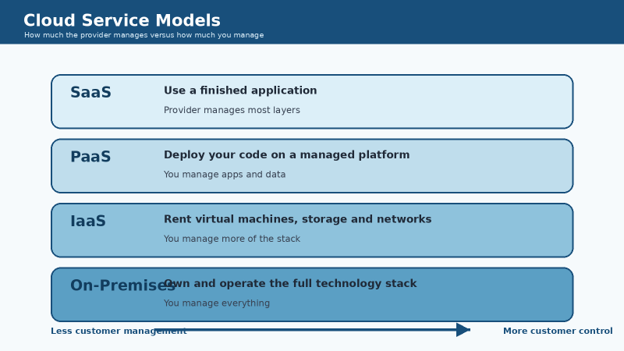
The fastest way to make what is cloud computing explained useful is to identify what you are actually buying. The three classic service models describe how far the provider’s management extends up the technology stack.
Software as a Service (SaaS)
SaaS is a finished application delivered through a browser, mobile app or desktop client. The provider operates the underlying platform, servers and application updates. The customer mainly manages users, permissions, settings, content and acceptable use.
Best for: email, collaboration, accounting, CRM, file sharing, customer support and productivity tools.
Main advantage: fast deployment with little infrastructure work.
Main risk: limited customization, data-portability concerns and dependence on the vendor’s roadmap.
For practical SaaS examples, see MyFlexBots’ guide to cloud-based AI productivity tools.
Platform as a Service (PaaS)
PaaS gives developers a managed environment for building and deploying applications. The provider may manage operating systems, runtime components, scaling, patching and platform tools. The customer manages application code, data, user experience and business logic.
Best for: web apps, APIs, internal tools and development teams that want to avoid server maintenance.
Main advantage: faster development and simpler scaling.
Main risk: platform-specific services can make moving the application difficult later.
Infrastructure as a Service (IaaS)
IaaS rents foundational resources such as virtual machines, virtual networks, and storage. The provider manages physical infrastructure and the virtualization layer. The customer usually manages operating systems, patches, applications, data, identity configuration and much of network security.
Best for: custom systems, legacy applications, test environments and workloads that need operating-system control.
Main advantage: flexibility without buying physical servers.
Main risk: misconfiguration, unmanaged patches and surprise usage charges if governance is weak.
| Model | You Receive | You Usually Manage | Typical Buyer | Complexity |
| SaaS | Finished application | Users, settings and data | Business team | Low |
| PaaS | Managed application platform | Code, data and app configuration | Development team | Medium |
| IaaS | Virtual infrastructure | OS, apps, data and many controls | IT/engineering | High |
| Pro-Tip: Choose the highest-level managed service that still meets your technical, legal and integration needs. Every layer you manage yourself creates patching, monitoring, backup and staffing work. |
Public, Private, Hybrid and Community Clouds
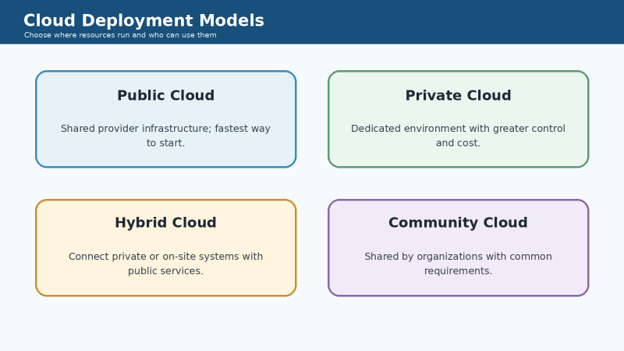
Service models explain what is managed; deployment models explain where the environment sits and who can use it. A complete what is cloud computing explained overview needs both because “private cloud” and “SaaS” describe different dimensions.
Public Cloud
A public cloud is operated for multiple customers by a provider. Customers share the provider’s large infrastructure pool while accounts and workloads are separated through technical controls. Public cloud is usually the fastest route to global capacity, managed services and pay-as-you-go resources.
Private Cloud
A private cloud is dedicated to one organization. It may run in the organization’s facility or be hosted by a specialist provider. It can offer stronger control over architecture and placement, but the organization pays for more capacity, expertise, and maintenance.
Hybrid Cloud
Hybrid cloud connects two or more distinct environments, commonly an on-premises or private system and public cloud services. It is useful when some data or legacy applications must remain in place while newer applications use flexible public services. Integration, identity, ty and monitoring become critical because one business process may cross several environments.
Community Cloud
A community cloud is shared by organizations with common requirements, such as a sector, mission, ion or regulatory framework. It is less common in everyday small-business discussions but remains part of the NIST deployment model.
Essential Tools and Planning Materials
You do not need an enterprise consulting budget to test a cloud service safely. You do need a written inventory, a way to control access, a cost limit, and an exit path. The table below treats “materials” as the practical items required for a cloud pilot.
| Tool or Material | Purpose | Estimated Cost | Skill Level | Minimum Standard |
| Workload inventory | List apps, owners, data, users, and dependencies | $0 | Beginner | One accountable owner per item |
| Cloud account or trial | Create a controlled proof of concept | $0 plus usage | Beginner | No production data in an unreviewed trial |
| Cost calculator and budget alert | Estimate and cap spending | $0 | Beginner | Alert before the monthly limit |
| Identity system with MFA | Protect administrator and user access | Existing or plan-based | Beginner | MFA on every privileged account |
| Backup or export destination | Recover data and prove portability | Varies | Beginner | Documented restore test |
| Logging and monitoring | Detect failures, access changes and cost spikes | Free tier to paid | Intermediate | Retain the logs you actually need |
| Migration checklist | Track decisions, testing and rollback | $0 | Beginner | Named owner and deadline for each task |
Cost note: Cloud pricing varies by provider, region, service, data transfer, and consumption. Treat the figures above as planning categories, not vendor quotes.
Benefits and Trade-Offs You Should Evaluate
Marketing pages often present what is cloud computing explained as a list of benefits without the operating trade-offs. Cloud can reduce hardware purchasing and speed up experiments, but it does not remove responsibility or guarantee lower cost.
Where Cloud Computing Helps
Faster provisioning: Create a test environment or user account in minutes instead of waiting for hardware delivery.
Elastic capacity: Increase resources for a campaign, launch or seasonal peak, then reduce them afterward.
Remote access: Approved users can work from supported locations and devices.
Managed services: Use databases, analytics, backups and security features without building every component from scratch.
Resilience options: Design across zones, regions or backup locations instead of depending on one server room.
Experimentation: Test an idea with small resources before making a long-term purchase.
Where Cloud Computing Creates New Risk
Internet dependence: A connection failure can interrupt access unless offline or local fallbacks exist.
Variable cost: Automatic scaling, storage growth, logs and data transfer can increase bills quietly.
Vendor lock-in: Proprietary databases, workflows and identity features may be expensive to replace.
Shared responsibility: The provider protects parts of the service, but customers still control identities, data and configuration.
Data-location and compliance questions: Organizations may need to know where information is stored, processed and backed up.
Service changes: Pricing, limits, interfaces and product availability can change over time.
Step-by-Step Cloud Adoption Guide
Define the Problem Before Choosing a Provider
Start with the business problem, not the provider logo. When what is cloud computing explained becomes a buying question, document the users, data, performance needs, downtime tolerance, legal constraints, integrations,n,s and current cost.
Name the workload. Examples include file sharing, customer support, website hosting, data backup, or a custom application.
Identify the owner. One person must approve access, cost and risk decisions.
Classify the data. Separate public, internal, confidential and highly sensitive information.
Map dependencies. Record login systems, databases, APIs, email, payment tools and local equipment.
Define success. Use measurable targets such as setup time, recovery time, monthly cost or response speed.
| 💡 Quick Hack: Begin with a workload that is useful but reversible. A shared project folder or non-critical internal tool teaches access, billing,g and support without putting the entire business at risk. |
Choose the Right Service Model
Use what is cloud computing explained as a responsibility test. If a finished SaaS product solves the need, do not rent IaaS servers and rebuild the same application unless control, integration, or regulation clearly requires it.
Choose SaaS when the process is comm,o,n and configuration is enough.
Choose PaaS when you need custom software but do not want to manage operating systems.
Choose IaaS when the workload requires deep control or cannot run on a higher-level service.
Keep on-premises when latency, equipment, legal restrictions,n,s or offline operation make local control essential.
Shortlist Providers Using Non-Marketing Criteria
Confirm the service is available in a suitable region and supports your data requirements.
Read export, deletion, retention and account-closure rules.
Check identity integration, MFA, role-based access and administrator recovery.
Review service limits, support channels, status history and planned maintenance practices.
Calculate normal usage, peak usage, backups, logs and data transfer—not only headline storage or server price.
Document what happens if the provider changes the product or you decide to leave.
Estimate the Full Cost
A reliable what is cloud computing explained budget includes more than the advertised monthly price. Add user licenses, compute time, storage classes, database capacity, backups, snapshots, monitoring, support, outbound data transfer, migration labor and ongoing administration.
Baseline cost: What the service costs during a normal month.
Peak cost: What happens during a promotion, busy season or traffic spike.
Failure cost: Extra resources, support or data recovery during an incident.
Exit cost: Export fees, transfer time, engineering work and overlapping subscriptions during migration.
| Pro-Tip: Create budget alerts at 50%, 75% and 90% of the approved monthly amount. Alerts are most useful when they reach both the technical owner and the person responsible for spending. |
Build a Controlled Proof of Concept
Create a separate test account, project,ct or subscription rather than experimenting inside production.
Enable MFA before adding other users.
Use sample or sanitized data until security, deletion,tio,n and backup controls are verified.
Apply the smallest permissions required for each role.
Set a budget limit or alert before enabling automatic scaling.
Test normal use, peak use, a failed login, a deleted file, an administrator lockout, ut and a restore.
Record the settings so the environment can be rebuilt consistently.
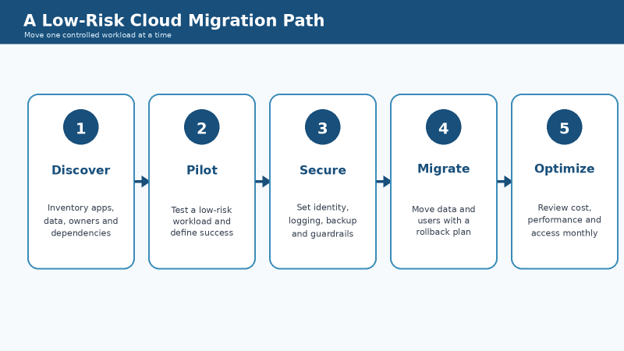
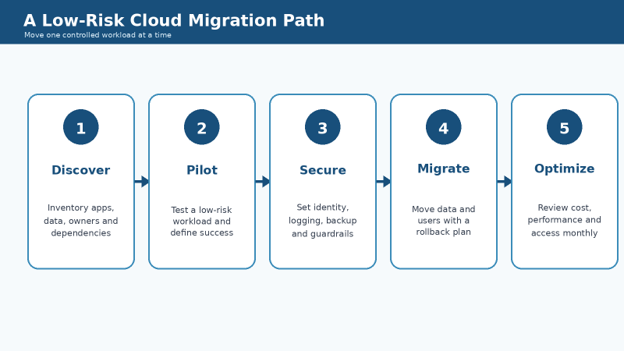
Plan Migration and Rollback
A migration plan should specify what moves, in what order, who validates it, how long old and new systems overlap, and exactly how to roll back. Do not use “move everything over the weekend” as a plan.
Prepare: clean duplicate data, fix ownership, and remove inactive accounts.
Pilot: move a small user group or copy of the workload.
Validate: compare records, permissions, performance, and integrations.
Cut over: switch users through a controlled change window.
Stabilize: monitor errors, cost, support requests, and data sync.
Retire: remove the old system only after retention and rollback periods end.
Cloud Security and the Shared Responsibility Model
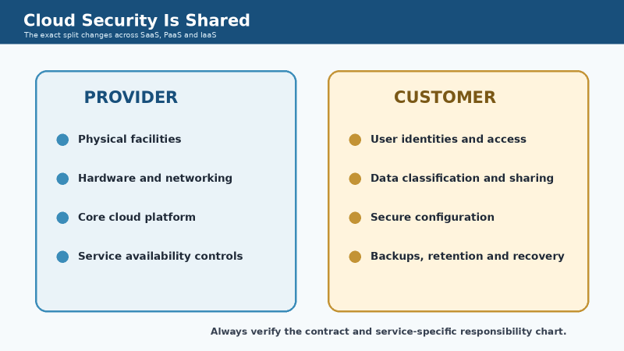
Security is where what is cloud computing explained must become specific. The provider may secure buildings, hardware, and core platform layers, while the customer remains responsible for user access, data sharing, configuration,n and many application controls. The split changes by service model.
Microsoft’s cloud shared responsibility model illustrates how customer duties generally decrease as services move from on-premises toward SaaS, but responsibility never disappears. Contracts and service-specific documentation decide the exact boundary.
Minimum Security Checklist
Require MFA for administrators and all supported users.
Use named accounts; do not share one administrator login.
Grant the least privilege needed and review access on a schedule.
Encrypt data in transit and use provider-supported encryption at rest.
Enable logs for sign-ins, administrator actions, and important data events.
Back up critical information outside the failure path you are protecting against.
Test restoration instead of assuming a green backup icon means recovery works.
Document data retention, legal holds, deletion and account-closure steps.
Review integrations and third-party applications that can access the account.
Keep an offline record of support, billing and emergency recovery contacts.
For a broader government reference, review CISA cloud security guidance on migration, data protection and cloud security architecture.
| 💡 Quick Hack: Create two administrator accounts: one for daily administration with limited privileges and one emergency account stored securely and tested periodically. Do not use the emergency account for ordinary work. |
Cloud Storage Is Not Automatically a Backup
Synchronization keeps files available across devices, but it can also copy accidental deletions, ransomware-encrypted files, or bad edits. A backup is a recoverable, versioned copy protected from the same failure. Check version history, retention, restore scope,e and whether deleted files can be recovered after an account is closed.
Readers managing a small Windows drive can also use cloud placeholders in the MyFlexBots guide to free up disk space with cloud files—but should verify sync and backup status before removing local copies.
Common Cloud Computing Mistakes to Avoid
Most failures are not caused by the abstract idea of cloud. They come from weak ownership, unclear permissions, uncontrolled cost, st or incomplete migration testing. Use this what is cloud computing explained checklist to avoid five beginner errors.
- Moving before mapping dependencies
An application may rely on a local database, printer, license server, identity system or scheduled file exchange. Inventory connections and test them before cutover.
- Giving everyone administrator access
Broad privileges make setup feel easier, but they increase accidental deletion, exposure and audit problems. Create roles around actual tasks.
- Treating the first-month bill as the permanent bill
Storage, logs, backups, users and data transfer grow. Review unit economics and set alerts before growth becomes invisible.
- Assuming the provider backs up everything
Some services protect infrastructure availability but leave file retention, database backups or application recovery to the customer. Read the exact service terms.
- Skipping the exit plan
A service is not fully evaluated until you know how to export data, preserve metadata, replace integrations, and close the account without losing records.
Advanced Tips and Next-Level Cloud Hacks
Use Infrastructure as Code for Repeatable Environments
Advanced teams describe infrastructure in version-controlled files instead of clicking through dashboards manually. Repeatable definitions reduce configuration drift, speed disaster recovery, and make changes reviewable. Start with a small test environment; poorly governed automation can create mistakes just as quickly as it creates resources.
Design for Failure, Not Perfect Uptime
Assume an account, zone, region, integration,n or internet connection can fail. Decide which workloads require redundancy, which can tolerate a delay, ay and which need an offline process. Resilience is a business decision because every additional copy and failover path adds cost and complexity.
Separate Accounts, Projects or Subscriptions by Purpose
Keep production, testing and experiments separate. Use clear names, owners, budgets and permissions. This limits the damage from a bad test and makes billing easier to explain.
Tag Every Billable Resource
Use tags or labels for owner, project, environment, cost center, and expiration date. A resource without an owner is likely to remain active after its purpose ends.
| 💡 Quick Hack: Add an “expires_on” tag to temporary resources and review expired items weekly. This simple rule catches forgotten test servers, snapshots, and storage before they become permanent charges. |
Prefer Open Data Formats at System Boundaries
Proprietary managed services can be valuable, but exports should use documented formats whenever possible. Keep schemas, transformation logic, and restore instructions. Portability is not the same as avoiding every vendor feature; it means understanding the cost of replacing each dependency.
Connect Cloud Strategy to AI Workloads Carefully
Many AI services depend on cloud storage, managed compute, APIs and identity controls. That convenience increases the importance of data classification, retention settings and cost limits. For a related beginner guide, read how generative AI uses cloud infrastructure and why model access does not remove data-governance duties.
Troubleshooting and Maintenance Guide
Troubleshooting becomes easier when what is cloud computing explained is translated into observable layers: identity, network, service configuration, application, data, and billing. Check the layer connected to the symptom instead of changing random settings.
Users Cannot Sign In.
Check provider status, internet access, account status, MFA time or device issues, identity synchronization, role assignment,nt and conditional-access rules. Test with one known-good account before resetting everyone.
The Application Is Slow
Measure from more than one location and device. Check network latency, service region, database performance, resource limits, application logs and recent changes. Adding capacity does not fix an inefficient query or a broken integration.
The Monthly Bill Suddenly Increased
Compare cost by service, project, tag and day. Look for automatic scaling, forgotten test resources, growing logs, snapshots, premium support, data transfer and newly added users. Stop the cause before deleting evidence needed for analysis.
A File or Record Was Deleted
Pause sync or automated jobs if they may spread the deletion. Check recycle bins, version history, snapshots, logs, and backups. Restore to a separate location first so the recovery does not overwrite newer valid data.
An Integration Stopped Working
Check expired credentials, API limits, changed network rules, certificate dates, field or schema changes, and provider status. Rotate credentials carefully and update the documented owner.
The Provider Has an Outage
Follow the status page and your incident plan. Use approved fallback processes, communicate realistic impact, and preserve logs. Avoid making unrelated configuration changes during an active provider incident unless the runbook requires them.
You Are Locked Out of the Administrator Account
Use the tested emergency recovery path, provider support process and offline contact details. After recovery, investigate why normal administrator access failed and update the runbook.
A Practical Maintenance Schedule
Weekly: review critical alerts, failed backups, unusual sign-ins, service incidents and rapidly growing costs.
Monthly: remove unused resources, review access, compare budget to actual use and test one recovery path.
Quarterly: review provider changes, integrations, retention rules, emergency contacts and business continuity.
Annually: reassess architecture, contracts, data locations, exit options and whether the service still fits the workload.
Frequently Asked Questions
Is cloud computing the same as the internet?
No. The internet is the network used to connect systems. Cloud computing is a way of delivering configurable computing resources over a network. A cloud service commonly uses the public internet, but it may also use private network connections.
What are everyday examples of cloud computing?
Webmail, online file storage, video meetings, streaming services, CRM software, online accounting, website hosting, managed databases and AI tools are common examples. The user accesses a service while the provider operates much of the underlying infrastructure.
Is the cloud cheaper than owning servers?
It can be cheaper for variable workloads, fast experiments and teams that would otherwise buy and maintain underused equipment. It can also be more expensive when resources run continuously, data transfer is high, or governance is weak. Compare total cost, not just the initial monthly price.
Is cloud computing secure?
Cloud services can provide strong physical security, identity tools, logging and encryption features, but security depends on configuration and shared responsibility. Weak passwords, excessive permissions, exposed data and untested recovery can make a well-built platform unsafe.
Can cloud computing work without the internet?
Most cloud services need network access for full use. Some applications cache files or support limited offline work, then synchronize later. Critical operations should document what staff can do during an internet or provider outage.
What is the best cloud model for a small business?
Most small businesses should start with reputable SaaS for common needs such as email, collaboration, accounting,g and customer management. Use PaaS or IaaS only when a custom application or technical requirement justifies the added management work.
Conclusion: Use the Cloud Deliberately
The best answer to what is cloud computing explained is practical: cloud computing lets you consume software and infrastructure as managed, network-accessible services instead of owning every layer yourself. Its real value comes from speed, elasticity and managed capabilities; its real risks come from unclear responsibility, uncontrolled access, variable cost and weak recovery planning.
Start with one reversible workload. Define success, choose the highest suitable service model, secure identity first, set cost alerts, test backups and keep an exit path. That approach turns cloud adoption from a fashionable purchase into a controlled operating decision.
editor's pick
latest video
news via inbox
Nulla turp dis cursus. Integer liberos euismod pretium faucibua


