
AI Tools for Small Business No Budget: 15 Free Tools to Grow Faster
Running a small business with no software budget usually creates the same problem: the owner becomes the copywriter, designer, sales assistant, researcher, support desk and operations manager at the same time. The goal of AI tools for small businesses no budget is not to collect more apps—it is to remove repetitive work without adding another monthly bill.
This guide shows you which free or limited-free AI tools are genuinely useful in 2026, what each one is best at, where the limits matter, and how to build a practical stack that can support marketing, sales, content, customer follow-up and day-to-day operations. Free plans change often, so the specific allowances below should be checked before you build a mission-critical workflow around them.
Featured Snippet: What are the best free AI tools for a small business?
Answer: The best free AI tools for a small business combine a general AI assistant, research tool, design platform, CRM, social scheduler and light automation. Start with ChatGPT or Gemini, Perplexity, Canva, HubSpot, Buffer and Zapier, then add specialized tools only when they replace a specific recurring task.
The zero-budget rule: solve bottlenecks, not curiosity
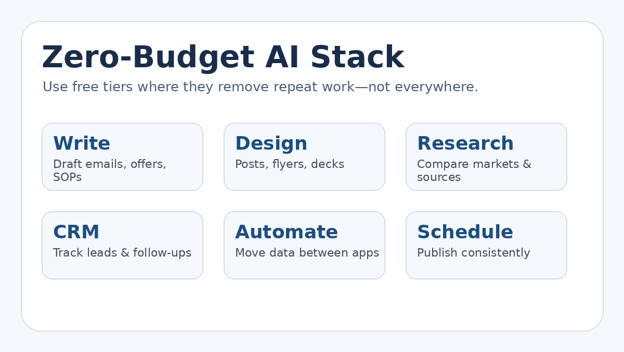
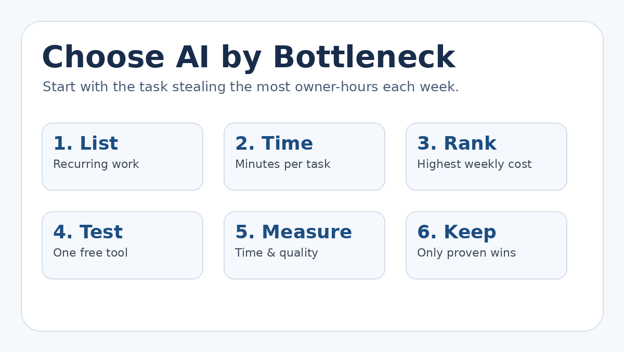
A free plan is valuable only if it saves owner-hours, prevents missed follow-ups or improves output quality. Before creating another account, list the tasks you repeat every week and estimate how many minutes each one consumes.
Writing quotes, emails, product descriptions or proposals
Researching competitors, suppliers, customer questions or keywords
Designing social posts, flyers, basic presentations or product graphics
Tracking leads and remembering who needs a follow-up
Scheduling social media
Copying data between forms, spreadsheets and other apps
💡 Quick Hack: Put a dollar value on your own time. If a 20-minute task happens 10 times a week, automating even half of it can be more valuable than chasing a tool with hundreds of features you rarely use. This is the mindset that makes AI tools for small business no budget practical instead of distracting.
Essential tools and materials breakdown
| Tool | Best job | Free access | Setup | Skill | Watch-out |
| ChatGPT | Drafting, planning, analysis | Free plan | 5–10 min | Beginner | Usage limits |
| Gemini | Ideas, summaries, Google-centered work | Free access | 5 min | Beginner | Feature limits vary |
| Claude | Long-form writing and document thinking | Free plan | 5 min | Beginner | Limited usage |
| Perplexity | Source-backed research | Free Standard | 5 min | Beginner | Pro search limits |
| Canva | Design + AI writing | Free plan | 15 min | Beginner | AI use limits |
| Adobe Express | Social graphics and quick editing | Free plan | 15 min | Beginner | Premium assets locked |
| HubSpot CRM | Leads, pipeline, AI-assisted CRM | Free tools | 30–60 min | Intermediate | Free user/contact limits |
| Buffer | Social scheduling + AI assistance | Free plan | 20 min | Beginner | 3-channel cap |
| Zapier | Simple workflow automation | Free plan | 30–60 min | Intermediate | 100 tasks/month |
| Notion | SOPs, notes, light AI trials | Free + limited AI trial | 15 min | Beginner | AI responses limited |
| Grammarly | Polish emails and copy | Free plan | 5 min | Beginner | AI prompt cap |
| Microsoft Copilot | General web-grounded assistant | Free/eligible access | 5 min | Beginner | Business features vary |
| NotebookLM | Grounded analysis of your own sources | Free personal access | 10 min | Beginner | Account/source limits |
| Photoroom | Product-photo cleanup | Free utilities | 10 min | Beginner | Daily/export limits |
| Otter | Meeting transcription and notes | Free Basic | 15 min | Beginner | Minute/feature caps |
2026 verification note: official pages checked for ChatGPT, Claude, Perplexity, Canva, Adobe Express, HubSpot, Buffer, Zapier, Notion and Grammarly confirm free or complimentary access. Limits can change, and some platforms vary by account, region or feature. Treat free-plan numbers as operational limits to re-check, not permanent promises.
SBuild your core AI assistant layer
For most businesses, one general assistant should do 60–80% of the text-heavy work. The mistake is opening the tool with a vague request such as “write a marketing post” and then blaming the AI for bland output.
1) ChatGPT — best all-round starting point
Best for: brainstorming offers, drafting customer emails, turning rough notes into SOPs, summarizing documents, building checklists and analyzing simple data.
OpenAI’s current pricing page lists a $0 Free plan with core ChatGPT access and limited access to several tools. That makes it a strong first choice when AI tools for small business no budget need to cover many jobs without separate subscriptions.
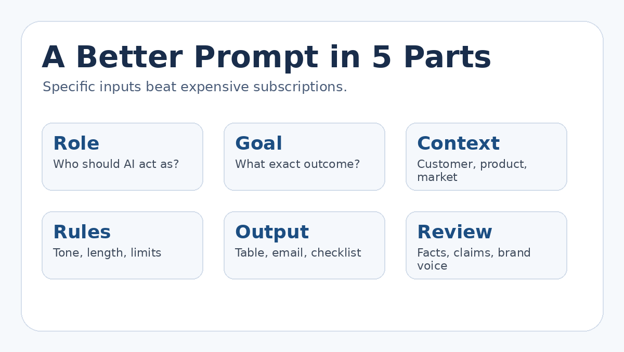
Use this starter prompt:
“Act as an operations assistant for a small [industry] business. My customer is [customer]. The goal is [outcome]. Use a [tone] tone. Ask me for missing facts before drafting. Return the answer as [email/checklist/table]. Do not invent prices, guarantees or customer claims.”
2) Google Gemini — useful when your work already lives in Google
Gemini is strong for idea development, summaries, planning and general question answering. Google documents free access to Gemini Apps for personal accounts, with paid Google AI plans offering higher limits and priority access.
Use Gemini for first-pass research questions, campaign angles, spreadsheet formula explanations or alternate versions of an email. Keep confidential customer information out of prompts unless your business has reviewed the account and data settings.
3) Claude — strong for long documents and careful rewriting
Anthropic lists a $0 Free plan with limited usage. Claude is especially useful when you want to turn a messy policy, brief, transcript or long draft into a cleaner structure without losing the thread.
A practical use: paste a non-sensitive proposal draft and ask for a table containing the customer problem, proposed solution, proof, assumptions, missing information and next action.
💡 Quick Hack: Do not use three chatbots for the same job. Pick one as your default assistant and keep a second only for cross-checking important work or when you hit a free limit.
Add a research tool that shows its sources
4) Perplexity — best for quick source-backed market research
Perplexity’s Standard plan is free and supports basic searches with limited Pro Searches. For a small business, its real advantage is speed: you can ask a market question and inspect the sources instead of treating generated prose as fact.
Good research tasks include comparing local competitor offers, collecting customer objections from public sources, finding regulations that apply to your product category, or building a reading list before you write a blog post.
Pro-Tip: Ask Perplexity to separate “verified facts,” “claims from vendors,” and “unknowns.” That simple instruction reduces the chance that a marketing claim is repeated as if it were established fact. That verification habit is essential when AI tools for small business no budget are used for decisions, claims or customer-facing content.
5) NotebookLM — best for answering from your own business documents
NotebookLM is useful when the answer should come from your own source material rather than the open web. Load approved documents such as product manuals, public policies, training notes or meeting records, then ask grounded questions about those sources.
This can turn a folder of scattered reference material into a practical internal knowledge assistant. It is especially useful for onboarding, sales preparation and FAQ creation because you can keep the task tied to the supplied sources.
Create visuals without hiring a designer for every post
6) Canva Free — best all-purpose design tool
Canva’s free plan covers a broad set of design tasks, and Magic Write is available to free users with fair-use limits. Use it for social posts, quote cards, simple brochures, pitch slides, thumbnails and quick brand mockups.
Do not let templates control your brand. Pick one font pair, two or three brand colors and a consistent photo style. Save those choices in a simple one-page brand reference even if advanced brand-kit features are paid.
💡 Quick Hack: Build five reusable templates—announcement, testimonial, offer, educational tip and before/after. Duplicating those templates is faster and more consistent than starting from a blank design every day.
7) Adobe Express Free — strong alternative for social and quick edits
Adobe Express Free currently includes a large template library, standard photo/video/document editing, post scheduling to one account per social network and free Adobe Stock assets. That makes it useful when a tiny team wants creation and basic publishing in one place.
Use it for resizing one campaign into multiple social formats, basic promo videos, PDF touch-ups and branded social assets. Filter for free stock assets before investing time in a design.
8) Photoroom — best for cleaner product photos on a phone
Photoroom offers free utilities such as background removal, AI Expand, image enhancement, basic retouching and resizing with daily limits. For local sellers, restaurants, marketplace merchants and service businesses, cleaner photos can make a larger difference than another AI writing app.
Shoot near a window, keep the camera level, remove clutter, then use the background tool only to simplify the image—not to make the product look materially different from what the customer receives. For product sellers, AI tools for small business no budget can create real value simply by making existing photos cleaner and easier to reuse.
Turn marketing into a repeatable weekly system
9) Buffer Free — scheduling plus an AI assistant
Buffer’s Free plan currently supports up to three channels, 10 scheduled posts per channel and an AI Assistant. For a solo owner, that is often enough to batch one or two weeks of consistent publishing without living inside social apps.
Write the raw idea first. Use AI to create platform-specific variations, then manually add the details that make the post credible: your real offer, actual service area, real customer question and a clear next action.
10) Grammarly Free — polish business writing before it goes out
Grammarly’s Free plan currently includes writing correctness, tone feedback and a monthly allowance of AI prompts. It is most valuable as a final quality layer on proposals, outreach emails, website copy and customer support replies.
Use the generative feature sparingly. The highest-value habit is to draft with your real facts, then use Grammarly to catch mistakes and tighten wording rather than asking it to invent the substance.
Stop losing leads
11) HubSpot Free CRM — best zero-cost foundation for sales follow-up
HubSpot’s free CRM is not a short trial: the company says its free tools do not expire, and the current free tier includes core CRM functions plus AI-assisted features such as Breeze Assistant and an AI content writer. For AI tools for small business no budget, this is one of the most practical ways to prevent leads from disappearing into WhatsApp, email and spreadsheets.
Start with a four-stage pipeline: New Lead → Contacted → Quote/Proposal → Won/Lost. Every lead should have one owner, one next action and one next-action date.
💡 Quick Hack: Do not migrate every historic contact on day one. Import only active leads and recent customers first. Once the workflow is stable, clean and import the older database.
Automate one handoff at a time
12) Zapier Free — simple automation when manual copying is the problem
Zapier’s Free plan currently provides 100 tasks per month, unlimited workflow assets and two-step Zaps. That is not enough for a high-volume company, but it can be enough to eliminate one or two annoying handoffs.
Examples: send a website form lead into a spreadsheet, create a follow-up task when a lead arrives, or copy a simple status change to another supported app. Keep the automation short so you can understand exactly what happened when it fails.
Pro-Tip: Reserve free automation tasks for revenue or customer-service workflows. Do not spend a limited monthly allowance moving low-value data that nobody uses.
Build a lightweight knowledge and meeting layer
13) Notion — useful for SOPs, content calendars and limited AI trials
Notion can organize SOPs, meeting notes, content ideas, project checklists and simple databases. Notion says everyone can try its AI features for free through complimentary AI responses, after which continued AI access may require an upgrade.
Use the free AI allowance to test whether the feature genuinely improves your workflow. If not, keep Notion as a non-AI knowledge base and use your general chatbot for drafting.
Notion AI complimentary responses
14) Otter — meeting notes when you keep forgetting action items
Otter’s free Basic plan is designed for lighter transcription and meeting-note use. Because free minute and feature caps can change, check the current pricing page before relying on it for every client call.
The business value is not the transcript itself. After each meeting, capture only decisions, owner, deadline, promised deliverable and the next customer contact. That turns transcription into execution.
15) Microsoft Copilot — useful when your team already works in Microsoft
Microsoft provides Copilot experiences on the web and also offers Copilot Chat at no additional cost with eligible Microsoft 365 plans. If you already pay for Microsoft 365, check what your existing license includes before buying another AI product.
Use it for drafting, summaries, web-grounded questions and quick business explanations. Do not assume the free web experience includes the same business-data integration or controls as paid Microsoft 365 Copilot products.
Microsoft Copilot for business information
How to combine the tools into one zero-budget workflow
The strongest AI tools for small business no budget stack is deliberately small. A service business can run an effective starter system with six tools rather than 15.
| Stage | Free tool | Output |
| Research | Perplexity or NotebookLM | Collect facts, competitor patterns and customer questions. |
| Draft | ChatGPT, Gemini or Claude | Turn facts into an email, proposal, FAQ, script or post. |
| Polish | Grammarly | Fix clarity, tone and mistakes. |
| Design | Canva or Adobe Express | Create the visual asset. |
| Track | HubSpot | Record the lead, next step and outcome. |
| Schedule / automate | Buffer + Zapier | Publish or move information automatically where it is worth the task allowance. |
A practical 30-day implementation plan
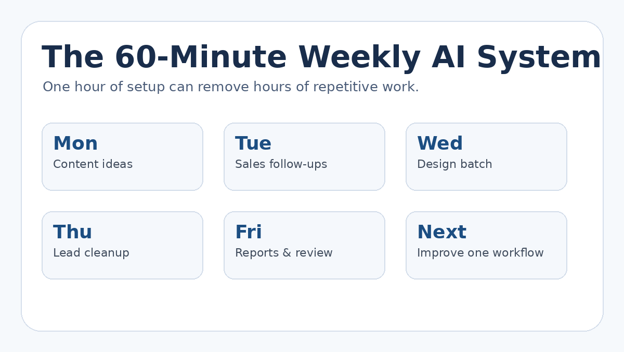
Days 1–3: Measure the work — Track repeated tasks for three working days. Do not automate anything yet. Record frequency, minutes and business impact.
Days 4–7: Choose one assistant — Pick ChatGPT, Gemini or Claude. Create three reusable prompts: customer reply, marketing draft and internal checklist.
Week 2: Fix lead follow-up — Set up HubSpot or another free CRM. Every incoming lead gets a status, next action and date.
Week 3: Batch content — Build five Canva/Adobe Express templates and schedule a week of posts with Buffer.
Week 4: Automate one handoff — Use Zapier only for a workflow you have already performed manually enough times to understand it.
💡 Quick Hack: Keep a one-page “AI savings log.” Each time a tool saves 15 minutes, record it. At the end of the month, keep only the tools that have measurable savings or revenue impact. Over time, this log shows which AI tools for small business no budget actually earn a permanent place in your workflow.
Common mistakes to avoid
- Installing every free tool — More accounts create more logins, duplicated data and inconsistent output. Keep one tool per job unless there is a clear backup purpose.
- Feeding sensitive customer data into random free services — Free does not mean appropriate for confidential information. Review privacy terms, access controls and your legal obligations before using customer, employee or financial data.
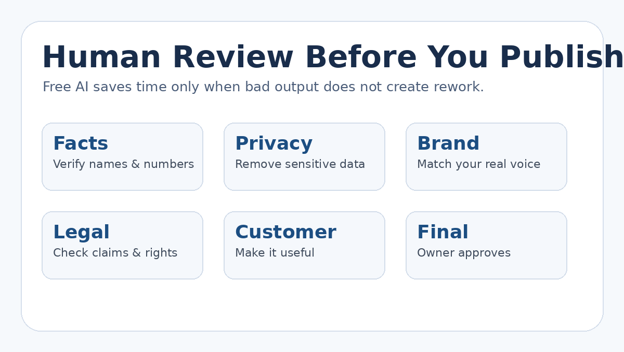
- Publishing AI copy without fact-checking — AI can produce plausible errors. Verify prices, dates, product specs, regulations, guarantees, statistics and source claims.
- Automating a broken process — If your lead process is unclear, automation makes the confusion happen faster. Define the manual process first, then automate the stable handoff.
- Measuring output instead of outcomes — Twenty AI-generated posts are not a win if they produce no qualified conversations. Track leads, reply time, booked calls, conversion, time saved and errors avoided.
Advanced tips and next-level hacks
Create prompt templates, not prompt history: Store your best prompts in a simple document with fill-in fields for customer, offer, audience, goal, proof and CTA. This creates repeatable quality.
Use AI as a critic after using it as a writer: After drafting, start a fresh prompt: “Find unsupported claims, vague promises, missing objections and confusing sentences.” The second pass is often more valuable than generating more copy.
Build a tiny evidence library: Keep approved facts—prices, specifications, testimonials, service areas, turnaround times, refund terms—in one document. Feed only the relevant portion to AI.
Separate creative work from factual work: Brainstorming can tolerate more variation. Pricing, contracts, compliance and customer commitments require stricter verification.
Set an upgrade trigger: Do not upgrade because a tool looks impressive. Upgrade only after a free-plan limit is costing more time or missed opportunity than the paid fee.
Pro-Tip: A paid tool can be cheaper than a free tool if the free plan creates manual cleanup. “No budget” should mean “no unnecessary subscription,” not “never pay for software even when ROI is obvious.” That ROI rule keeps AI tools for small business no budget aligned with business value rather than software hype.
Troubleshooting and maintenance guide
The AI output sounds generic — Add customer type, location, offer, proof, objections, tone and a concrete CTA. Give a strong example of your preferred writing.
The AI keeps inventing facts — Tell it to mark unknowns explicitly, provide source links for factual claims, and never infer a price/specification that you did not supply.
Free limits are reached too quickly — Batch similar work, shorten prompts, use one primary assistant, and move low-value tasks back to templates or spreadsheets.
Automations fail silently — Use a simple test record, verify the destination, add a manual weekly check and keep the workflow to one trigger plus one action while on a free plan.
The team is copying sensitive information into tools — Publish a simple AI-use policy: what data is allowed, what is prohibited, which accounts are approved and who reviews external-facing output.
The tool stack is becoming messy — Quarterly, remove unused apps, revoke stale integrations, export important data and document the owner of each workflow.
For risk management, the U.S. Small Business Administration recommends starting small and testing whether AI adds value, while NIST provides a voluntary framework for managing AI risks. Those two ideas fit small businesses well: experiment cheaply, but govern important uses deliberately.
SBA: AI for small business | NIST AI Risk Management Framework
Frequently Asked Questions
What are the best AI tools for small business no budget?
Start with one general assistant such as ChatGPT, Gemini or Claude; Perplexity for research; Canva for design; HubSpot for lead tracking; Buffer for scheduling; and Zapier for one or two simple automations. Add specialized apps only after a recurring need appears.
Can I really run business AI for free?
You can cover a surprising amount of light work with free tiers, but free plans have limits. They are ideal for testing workflows, low-volume businesses and owners who want proof of value before paying.
Which free AI tool is best for marketing?
For text, use a general assistant. For visual content, Canva or Adobe Express is more practical. For scheduling, Buffer can reduce manual posting. The best combination depends on whether your bottleneck is ideas, production or consistency.
Which free AI tool is best for sales?
A chatbot can draft outreach, but a CRM often creates more value because it prevents missed follow-ups. HubSpot’s free CRM is a useful starting point for small teams that need a visible pipeline.
Is it safe to put customer data into free AI tools?
Do not assume so. Review privacy terms, business requirements and account controls. Avoid uploading sensitive customer, employee, financial or confidential data unless the tool and your internal policy explicitly permit it.
When should a small business pay for AI?
Pay when a free limit blocks a proven workflow, when you need stronger privacy/admin controls, when collaboration matters, or when the paid plan saves more time or produces more revenue than its recurring cost.
Conclusion: start with six tools, not fifteen
The point of AI tools for small business no budget is leverage. You do not need a complicated “AI transformation.” You need fewer repetitive tasks, faster customer follow-up, clearer marketing and better control of your time.
Choose one assistant, one research tool, one design platform, one CRM, one scheduler and—only if needed—one automation tool. Run that stack for 30 days and measure the hours saved, leads followed up and outputs improved. Then decide what deserves to stay.
What is the single business task you would most like AI to remove from your week? Share it in the comments, and use it as the starting point for your first workflow.
editor's pick
latest video
news via inbox
Nulla turp dis cursus. Integer liberos euismod pretium faucibua


