
Best AI Image Generators 2026: Tools That Actually Work
The AI image market is crowded, noisy, and full of tools that look impressive in demos but fall apart when you need reliable client-ready output. This guide to best ai image generators 2026 shows how to choose the right generator for blog images, ads, product mockups, social posts, thumbnails, and brand design without wasting money on the wrong subscription.
You will learn which tools fit specific jobs, how to compare pricing beyond the headline monthly fee, how to build prompts that produce usable results, and how to avoid the legal and quality traps that can damage a brand.
Featured Snippet: What Are the Best AI Image Generators in 2026?
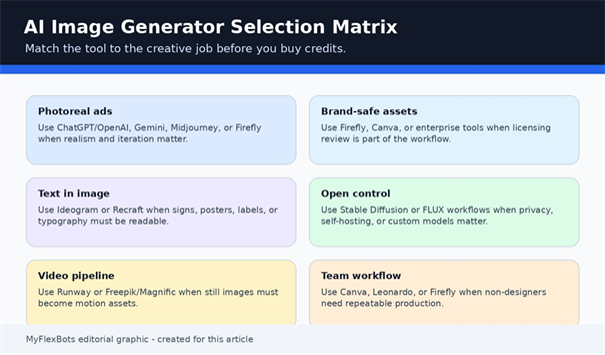
The best ai image generators 2026 are ChatGPT/OpenAI for conversational editing, Midjourney for cinematic style, Adobe Firefly for commercial design workflows, Ideogram for text in images, Leonardo AI for creative production, Canva for non-designers, Stable Diffusion for control, and Runway or Freepik/Magnific for image-to-video pipelines.
Why This 2026 Guide Is Different
Most roundup posts rank tools like a beauty contest: pretty screenshots first, hard workflow questions later. That is not enough for creators, agencies, ecommerce teams, or bloggers who need repeatable visuals every week.
The real question is not “Which tool makes the prettiest image?” The better question is: which tool gives you the fastest path from idea to publishable asset with the least rework, lowest risk, and best brand consistency? That is the lens used throughout this practical comparison.
Essential Tools & Materials Breakdown
Treat AI image creation like a small production setup. You do not need every tool, but you do need a clear stack: one generator for concepting, one editor for corrections, one place to store prompts, and one checklist for commercial review.
| Tool or Material | Best Use | Estimated Cost | Skill Level | What to Watch |
| ChatGPT/OpenAI image tools | Conversational image generation, edits, blog visuals, ad concepts | Free limited access or paid/API usage depending on plan | Beginner to intermediate | Limits, prompt precision, and current model pricing |
| Midjourney | Editorial, cinematic, artistic, fashion, concept visuals | Subscription tiers vary by plan | Intermediate | Requires taste, style control, and revision discipline |
| Adobe Firefly | Commercial design, Adobe workflows, brand-safe ideation | Free/paid Adobe ecosystem plans vary | Beginner to pro | Credit limits and export workflow |
| Ideogram | Posters, signs, thumbnails, graphics with readable text | Free and paid credit plans | Beginner | Still review spelling, kerning, and layout |
| Leonardo AI | Game assets, characters, product concepts, custom styles | Free tier and paid token plans | Intermediate | Token use can climb during heavy testing |
| Stable Diffusion / Stability tools | Self-hosting, privacy, model control, custom workflows | Free open tools to enterprise licensing | Advanced | Hardware, setup, licensing, and governance |
| Canva / Magic Media | Social posts, presentations, quick business graphics | Free and paid Canva plans | Beginner | Less deep control than specialist tools |
| Runway or Freepik/Magnific | Image generation plus motion, upscaling, and production suites | Free trials and paid plans vary | Intermediate | Credit economics and workflow lock-in |
The 2026 Evaluation Framework: How to Judge Any AI Image Generator
Before you pick from the shortlist, score each platform against the job you actually need done. A tool that is brilliant for fantasy art may be weak for product mockups. A tool that is easy for social graphics may be too limited for a brand campaign.
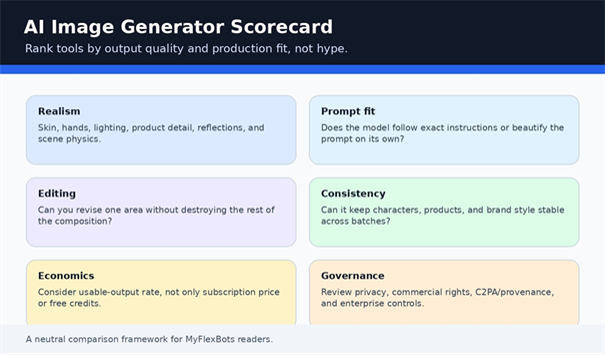
Use this six-part scoring system before subscribing:
- Realism: hands, eyes, shadows, product surfaces, reflections, fabric, and camera logic.
- Prompt adherence: whether the result follows the brief or simply makes something beautiful.
- Editing control: inpainting, outpainting, reference images, region edits, and revision stability.
- Text accuracy: letters, labels, numbers, signs, posters, packaging, and interface screenshots.
- Commercial fit: terms, rights, privacy, provenance, team controls, and brand review needs.
- Production economics: usable-output rate, speed, credits, monthly limits, and export quality.
| 💡 Quick Hack: Run a 20-prompt benchmark before paying annually.
Use the same 20 prompts across your shortlist: five photoreal scenes, five product shots, five typography designs, and five edit requests. Count only images you would actually publish. The cheapest plan is often not the cheapest workflow if 80% of outputs need rework. |
Top Picks: The Best AI Image Generators by Use Case
There is no single winner for every creator. The smartest choice depends on whether you care most about realism, design safety, typography, speed, control, or team collaboration. Below is the practical shortlist for 2026 based on how real users actually publish visual content.
1. ChatGPT / OpenAI Image Generation – Best Overall for Guided Creation
ChatGPT is the most approachable choice when the user does not want to “prompt engineer” every detail from scratch. You can describe a concept, ask for variations, upload reference material where supported, and refine the output in plain language.
OpenAI’s image generation ecosystem is also useful for developers and automation teams because the API pricing page lists dedicated image generation models and token-based pricing. For MyFlexBots readers building content workflows, that matters because image creation can be connected to blog production, ecommerce automation, or social media pipelines.
Choose ChatGPT when you need fast concepting, practical revisions, blog visuals, hero images, and marketing creative that benefits from conversation. It is one of the most flexible answers in a best ai image generators 2026 list because it works for non-designers as well as technical teams.
| Pro-Tip: Ask for a creative brief before the image.
Instead of starting with “create an image,” ask the model to produce a one-paragraph art direction brief first. Approve the brief, then generate. This reduces random outputs and gives you a reusable prompt record. |
2. Midjourney – Best for Cinematic, Editorial, and High-Style Visuals
Midjourney remains a favorite for creators who want polish, mood, cinematic lighting, and visually rich compositions. It is especially strong for concept art, editorial campaigns, fashion-style imagery, architecture inspiration, fantasy scenes, and social visuals where the “wow” factor matters.
The tradeoff is control. Midjourney can produce stunning images, but a beautiful image is not the same as an accurate one. Product details, exact text, compliance-heavy visuals, or strict brand layouts may require additional editing elsewhere.
Use Midjourney if your brand needs aesthetic strength and you are comfortable iterating. In a best ai image generators 2026 workflow, it is the taste-maker tool: outstanding for direction, not always the final production stop.
| 💡 Quick Hack: Build a style reference library.
Save 20 approved Midjourney outputs as reference examples. Use them to define your brand’s lighting, color, camera angle, texture, and composition. This makes future campaigns more consistent. |
3. Adobe Firefly – Best for Commercial-Safe Creative Workflows
Adobe Firefly is built for designers and businesses that care about workflow, brand safety, and integration with Adobe tools. Adobe positions Firefly around commercially safe generative AI models and professional creative production, which makes it attractive for teams that must send assets through client review.
Firefly is not always the wildest or most artistic generator, but that is not the point. Its strength is predictable business design: social ads, moodboards, product visuals, Photoshop edits, background generation, and branded campaign assets.
If you already use Photoshop, Illustrator, Express, or Creative Cloud, Firefly belongs near the top of your best ai image generators 2026 shortlist because it reduces tool-switching and gives designers a smoother path from AI concept to finished file.
| Pro-Tip: Use Firefly for fixes, not only first drafts.
Generate a direction anywhere, then use Adobe tools for cleanup, background expansion, compositing, and final brand polish. Many teams get better results by combining tools instead of forcing one generator to do everything. |
4. Ideogram – Best for Text, Posters, Signs, and Ad Graphics
Many AI image tools still struggle when the image itself must contain readable words. Ideogram has built a strong reputation around typography-aware generation, making it useful for posters, thumbnails, labels, banners, ads, event graphics, and social media images with slogans.
Its official model pages emphasize text rendering, prompt alignment, editing, and commercial API access, which is exactly why marketers keep testing it. If your image includes words, Ideogram should be in the first round of testing.
For best ai image generators 2026 research, Ideogram is the specialist pick: not necessarily the first choice for every photoreal image, but a practical solution when the words inside the picture matter.
| 💡 Quick Hack: Keep text short and locked.
For best results, write the exact phrase in quotation marks and keep it under seven words. Generate the design first, then fix final typography in Canva, Photoshop, or Illustrator if the design will be used commercially. |
5. Leonardo AI – Best for Creative Production, Characters, and Game Assets
Leonardo AI is useful for creators who need more than a one-off pretty picture. It supports image generation, creative variations, custom styles, editing, upscaling, and motion-related workflows. Canva’s acquisition of Leonardo also signals how important creator-first AI production has become.
Leonardo is especially strong for game art, characters, concept batches, product concepts, and visual exploration where you need several coherent directions quickly. It works well for teams that want more control than Canva but less technical setup than local Stable Diffusion.
Among the best ai image generators 2026, Leonardo is a strong middle ground: powerful enough for serious creative production, still accessible enough for marketers and small studios.
6. Canva Magic Media – Best for Non-Designers and Business Teams
Canva’s AI image generation tools sit inside the place where many businesses already build posts, decks, flyers, thumbnails, and simple ads. That convenience is the feature. A user can generate an image, place it inside a layout, add brand fonts, resize it for platforms, and export without learning a separate production tool.
Canva is not the deepest AI image laboratory, but it is one of the easiest ways to turn AI visuals into publishable business assets. For small companies, freelancers, coaches, and bloggers, that matters more than exotic controls.
Use Canva when speed, templates, brand kits, and collaboration matter. It is not always the most powerful entry in a best ai image generators 2026 roundup, but it may be the most practical for everyday social content.
7. Stable Diffusion and Stability AI – Best for Control, Privacy, and Customization
Stable Diffusion remains important because open and self-hostable workflows give advanced users control over models, LoRAs, fine-tunes, privacy, and automation. Stability AI’s official license information is essential reading for organizations using core models or derivative works commercially.
The main downside is setup. Local workflows can require GPU knowledge, model management, interface choices, prompt discipline, and safety controls. Beginners can lose hours before they produce anything useful.
For developers, agencies, and product teams, Stable Diffusion-style workflows are powerful because they can be customized. For casual users, a hosted tool may be faster.
8. Google Gemini Image Generation – Best for Google Ecosystem Users
Google’s image generation tools have become increasingly important inside the Gemini ecosystem, especially for users who already rely on Google apps. The biggest advantage is convenience: a conversational assistant can help brainstorm, generate, revise, and connect visual ideas to wider productivity workflows.
For agencies and developers, Google’s official pricing and model documentation should be checked before building image generation at scale. For everyday creators, the appeal is simple: image generation can live near search, documents, email, and planning.
9. Runway – Best When Static Images Need to Become Motion
Runway is best known for video, but that is exactly why it deserves attention in an image generator guide. Modern campaigns rarely stop at a still image. A blog hero may become a reel, a product shot may become a short ad, and a brand concept may become a motion sequence.
Runway’s product positioning centers on image, video, audio, editing, and language models in one creative toolkit. That makes it useful when your AI visual workflow has to move beyond a single JPEG.
10. Freepik/Magnific and Recraft – Best for Production Suites and Vector Needs
Freepik has evolved into Magnific, combining AI image generation, stock assets, upscaling, video, audio, and design workflows. It can be useful for teams that want one platform for production assets instead of a collection of separate apps.
Recraft deserves attention when vector output, icons, logos, mockups, and editable design assets matter. Standard image generators often create raster files first; Recraft’s vector-first positioning is useful for branding and scalable design.
Step-by-Step Execution Guide: How to Choose and Use the Right Tool
Define the Output Before You Open Any Generator
Start with the end file, not the prompt. Are you creating a 16:9 blog hero, a square Instagram post, a vertical TikTok cover, a transparent product cutout, a print poster, or a vector icon? Each output changes the tool choice.
Write a one-line creative brief: “Create a realistic 16:9 hero image for a blog post about AI automation tools, with a modern desk, abstract interface screens, blue lighting, and no readable brand logos.” This one sentence saves time because it forces you to define purpose, format, subject, and restrictions.
Choose the Tool by Job Type
Do not subscribe to the first tool that trends on social media. Match the generator to the creative job:
- For conversational revisions: choose ChatGPT/OpenAI image tools.
- For cinematic style: choose Midjourney.
- For commercial design review: choose Adobe Firefly.
- For readable text inside images: choose Ideogram or Recraft.
- For game assets and creative batches: choose Leonardo AI.
- For social templates: choose Canva.
- For self-hosting and privacy: choose Stable Diffusion workflows.
- For motion campaigns: choose Runway or Freepik/Magnific.
| 💡 Quick Hack: Buy one month, not one year.
Test a tool for 30 days with real client-style prompts before buying annual plans. AI tools change so fast that a “best” plan today may be average in three months. |
Build a Prompt Template
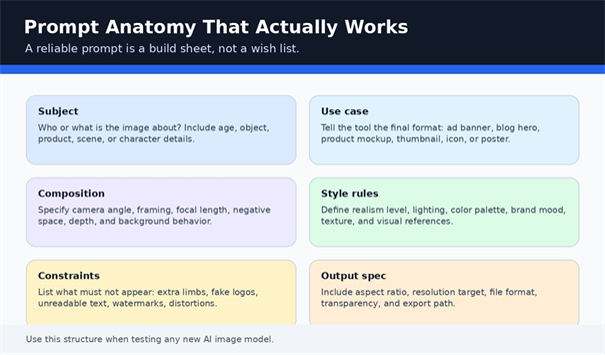
A strong prompt is not a long poem. It is a production instruction. Use this structure: subject, context, use case, composition, style, lighting, color, constraints, aspect ratio, and output details.
Example: “Photorealistic image of a small ecommerce team reviewing AI-generated product visuals on a laptop, modern office, natural light, clean composition, shallow depth of field, blue and white color palette, no logos, no distorted hands, 16:9 blog hero image.”
This template is better than “make an AI image generator blog picture” because the model has a clear job. It also gives you more consistent results across different platforms.
Generate Broadly, Then Edit Narrowly
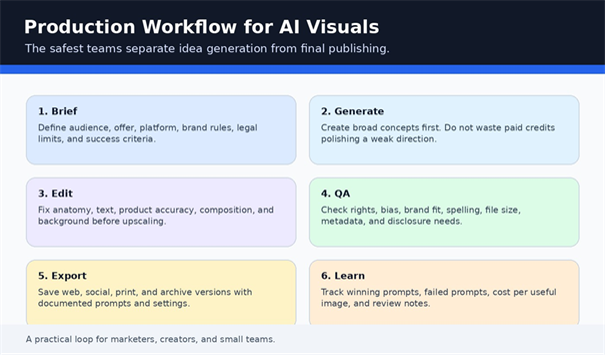
Beginners usually make the mistake of polishing too early. First, generate 8 to 20 rough directions. Pick the best concept. Then refine lighting, composition, facial details, text, background, and aspect ratio.
Do not spend ten prompts fixing a bad base image. If the first image has the wrong composition, regenerate. If the composition is right but one area is flawed, use editing tools.
Apply a Human Quality Pass
Every AI image needs human review. Check hands, eyes, teeth, product shapes, shadows, reflections, background objects, brand marks, text, cultural accuracy, and claims. AI image generators can produce convincing nonsense.
For business content, zoom to 200%. Tiny errors become obvious when the image is cropped for social media or compressed on a website.
Export for the Platform
A great image can still perform poorly if exported incorrectly. Save blog images in compressed WebP or optimized JPEG. Use PNG when transparency or sharp interface graphics matter. Keep a high-resolution archive file and a web-ready file.
For WordPress, use descriptive filenames such as ai-image-generator-comparison-2026.jpg and alt text that describes the visual, not just the keyword. Good alt text improves accessibility and image SEO.
Common Mistakes to Avoid
Mistake 1: Choosing the Most Viral Tool Instead of the Right Tool
The most viral tool may not be the best tool for your business. Midjourney can look amazing, but if you need editable graphics with text, Ideogram, Recraft, Canva, or Adobe may save more time.
Avoid picking from a roundup based only on sample galleries. Test your own use case.
Mistake 2: Ignoring Commercial Rights and Client Requirements
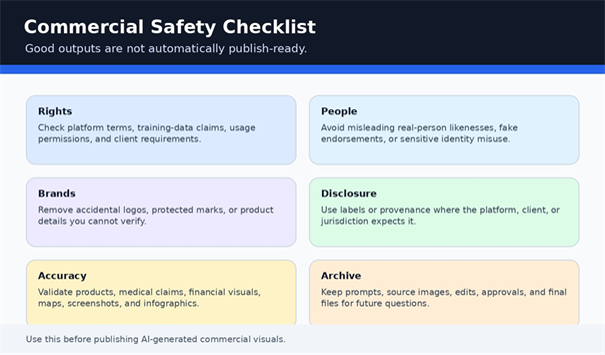
AI-generated does not automatically mean safe to use. Read the platform terms, privacy policy, commercial use language, and client contract before publishing. U.S. Copyright Office resources are also worth reviewing when AI outputs are part of a larger creative work.
For client work, document the tool used, prompt, source references, human edits, approval date, and final file version.
Mistake 3: Expecting Perfect Text Inside Images
Text has improved, but you should still verify every letter. If a poster says “SALE,” check the spacing, spelling, and alignment. For serious ads, create the visual in AI and add final text manually in a design tool.
Mistake 4: Uploading Sensitive Client Assets Without Checking Privacy
Reference images are powerful, but they can include faces, products, prototypes, private interiors, unreleased branding, or confidential documents. Check whether the tool uses uploads for training, review, or model improvement before adding sensitive files.
Mistake 5: Counting Outputs Instead of Usable Outputs
A plan that gives 1,000 generations is not automatically better than a plan that gives 100. What matters is usable-output rate. If one tool produces publishable results 60% of the time and another produces usable results 10% of the time, the “expensive” tool may actually be cheaper.
Advanced Tips and Next-Level Hacks
Create a Brand Prompt Bible
A brand prompt bible is a simple document that stores approved style language, color instructions, negative prompts, composition preferences, banned elements, export specs, and example prompts. This prevents every team member from reinventing the brand look.
| 💡 Quick Hack: Use three brand modes.
Create one prompt style for “clean corporate,” one for “premium editorial,” and one for “bold social.” Most brands do not need unlimited styles; they need three repeatable directions. |
Use Negative Prompts Strategically
Negative prompts should be specific. Instead of saying “bad quality,” say “no distorted hands, no fake logos, no unreadable text, no extra fingers, no watermark, no duplicated face, no melted objects.”
Overloaded negative prompts can confuse some models, so keep the list focused on the errors you actually see.
Create a Two-Tool Workflow
Many pros use one tool for generation and another for finishing. For example, generate a cinematic concept in Midjourney, fix composition in Photoshop/Firefly, add typography in Canva or Illustrator, and compress for WordPress.
This blended approach often beats chasing a single perfect generator.
Track Cost Per Published Asset
Do not track only monthly subscription fees. Track how many images you actually published. If a $30 plan creates 30 usable visuals, the cost is $1 per published asset. If a free plan takes five hours to create one acceptable image, it is not free.
Troubleshooting and Maintenance Guide
Problem: The Image Looks Good but Does Not Match the Prompt
Shorten the prompt and put the most important instruction first. Use numbered requirements. Ask for one image with strict constraints instead of several vague ideas.
If the tool keeps ignoring a detail, switch tools. Some models are better at style; others are better at instruction following.
Problem: Faces or Hands Look Wrong
Use tighter framing, fewer people, more natural poses, and higher-quality settings. Avoid crowded scenes when the subject must look realistic. If the platform supports editing, fix the area instead of regenerating the entire image.
Problem: Product Images Are Inaccurate
Use reference images only where terms and privacy allow it. Describe exact product geometry, material, size, color, packaging, and camera angle. For ecommerce, do not let AI invent features the product does not have.
Problem: Text Is Misspelled
Use Ideogram or a design tool for final typography. Keep AI-generated text short. If the design is for an ad, poster, label, or thumbnail, manually place the final text after the image is approved.
Problem: Costs Are Rising Too Fast
Batch your concepting. Use low-quality or draft mode for exploration, then high-quality mode only for final candidates. Keep a prompt library so you do not pay repeatedly to rediscover the same style.
Long-Term Maintenance: Review Your Tool Stack Quarterly
AI image tools change quickly. Review your stack every quarter by checking pricing, terms, output quality, model updates, and your actual publishing needs. The tool that wins this month may not be the winner next quarter.
For MyFlexBots readers, the best habit is to maintain a living workflow: prompts, tools, costs, outputs, and review notes. That makes your AI visual process measurable rather than random.
Responsible Use: Copyright, Provenance, and Trust
The best AI image workflows include governance. Use official resources such as the U.S. Copyright Office AI materials, NIST AI Risk Management Framework resources, and C2PA Content Credentials to understand rights, provenance, and transparency expectations.
This does not mean every blog image needs a legal memo. It means commercial teams should know which tool created an image, whether human edits were made, whether a real person or brand is depicted, and whether disclosure is needed.
As AI imagery becomes more realistic, trust will become a competitive advantage. Brands that document their process will look more professional than brands that treat AI as a shortcut with no audit trail.
FAQ: Best AI Image Generators 2026
What is the best AI image generator overall in 2026?
For most users, ChatGPT/OpenAI image generation is the best overall starting point because it is conversational, flexible, and useful for edits. However, the right choice depends on the job: Midjourney for artistic style, Firefly for commercial design, Ideogram for text, and Stable Diffusion for control.
Which AI image generator is best for text in images?
Ideogram is one of the strongest choices for readable text inside images, especially posters, signs, labels, and social graphics. Still, always proofread the final image and consider adding final typography in a design app for commercial campaigns.
Which AI image generator is safest for commercial use?
Adobe Firefly, Canva, and enterprise-grade workflows are often preferred by teams that care about commercial review, brand controls, and design integration. “Safest” depends on your use case, contract, jurisdiction, and platform terms, so review current terms before publishing.
Is Stable Diffusion still worth using in 2026?
Yes, especially for advanced users who want privacy, self-hosting, model customization, automation, and fine-grained control. It is less convenient for beginners but remains highly valuable for technical teams and creators who need a custom workflow.
Can AI-generated images be used on blogs and websites?
In many cases, yes, but you should review the tool’s terms, avoid misleading real-person likenesses, remove accidental trademarks, and add human review. For SEO, compress the image, use descriptive filenames, and write useful alt text.
How do I choose between free and paid AI image generators?
Start free if you are learning. Upgrade when you need higher limits, faster queues, better exports, commercial features, private generation, batch tools, or team collaboration. Measure cost per published asset instead of only monthly price.
Conclusion: Build a Visual Workflow, Not a Tool Collection
The smart way to choose from the best ai image generators 2026 is to start with your output, test real prompts, measure usable results, and build a repeatable workflow. The winner is not the tool with the flashiest demo; it is the tool that helps you publish better visuals faster, safer, and with less editing waste.
For MyFlexBots, the opportunity is bigger than pretty AI art. The real advantage is building a system: prompt library, tool stack, review checklist, cost tracking, and reusable templates. Which AI image generator are you planning to test first for your website, ads, or social content? Bookmark this best ai image generators 2026 guide as your quarterly testing checklist.
editor's pick
latest video
news via inbox
Nulla turp dis cursus. Integer liberos euismod pretium faucibua


