
Best AI Writing Tools for Beginners in 2026 Tools
Staring at a blank document is hard enough without opening ten AI tabs and wondering which one actually helps. The best AI writing tools for beginners 2026 are not the apps with the longest feature lists; they are the tools that make it easier to brainstorm, draft, revise, fact-check, and publish without forcing you to learn a complicated workflow.
This guide compares 15 beginner-friendly options, explains what each tool is good at, shows where free plans are enough, and gives you a repeatable writing process you can use for blog posts, emails, product copy, schoolwork, social captions, and business documents. You will also learn how to prompt AI more effectively, avoid common quality problems, and keep a human voice in the final draft.
Quick Answer: What Are the Best AI Writing Tools for Beginners in 2026?
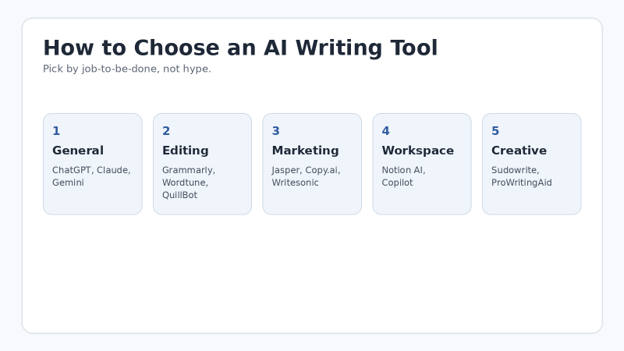
The easiest AI writing tools for beginners are ChatGPT, Claude, Gemini, Grammarly, QuillBot, Wordtune, Notion AI, and Microsoft Copilot. Jasper, Copy.ai, and Writesonic fit marketing workflows; Sudowrite and ProWritingAid suit creative writers. Start with one general assistant plus one editing tool, then add specialist software only when your workflow requires it.
| 💡 Quick Hack: Do not subscribe to three AI writers on day one. Use free tiers for one week with the same three tasks—an outline, a 500-word draft, and a rewrite. The tool that needs the least cleanup is usually the better fit for you. |
Essential Tools & “Materials”: What You Actually Need
| Item | Purpose | Estimated Cost | Skill Level | Beginner Advice |
| General AI assistant | Ideas, outlines, drafting, rewriting | 0–20+/mo | Beginner | Start here. |
| Grammar/editor | Clarity, grammar, tone | 0–30/mo | Beginner | Useful after drafting. |
| Research source set | Facts, links, first-party sources | Free | Beginner | Never skip verification. |
| Notes or document app | Store briefs, prompts and drafts | Free–paid | Beginner | Keep one source of truth. |
| SEO checklist | Intent, headings, links, metadata | Free | Beginner | Use after the draft, not before. |
| Human review | Voice, accuracy, examples | Time cost | Essential | Your final quality gate. |
How We Evaluated Beginner-Friendly AI Writing Tools
For this guide, “beginner-friendly” means a new user can get useful text in minutes without building automations or learning technical settings. We focused on six practical criteria: ease of prompting, output quality, editing help, free or low-cost access, usefulness across common writing tasks, and how much human cleanup the first draft usually needs.
When reviewing the Best ai writing tools for beginners 2026, use the same test tasks so ease of use and cleanup time can be compared fairly.
Pricing changes often, so the figures below are snapshots from official vendor pages checked in September 2026 where available. Treat them as a comparison aid rather than a permanent price list. Free usage limits and regional pricing can also vary.
- ChatGPT — Best All-Purpose Starting Point
ChatGPT is the simplest place to learn AI-assisted writing because it can move from idea generation to outlining, drafting, rewriting, summarizing, and critique in one conversation. A beginner can paste a rough idea, explain the audience, and ask for multiple versions without switching apps.
Best for: blog outlines, emails, product copy, brainstorming, rewriting, and learning how prompts work.
Why beginners like it: the chat format encourages iteration. Instead of trying to write one “perfect prompt,” you can correct the draft, add examples, change tone, and ask for a tighter second version.
Watch out for: confident-sounding factual errors. For any claim involving dates, statistics, health, finance, legal matters, products, or current events, verify against reliable sources before publishing.
- Claude — Strong for Long-Form Drafting and Revision
Claude is especially useful when you want to work with long documents, preserve a coherent voice, or ask for thoughtful revisions across a large draft. It works well for articles, reports, guides, and “review this entire document” tasks.
Best for: long-form drafting, document review, tone matching, summarization, and structural editing.
Beginner workflow: paste your outline first, ask Claude to identify gaps, then draft one section at a time. This usually creates better consistency than asking for a 3,000-word article in one shot.
Current plan note: Anthropic lists a free tier and Claude Pro at $20/month or $200/year for individuals, with higher-capacity Max plans above that.
- Google Gemini — Convenient for Google-Centered Workflows
Gemini is a practical option for users already living inside Google’s ecosystem. It can help create drafts, summarize information, brainstorm alternatives, and support everyday productivity.
Best for: idea generation, summaries, Google-centric workflows, and quick drafting.
Why it works for beginners: the interface is conversational, so the learning curve is similar to other general AI assistants. If your work already moves through Google Docs, Gmail, and Drive, that ecosystem fit can matter more than tiny differences in writing style.
Watch out for: feature and plan differences across regions and Google account types. Check the current Google AI plan page before purchasing.
- Grammarly — Best for Editing What You Already Wrote
Grammarly is less about replacing the writer and more about improving the draft. That makes it one of the safest first AI tools for people who already write their own content but want help with grammar, clarity, tone, sentence rewrites, and polish.
Best for: grammar, business emails, tone, clarity, rewrites, and final proofreading.
Pricing snapshot: Grammarly’s official support page lists Pro at $30 monthly, $60 quarterly, or $144 yearly, while the free plan includes core writing assistance and limited AI use.
Beginner advantage: you can keep your normal writing workflow and use Grammarly as a second pass instead of asking AI to create everything from scratch.
- QuillBot — Best for Paraphrasing and Quick Rewording
QuillBot is useful when your sentence is technically correct but sounds awkward, repetitive, too formal, or too wordy. Its paraphrasing and grammar tools give beginners fast alternatives without requiring detailed prompts.
Best for: paraphrasing, shortening, sentence alternatives, grammar checks, and rewriting study notes.
Pricing note: QuillBot says it offers free and Premium options, with pricing adjusted by region and subscription term. Its help center recommends checking the current Premium page for exact local pricing.
Use it carefully: paraphrasing should improve clarity, not disguise copied material. Always keep attribution where it is required.
- Wordtune — Best for Sentence-Level Rewrites
Wordtune focuses on rewriting and improving existing text. It is a good match for beginners who know what they want to say but struggle with wording.
Best for: sentence rewrites, fluency, vocabulary, summaries, and clarity.
Pricing snapshot: Wordtune lists a free Basic plan, an Advanced plan at $6.99/month billed annually, and Unlimited at $9.99/month billed annually on its current pricing page.
Best use: draft naturally first, then use Wordtune on selected sentences instead of rewriting every paragraph. Your final article will sound more like you.
- Notion AI — Best If Your Notes and Drafts Already Live in Notion
Notion AI sits inside the same workspace where many people keep research, content calendars, meeting notes, and drafts. That reduces copying between apps and makes it useful for turning scattered notes into structured content.
Best for: turning notes into outlines, summarizing workspace information, drafting internal docs, and organizing content projects.
Current plan note: Notion says AI is included with Business and Enterprise plans, while Free and Plus workspaces can receive limited complimentary AI responses.
Beginner advantage: context stays near the draft. If you already use Notion, integrated AI may be more valuable than another standalone subscription.
- Microsoft Copilot — Best for Microsoft 365 Users
Copilot is a natural choice for people who spend their day in Word, Outlook, PowerPoint, and the broader Microsoft ecosystem. The biggest benefit is not “better prose”; it is reducing friction between writing and the documents you already use.
Best for: business documents, email drafts, summaries, document-based workflows, and Microsoft 365 users.
Beginner workflow: create your rough structure in Word, use AI for alternate wording or summaries, then keep the final review in the same document.
Plan note: Microsoft’s consumer Copilot and Microsoft 365 offerings change by bundle and usage limits, so confirm the exact individual plan before buying.
- Jasper — Best for Brand-Controlled Marketing Content
Jasper is designed for marketing teams that want reusable brand voice, audiences, knowledge assets, and campaign workflows. It can be overkill for a casual beginner, but it becomes attractive when consistency across many marketing assets matters.
Best for: marketing teams, brand voice, campaigns, and repeatable content systems.
Pricing snapshot: Jasper’s official page lists Pro at $69/month when billed monthly or $59/month when billed yearly, with a 7-day free trial; Business uses custom pricing.
Who should skip it: a beginner writing two blog posts a month will usually get better value by starting with a general AI assistant and an editor.
- Copy.ai — Best for Sales and Go-to-Market Workflows
Copy.ai has expanded beyond simple headline generators into a broader go-to-market AI platform. Its chat and workflow features can help teams create sales, marketing, and outreach content.
Best for: sales copy, outreach, marketing operations, and teams building repeatable workflows.
Pricing snapshot: Copy.ai lists a Chat plan at $29/month or $24/month billed annually, with higher workflow-oriented tiers for larger organizations.
Beginner advice: use the chat features first. Do not build complex workflows until you can clearly describe the repeatable task you want to automate.
- Writesonic — Best for SEO and AI Search Visibility Workflows
Writesonic has moved beyond being only an AI writer and now emphasizes SEO, content production, and visibility in AI-powered search experiences. That makes it more specialized than the general tools above.
Best for: SEO teams, AI search visibility, content audits, and scaled article production.
Pricing snapshot: Writesonic currently lists a Starter plan at $79/month billed annually, including AI search visibility tracking, AI articles, and site audits, with larger plans above it.
Beginner advice: this is most useful when you already have a website, content strategy, and measurable SEO workflow. For learning basic AI writing, start cheaper.
- Rytr — Best for Lightweight Short-Form Experiments
Rytr is built around quick content generation for common formats such as emails, short marketing copy, descriptions, and idea generation. Its appeal is simplicity rather than deep document workflows.
Best for: short-form content, quick variations, captions, and basic marketing drafts.
Beginner advantage: templates reduce prompt anxiety. Pick a use case, provide context, generate options, then edit the strongest result.
Pricing and limits can change, so check Rytr’s official plan page before deciding between free and paid access.
- Sudowrite — Best for Fiction and Creative Writing
Sudowrite is purpose-built for storytelling rather than general business writing. It can help with scene expansion, character ideas, description, plot exploration, and creative revision.
Best for: novels, short stories, screenplays, scene development, and fiction brainstorming.
Pricing snapshot: Sudowrite lists a Hobby & Student plan at $10/month, Professional at $22/month, and Max at $44/month on its current pricing page.
Beginner advice: use creative AI for options, not for surrendering the story. Keep your own decisions about character motivation, pacing, theme, and final prose.
- ProWritingAid — Best for Deep Writing Analysis
ProWritingAid combines grammar and style assistance with detailed writing reports, rephrasing, document types, and author-focused tools. It suits writers who want to understand patterns in their writing rather than simply accept a one-click rewrite.
Best for: long-form editing, fiction and nonfiction revision, style reports, and learning from repeated mistakes.
Pricing snapshot: its current pricing page lists a free plan, Premium monthly pricing around $30, annual options, and a lifetime license; prices can vary by location and promotion.
Beginner advantage: reports can teach you why a passage feels weak—such as repetition, pacing, or sentence variety—instead of only replacing it.
- Perplexity — Best as a Research Companion, Not a Final Writer
Perplexity is most valuable at the research stage because it is built around answering questions with linked sources. That makes it useful before you draft, especially when you need names, definitions, current references, or a map of a topic.
Best for: source discovery, research questions, fact-check starting points, and gathering references.
Important distinction: finding a cited answer is not the same as verifying the source. Open the original link, confirm that it really supports the claim, and prefer first-party or authoritative evidence.
Use Perplexity beside your writing tool rather than expecting it to replace editing, judgment, or original experience.
| Pro-Tip: The Best ai writing tools for beginners 2026 are easiest to compare with a fixed test. Give every tool the same audience, same 250-word brief, same source notes, and same request for a second draft. Compare accuracy and editing time, not just the first impression. |
Beginner Comparison Table: Which Tool Fits Which Job?
| Tool | Best Use | Free Entry? | Learning Curve | Good First Choice? |
| ChatGPT | General writing | Yes | Easy | Yes |
| Claude | Long-form | Yes | Easy | Yes |
| Gemini | Google workflows | Yes | Easy | Yes |
| Grammarly | Editing | Yes | Very easy | Yes |
| QuillBot | Paraphrasing | Yes | Very easy | Yes |
| Wordtune | Rewriting | Yes | Very easy | Yes |
| Notion AI | Workspace writing | Limited | Easy | If you use Notion |
| Copilot | Microsoft documents | Varies | Easy | If you use 365 |
| Jasper | Marketing teams | Trial | Moderate | Later |
| Copy.ai | GTM workflows | Paid entry | Moderate | Later |
| Writesonic | SEO/GEO | Trial/paid | Moderate | Later |
| Rytr | Short-form | Varies | Easy | Yes |
| Sudowrite | Fiction | Trial | Easy | Yes for fiction |
| ProWritingAid | Deep editing | Yes | Moderate | Yes for writers |
| Perplexity | Research | Yes | Easy | Yes as companion |
Step-by-Step: How to Use AI Writing Tools Without Getting Generic Content
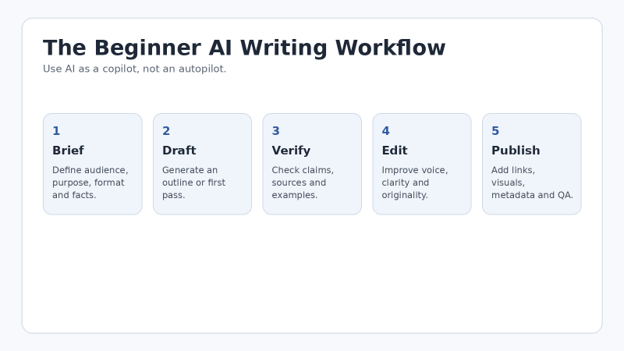
A tool is only half of the system. The repeatable process below matters more than the brand name, and it is the workflow I would teach a complete beginner before asking them to pay for anything.
Define the Job Before Opening the AI Tool
Write a four-line brief: who the reader is, what they need, what you want them to do next, and what the finished format should be. “Write a blog post about AI” is vague. “Create a beginner guide for small-business owners comparing AI writers, with a table, practical prompts, and a neutral explanation of trade-offs” is usable.
The Best ai writing tools for beginners 2026 become much easier to judge when you start with a clear brief instead of a vague request.
| 💡 Quick Hack: Keep a reusable “content brief” note with fields for audience, search intent, examples, sources, tone, exclusions, and CTA. Copy that into every new AI conversation. Consistency improves immediately. |
Give the Model Source Material
AI writing improves when it has something concrete to work from. Provide product details, interview notes, customer questions, your own examples, research links, previous brand copy, or a rough outline. Without context, the model is pushed toward generic internet-shaped language.
Ask for an Outline Before a Full Draft
The outline is your cheapest quality-control step. It lets you catch missing sections, repeated ideas, and a weak sequence before the tool generates 2,000 words. Ask for the reader question answered by each section, not only the heading. That reveals whether the structure has real purpose.
Use a Five-Part Prompt Formula
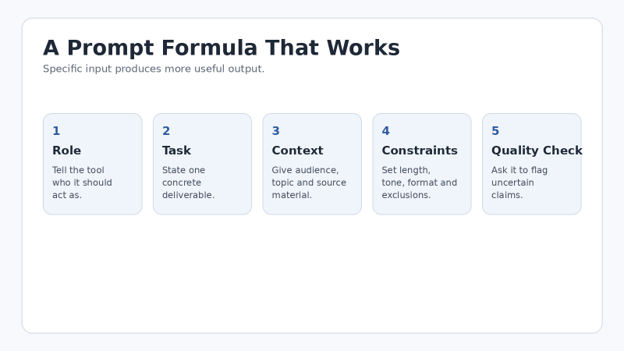
A reliable prompt does not need to be long. It needs to remove ambiguity. Use this sequence: role, task, context, constraints, quality check.
The Best ai writing tools for beginners 2026 all respond better when the prompt removes ambiguity about audience, format, and quality standards.
Role: “Act as a practical technology editor for first-time AI users.”
Task: “Create a 700-word section explaining how to choose an AI writing tool.”
Context: “The reader is a small-business owner with no AI experience.”
Constraints: “Use short paragraphs, plain English, one comparison table, and no hype.”
Quality check: “Flag any pricing or factual statement that should be verified before publication.”
OpenAI’s current prompt engineering guidance similarly emphasizes clear instructions and structured prompting. The exact interface changes over time, but clarity, examples, and explicit output requirements remain durable habits.
| Pro-Tip: For Best ai writing tools for beginners 2026 research, ask the AI to separate “facts to verify” from “writing suggestions.” This prevents a polished paragraph from hiding an uncertain claim. |
Draft Section by Section
Generating an entire long article in one request often produces repetition because the model has to satisfy many constraints at once. Instead, lock the outline, then draft one major section at a time. Feed the previous section’s conclusion or a compact style guide into the next prompt so the article stays connected.
Replace Generic Claims With Evidence and Experience
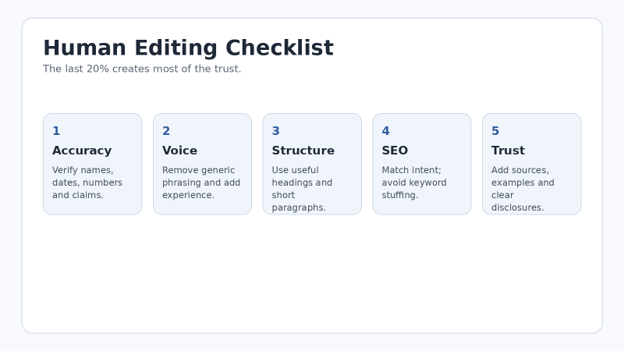
Look for phrases such as “revolutionize your workflow,” “game-changer,” “in today’s fast-paced world,” and unsupported statements like “this tool dramatically improves productivity.” Replace them with observable detail: a feature, a limitation, a short test, a source, or an example from the actual workflow.
Google’s guidance for generative AI content focuses on accuracy, quality, relevance, and creating content for people rather than generating pages at scale with little added value. That is a useful editorial standard even when search traffic is not your main goal.
| 💡 Quick Hack: Search your draft for “very,” “seamlessly,” “powerful,” “innovative,” “game-changing,” and “revolutionary.” If the sentence still works after deleting the adjective, delete it. Specific evidence is stronger than AI-flavored praise. |
Fact-Check Before You Polish
Do not spend 20 minutes polishing a paragraph whose core fact may be wrong. Verify product pricing, feature limits, dates, legal or policy statements, statistics, and attributed claims first. Prefer official product documentation and primary sources. Use secondary reviews for experience and opinion, not as the only source for a vendor’s current plan.
NIST’s Generative AI Profile is a useful reminder that generative systems introduce risks around reliability, information integrity, privacy, and misuse. A beginner does not need to become a risk analyst, but the practical lesson is simple: do not treat fluent output as verified output.
Edit for Voice, Rhythm, and Original Value
Now read the draft aloud. Break long sentences, delete repeated introductions, add a concrete example, and vary paragraph length. If every section begins with “X is a powerful AI tool,” the article will feel machine-produced even when the facts are correct.
Optimize for Search Intent—Not Keyword Density
If your target is Best ai writing tools for beginners 2026, the reader probably wants a shortlist, a comparison, prices or free options, use cases, and a recommendation framework. Satisfy that intent naturally. Do not force the same exact keyword into every heading. Use related language such as AI writing assistant, AI editor, AI copywriting software, and free AI writing tools where it improves clarity.
Google explicitly warns against scaled content created mainly to manipulate rankings. A useful AI-assisted article should add judgment, organization, original examples, verification, or firsthand testing—not just turn a keyword into 2,500 words.
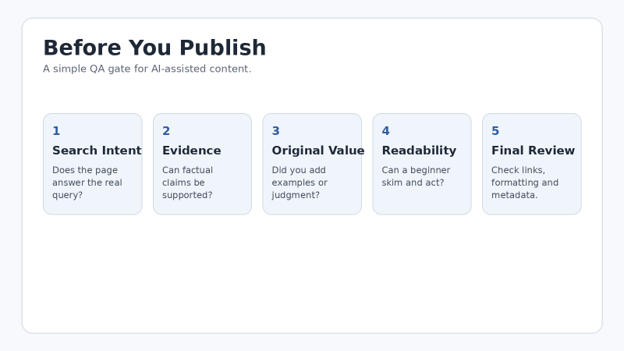
Run a Final Publishing Checklist
Does the introduction solve the reader’s problem quickly?
Are all current prices, limits, and features verified?
Do external links point to authoritative pages?
Does each major section add something new?
Are examples specific enough to be useful?
Is there a clear reason to choose each tool?
Are images compressed, relevant, and given descriptive alt text?
Does the article have an original author/editor review before publishing?
Common Mistakes Beginners Make With AI Writing Tools
Mistake 1: Choosing a Tool Before Defining the Task
A fiction writer, an SEO freelancer, and an office manager do not need the same software. Start with the job: research, drafting, rewriting, proofreading, marketing workflow, or creative writing. Then choose the smallest tool that solves it.
The Best ai writing tools for beginners 2026 should therefore be selected by the job you need to complete, not by popularity alone.
Mistake 2: Asking for a Finished Article in One Prompt
One-shot generation is fast but difficult to control. Outline first, approve the structure, then draft. This also makes it easier to spot unsupported claims and repetition.
Mistake 3: Publishing the First Output
First drafts are raw material. Even strong models can repeat clichés, invent a detail, misunderstand intent, or use an overly confident tone. Build a review step into the workflow every time.
Mistake 4: Paying for Overlapping Subscriptions
Three general-purpose AI subscriptions usually create more choice, not more productivity. For most beginners, one general writer plus one editing tool covers the majority of tasks.
Mistake 5: Treating AI Detection Scores as a Quality Standard
A text can be useful or poor regardless of what an AI detector reports. Focus on accuracy, originality, usefulness, style, and source quality. If your school, employer, or publication has an AI-use policy, follow that policy directly instead of trying to “beat” a detector.
| 💡 Quick Hack: Make a two-column review sheet: “AI gave me” and “I added.” Your side should include verified facts, examples, opinion or judgment, better structure, sources, and the final voice. If your column is empty, the article needs more human work. |
Advanced Tips: How to Get Better Results as Your Skills Improve
Build a Personal Style Sheet
Save a short list of writing rules: preferred sentence length, banned clichés, how you use headings, whether you write in first or second person, CTA style, punctuation preferences, and two sample paragraphs that sound like you. Paste this into important prompts.
With the Best ai writing tools for beginners 2026, a small reusable style sheet can improve consistency across every draft.
Use “Critique, Then Rewrite” Instead of “Make It Better”
Ask the model to identify five specific weaknesses before rewriting. You will get a more controlled revision because the tool must explain what it is changing. You can accept or reject the critique before generating new prose.
Create a Prompt Library by Outcome
Organize prompts by job: outline, headline, comparison table, FAQ expansion, simplification, brand-voice rewrite, source-check list, email response, and final QA. Reusing a tested prompt saves more time than constantly searching for a new tool.
| Pro-Tip: When you evaluate Best ai writing tools for beginners 2026, measure “minutes to publishable copy,” not words generated per minute. A fast draft that takes 40 minutes to repair is slower than a careful draft that needs five minutes of editing. |
Create a Source Pack Before Research-Heavy Drafts
Put authoritative links, notes, key numbers, and source dates into one document. Then instruct the AI to use only those materials for factual claims. This reduces accidental blending of old or unverified information into a polished answer.
Separate Creative Mode From Accuracy Mode
Brainstorming benefits from breadth; factual writing benefits from constraint. During ideation, ask for many angles. During the final draft, reduce creativity and require source-backed claims. Mixing both goals in the same prompt often creates confident invention.
Troubleshooting Guide: Fixing Common AI Writing Problems
The writing sounds generic: Add your audience, real examples, source notes, and a sample of your preferred voice. Ask the tool to remove clichés and replace broad claims with concrete detail.
The draft repeats the same point: Ask for a one-sentence purpose for each section. Delete or merge sections with the same purpose, then regenerate only the weak section.
The tone is too formal: Provide a short tone example. Say what to avoid: corporate jargon, long introductions, excessive adjectives, and passive voice.
Facts may be wrong: Stop rewriting and verify first. Ask the AI to list every sentence containing a number, date, product feature, policy, or attributed claim so you can check them systematically.
The article is too long: Ask for a compression pass that preserves examples and unique facts while removing repeated setup sentences. Cut introductions before cutting useful detail.
The article is too short: Do not request “more words.” Ask for missing reader questions, examples, edge cases, decision criteria, mistakes, troubleshooting, and FAQs. Useful depth beats padding.
SEO keywords feel forced: Replace exact-match repetitions with natural synonyms and related concepts. Keep the exact phrase in high-value places such as the title, introduction, and one or two relevant sections only when it reads naturally.
Every AI tool seems the same: Test with your own task. Tool differences become clearer when the input, desired format, and evaluation criteria are fixed.
Maintenance: How to Keep This 2026 Guide Accurate
AI products change quickly. A strong evergreen article needs a maintenance schedule. Recheck vendor pricing and plan names monthly or quarterly, depending on traffic. Review the comparison table whenever a major model, product, or plan changes. Update screenshots and remove tools that no longer serve the reader’s intent.
Because the Best ai writing tools for beginners 2026 change rapidly, pricing and feature checks should be part of your editorial maintenance routine.
For MyFlexBots, keep a small update log in WordPress or your editorial system: date checked, vendor pages reviewed, pricing changes, feature changes, and sections edited. This prevents “2026” content from quietly becoming a 2025 snapshot with a new title.
| 💡 Quick Hack: Set a recurring calendar reminder every 60–90 days to check the top five commercial tools in this article. Updating only the high-traffic comparison and price sections can keep the page trustworthy without rewriting the whole guide. |
Frequently Asked Questions
What is the easiest AI writing tool for a complete beginner?
A general chat-based assistant such as ChatGPT, Claude, or Gemini is usually the easiest starting point because you can describe the task in normal language and refine the answer through conversation. Pair it with Grammarly, QuillBot, or Wordtune if you mainly need editing help.
For most people comparing the Best ai writing tools for beginners 2026, a conversational general-purpose assistant is the simplest place to learn the workflow.
Are free AI writing tools good enough?
Yes for learning, occasional drafting, rewriting, and simple content. Free limits become a problem when you write daily, need larger documents, require advanced brand controls, or rely on a specialist workflow. Start free, identify the bottleneck, then pay to remove that bottleneck.
Which AI tool is best for blog writing?
For most beginners, a general assistant is enough for outlining and first drafts. Grammarly or ProWritingAid can handle editing, while Perplexity can support source discovery. Dedicated marketing platforms are more useful when you need brand governance, team collaboration, SEO auditing, or production at scale.
Can AI-written content rank on Google?
Google’s public guidance focuses on the quality and purpose of content rather than banning AI-assisted text as a category. It warns against using automation to create large amounts of low-value content for ranking manipulation. Useful, accurate, original, people-first content still requires editorial work regardless of how the first draft was produced.
How do I make AI writing sound more human?
Give the model your own notes and examples, then edit for specificity. Use natural sentence length, add firsthand observations where appropriate, remove generic transitions, and replace abstract claims with concrete detail. “Human” should mean authentic and useful, not deliberately adding mistakes.
Should I use one AI writing tool or several?
Begin with one general writing assistant and, if necessary, one specialist editor. Add more only when a specific task is not being solved. A small workflow is easier to learn, cheaper to maintain, and less likely to scatter drafts across multiple apps.
Final Verdict: Build a Writing System, Not a Subscription Collection
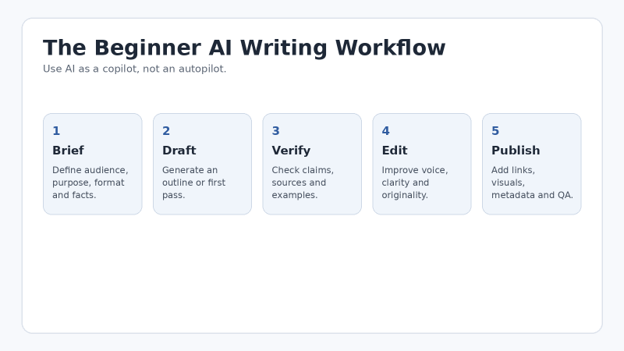
The Best ai writing tools for beginners 2026 can save hours, but the biggest productivity gain comes from a repeatable process: create a clear brief, use AI for a specific stage, verify factual claims, edit for voice, and publish only after a human quality check.
If you are starting today, choose one general assistant and one editor. Run the same real-world task through them for a week. Keep the combination that reduces your total editing time and helps you produce clearer work—not the one with the loudest feature list.
editor's pick
latest video
news via inbox
Nulla turp dis cursus. Integer liberos euismod pretium faucibua


