
How to Use AI for Your Business:A Practical Step-by-Step Guide
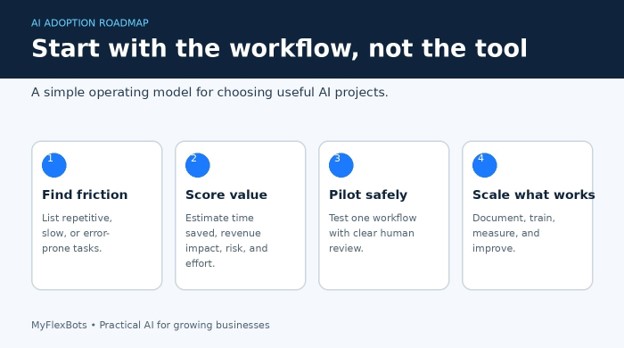
AI can save a business dozens of hours each month, but only when it is attached to a clear workflow. Many owners buy software first, experiment for a week, and then abandon it because nobody defined the problem, the owner, or the quality standard.
This guide explains how to use ai for your business without turning your company into a risky technology experiment. You will learn how to select high-value tasks, choose tools, protect data, build prompts, train employees, measure results, and scale successful pilots.
Direct Answer: What Is the Best Way to Use AI in a Business?
| Featured snippet answer: Start with one repetitive, measurable workflow. Map the current process, choose an approved AI tool, create a standard prompt, keep a human reviewer in the loop, and compare time, quality, cost, and risk against the old method. Scale only after the pilot proves dependable value. |
Essential Tools, Costs, and Skill Requirements
You do not need a data-science team to begin. Most small and mid-sized companies can test useful AI workflows with existing documents, a secure general-purpose assistant, a spreadsheet, and one employee who understands the process.
| Item | Purpose | Typical Cost | Skill Level | Buying Advice |
| General AI assistant | Drafting, analysis, summaries, ideas, and Q&A | $0–$30 per user/month | Beginner | Choose a business plan with admin and privacy controls. |
| Automation platform | Moves data and triggers actions between apps | $0–$100+ per month | Intermediate | Start with a small task volume before upgrading. |
| CRM or help desk | Stores customer history and structured workflows | $20–$100+ per user/month | Beginner–Intermediate | Prefer tools with permission controls and export options. |
| Spreadsheet/database | Tracks inputs, results, exceptions, and KPIs | $0–$25 per user/month | Beginner | A clean spreadsheet is often enough for the first pilot. |
| Knowledge base | Holds approved policies, FAQs, and procedures | $0–$20+ per user/month | Beginner | Remove outdated and duplicate documents before connecting AI. |
| Human reviewer | Checks accuracy, tone, risk, and final decisions | Existing staff time | Process expert | Assign a named owner; never use “the team” as accountability. |
| Security checklist | Controls data, access, vendors, and retention | Usually internal | Intermediate | Review vendor terms before uploading customer or company data. |
Your first pilot can cost almost nothing if you already pay for office software. The main investment is not the subscription. It is the time required to clean the workflow, test edge cases, and create a repeatable review process.
Set a Business Outcome Before Choosing a Tool
The most reliable way to learn how to use ai for your business is to begin with a measurable outcome. Good goals sound like “reduce first-response time from four hours to one,” “cut proposal preparation from 90 minutes to 30,” or “increase qualified follow-ups without adding headcount.”
Avoid broad goals such as “use more AI” or “make the business modern.” They do not tell anyone what success looks like.
Write one sentence describing the current problem.
Record the current time, cost, error rate, or conversion rate.
Name the person responsible for the workflow.
Set a realistic target for a 30-day pilot.
Define what AI is not allowed to decide or publish on its own.
| 💡 Quick Hack: Choose a task that happens at least 20 times per month. Frequent tasks produce enough evidence to judge whether the pilot really works. |
Build an AI Opportunity List
This discovery process turns how to use ai for your business into a practical operations exercise rather than a software-shopping project. Ask each department where work becomes repetitive, delayed, inconsistent, or difficult to search. Do not ask, “Where can we use AI?” Ask, “Which tasks consume time without requiring a fresh strategic decision every time?”
Strong early use cases often include:
Summarizing meeting notes and assigning follow-up actions.
Drafting first versions of emails, proposals, product descriptions, and social posts.
Classifying support tickets and suggesting approved responses.
Extracting fields from invoices, forms, and reports.
Turning call transcripts into CRM notes.
Comparing sales data and identifying unusual changes.
Searching internal procedures and approved knowledge documents.
Creating checklists, training quizzes, and standard operating procedures.
A weak first project involves high-stakes decisions, unclear data, low task volume, or no human expert available to review the result. Examples include automatically rejecting job candidates, issuing legal conclusions, setting medical advice, or sending unreviewed financial recommendations.
Score Each Use Case by Value, Effort, and Risk
A scorecard is especially useful when leadership teams disagree about how to use ai for your business and need an objective way to compare ideas. Create a simple scorecard with four 1-to-5 ratings: business value, frequency, implementation effort, and risk. Prioritize high-value, high-frequency tasks with low-to-moderate effort and manageable risk.
A practical score can use this formula:
| Pilot priority score: (Business value × Frequency) − (Implementation effort + Risk). Use the score to compare ideas, not as a perfect scientific model. |
Suppose proposal drafting scores 5 for value, 4 for frequency, 2 for effort, and 2 for risk. Its score is 16. Automated contract approval may score 5 for value and 3 for frequency, but 5 for effort and 5 for risk, producing a score of 5. The proposal workflow is a safer first pilot.
| Pro-Tip: Start with an assistant workflow before an autonomous workflow. Let AI suggest, summarize, or draft while a person approves the final action. |
Map the Current Workflow in Detail
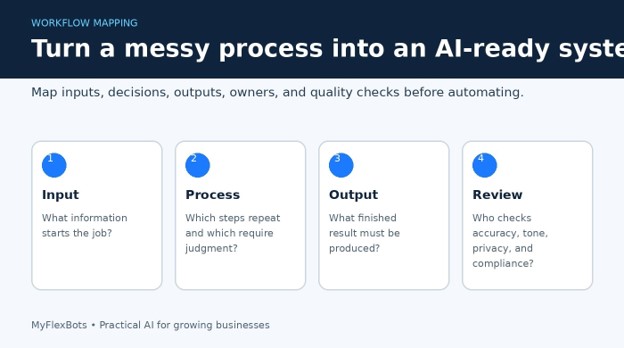
Before changing the process, document how the work is completed today. This reveals missing information, hidden decisions, duplicated steps, and exceptions that a software demo rarely shows.
Identify the trigger. What event starts the process?
List every required input, including files, fields, emails, policies, and customer details.
Write each action in sequence, even when the action seems obvious.
Mark decisions that require judgment or approval.
Record the final output and where it is stored.
List exceptions, complaints, unusual cases, and failure points.
Name the process owner and final reviewer.
This mapping step matters because AI often appears inaccurate when the real problem is inconsistent input. If salespeople use different proposal templates, prices, approval rules, and service descriptions, the tool cannot produce a stable result.
Clean and Protect the Data
A business should decide what data may enter an AI system before employees begin experimenting. Customer records, passwords, payment details, health information, legal files, confidential pricing, unreleased products, and employee records may require strict controls.
The Federal Trade Commission has emphasized that companies remain responsible for privacy and confidentiality promises made to customers. Read the FTC guidance on privacy and confidentiality commitments.
Use business accounts instead of unmanaged personal accounts.
Turn on multi-factor authentication and role-based access.
Remove unnecessary personal data from prompts and files.
Confirm whether the vendor uses submitted data for model training.
Review retention, deletion, export, and breach-notification terms.
Keep restricted data in approved systems unless security leaders permit integration.
| 💡 Quick Hack: Replace real names, emails, account numbers, and confidential figures with labels during early testing. Use “Customer A” and sample values until the workflow is approved. |
Choose the Right Type of AI Tool
Understanding how to use ai for your business does not mean buying a separate tool for every department. Choose the smallest toolset that handles the workflow and fits your security requirements.
General-purpose AI assistants
Best for writing, summarizing, brainstorming, document analysis, basic research support, and structured first drafts.
AI features inside existing software
Best for teams that already work in a CRM, help desk, office suite, design platform, or project-management system. Built-in AI reduces copying between tools.
Automation platforms
Best for moving information between apps, triggering tasks, formatting data, and routing exceptions. Automation is useful after the AI output has a stable format.
Specialized AI applications
Best when the tool is designed for a narrow workflow such as call analysis, document extraction, forecasting, coding, or support quality assurance.
Custom AI systems
Best when a company has unique data, strong technical support, meaningful volume, and a business case that cannot be met by standard software.
During vendor selection, test export options, access permissions, source citations, integrations, support response, uptime history, and the ability to disable or correct a workflow quickly.
Create Standard Prompts and Output Rules
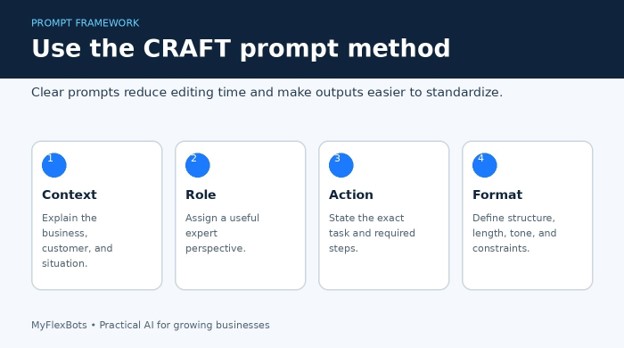
When teams ask how to use ai for your business consistently, prompt standards are one of the fastest ways to reduce quality differences. A useful prompt is closer to a work instruction than a search query. It provides context, defines the role, states the task, supplies source material, sets constraints, and describes the expected format.
Use this reusable structure:
| CRAFT prompt template: Context: Explain the company, customer, and situation. Role: Assign a relevant expert role. Action: State the task and steps. Format: Define headings, length, table fields, tone, and reading level. Tests: Require checks for missing facts, unsupported claims, sensitive data, and unclear language. |
Example for a sales follow-up:
| Example prompt: You are a B2B sales coordinator for a web-services company. Using only the meeting notes below, draft a 160-word follow-up email. Include the customer’s stated goals, three agreed next steps, owner and due date for each action, and one clear call to action. Do not invent prices or promises. If a required fact is missing, place it under “Information needed” instead of guessing. |
| Pro-Tip: Save approved prompts in a shared library with a name, owner, version date, permitted data, sample input, sample output, and review checklist. |
Add Human Review and Quality Checks
AI can produce confident errors, outdated details, missing context, or language that does not match your brand. Human review should be designed into the workflow rather than added after a public mistake.
Create a checklist that matches the task:
Are all names, dates, numbers, prices, and claims accurate?
Does the output rely only on approved information?
Does it disclose uncertainty instead of inventing an answer?
Is the tone appropriate for the customer and channel?
Does it contain personal, confidential, copyrighted, or restricted content?
Does a qualified person need to approve the decision?
Has the final output been stored in the correct system?
The NIST AI Risk Management Framework offers a voluntary structure for managing AI risk and trustworthiness across the system lifecycle. Review the NIST AI Risk Management Framework.
Run a Controlled 30-Day Pilot
This controlled approach shows how to use ai for your business without exposing every customer or employee to an unfinished process. A pilot should use a narrow group, a fixed workflow, clear success measures, and a method for recording failures. Do not release the tool to the entire business after one impressive example.
Select 2–5 employees who understand the process.
Train them on approved inputs, prompts, review steps, and prohibited data.
Process a small number of real cases with human approval.
Record time spent, edits made, errors found, and customer impact.
Meet weekly to review exceptions and update the prompt or process.
Compare the pilot with the original baseline after 30 days.
| 💡 Quick Hack: Run the old and new process in parallel for the first 10–20 cases. This exposes missing steps without risking customer delivery. |
Measure ROI With a Practical Scorecard
Businesses often overestimate AI savings by counting generated drafts rather than completed, approved work. Measure the entire process, including prompt preparation, review, corrections, integration failures, and employee training.
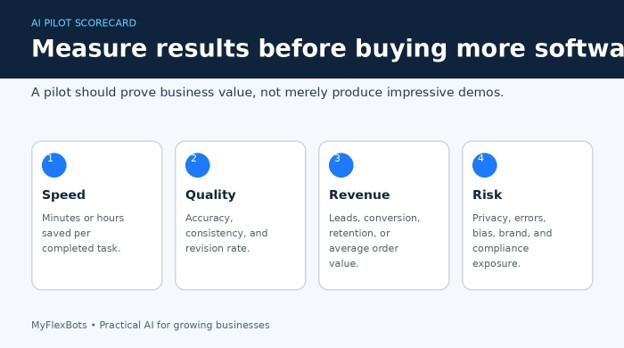
Caption: Measure speed, quality, revenue, and risk so a pilot is judged on business outcomes rather than impressive output.
Suggested Unsplash Markdown placeholder: 
Cycle time: total minutes from trigger to approved completion.
Cost per completed task: labor plus software and implementation costs.
Revision rate: percentage of outputs requiring major correction.
Accuracy rate: percentage meeting the approved checklist.
Adoption rate: percentage of eligible tasks using the workflow correctly.
Customer outcome: response time, satisfaction, conversion, retention, or complaints.
Risk events: privacy issues, incorrect claims, missed approvals, or security incidents.
A simple ROI estimate is: annual labor savings plus measurable revenue gain minus annual software, setup, training, and oversight costs. Use conservative assumptions. A workflow that saves five minutes occasionally may not justify another platform.
Train Employees Without Creating Fear
Training is central to how to use ai for your business because safe adoption depends on daily employee choices, not software settings alone. Employees need practical rules, examples, and reassurance. When leadership introduces AI as a mystery tool or a job-cutting program, staff may hide experimentation, resist adoption, or use unsafe personal accounts.
A useful training session should cover:
What the approved tool can and cannot do.
Which business problems the pilot is intended to solve.
What data is prohibited.
How to write and use the standard prompt.
How to verify facts and document changes.
How to report a bad output or security concern.
Who remains accountable for the final result.
| Pro-Tip: Train employees with real examples from their daily work. A 45-minute workshop using actual tasks is more useful than a two-hour lecture about AI history. |
Scale the Workflow Carefully
The next stage of how to use ai for your business is controlled expansion based on evidence, ownership, and documented standards. Once you know how to use ai for your business in one controlled workflow, scaling becomes a process-management job. Document the approved version, assign ownership, monitor quality, and expand to a second team only when the first workflow is stable.
Publish the standard operating procedure and review checklist.
Create role-based access and remove unused accounts.
Set monthly quality and cost reviews.
Track vendor changes to models, terms, pricing, and retention.
Maintain a rollback method if quality drops.
Add new use cases one at a time instead of launching a company-wide collection of disconnected tools.
Common Mistakes to Avoid
Buying tools before defining the workflow: The result is overlapping subscriptions and unclear ownership. Start with a measured problem and use the smallest tool that solves it.
Using poor or outdated source material: AI scales inconsistency. Clean templates, FAQs, product data, policies, and naming conventions before connecting them.
Allowing unreviewed customer-facing output: A fluent answer can still be wrong. Require approval for quotes, promises, legal statements, financial advice, and sensitive support cases.
Ignoring privacy and vendor terms: Convenience is not permission. Review data use, retention, access, training, and deletion terms before uploading company information.
Measuring output instead of outcomes: Ten drafts are not ten completed jobs. Measure approved completion time, error rate, customer results, total cost, and risk.
Advanced Tips and Next-Level AI Hacks
Build a small internal knowledge system
Organize current policies, approved answers, service descriptions, pricing rules, and process documents in one controlled location. Remove duplicates and mark each document with an owner and review date.
Use structured outputs
Ask AI to return fixed fields, tables, or JSON when another system will use the result. Consistent structure makes automation more reliable and allows missing fields to be detected.
Create an exception queue
Do not force automation to handle every case. Route low-confidence, unusual, high-value, or sensitive cases to a person. A good system knows when to stop.
Separate generation from verification
Use one step to draft and a second step to check required facts, formatting, prohibited claims, and missing information. For high-value tasks, the second check should include a human expert.
Negotiate software after proving volume
Track actual task volume during the pilot. When you know usage, request annual pricing, seat reductions, volume tiers, or a limited package. Do not purchase enterprise capacity based on a sales demo.
| 💡 Quick Hack: Create a “stop doing” list after each pilot. AI value often comes from removing unnecessary steps, not merely completing every old step faster. |
Troubleshooting and Long-Term Maintenance
The output is generic: Add customer context, examples, source material, constraints, and a specific format. Replace vague requests such as “write a proposal” with a step-by-step brief.
The AI invents facts: Restrict it to supplied sources, instruct it to flag missing information, and require a human fact check. Do not ask it to fill gaps creatively in factual work.
Employees produce inconsistent results: Use one approved prompt, a shared source folder, sample outputs, and a review checklist. Train on the same cases and compare results.
The automation breaks: Check whether an app field, permission, file format, or API connection changed. Add error alerts and keep a manual fallback process.
Costs rise unexpectedly: Review seat usage, token or task volume, duplicated tools, premium features, and unnecessary automation runs. Set budget alerts.
Quality drops after a model update: Retest standard cases, compare outputs against the previous baseline, update prompts, and pause high-impact workflows until they pass.
Staff bypass the approved process: Make the safe process easier than the unsafe one. Provide approved accounts, templates, training, and a clear method for requesting new use cases.
Monthly Maintenance Checklist
Review accuracy, revision rate, time saved, complaints, and failed automations.
Remove access for former employees and unused accounts.
Check vendor terms, privacy settings, model changes, and new integrations.
Refresh source documents and archive outdated versions.
Review exceptions to identify new rules or training needs.
Retest high-impact prompts with standard sample cases.
Confirm that the workflow still saves more than it costs.
Frequently Asked Questions
What is the easiest way to start using AI in a small business?
Start with a repeated writing, summarizing, classification, or data-extraction task that is easy for a person to review. Establish the current time and error rate, test one approved tool for 30 days, and measure completed work rather than generated output.
How much does it cost to implement AI in a business?
A basic pilot may cost $0–$30 per user each month, plus employee time. More advanced automation, CRM features, document processing, or custom integrations can cost far more. Begin with a low-cost pilot and expand only after the workflow proves measurable value.
Which business tasks should not be fully automated with AI?
Avoid full automation for high-impact legal, medical, hiring, credit, safety, pricing, and financial decisions unless qualified experts, strong controls, testing, and applicable compliance requirements are in place. AI can support these professionals, but accountability must remain clear.
Can AI replace employees?
AI usually replaces parts of tasks before it replaces complete roles. Businesses get better results by redesigning work: AI handles repetitive preparation, while employees manage judgment, relationships, exceptions, strategy, and final approval.
How can a business protect customer data when using AI?
Use approved business accounts, minimize personal data, review vendor retention and training terms, apply access controls, require multi-factor authentication, and keep sensitive information out of unapproved tools. Consult security, legal, or compliance professionals when the data is regulated.
How long should an AI pilot run?
Thirty days is suitable for a frequent workflow, provided the pilot processes enough real cases. Low-volume tasks may require 60–90 days. The pilot should continue until you have enough evidence on speed, quality, cost, employee adoption, customer impact, and risk.
Conclusion: Start Small, Measure Everything, Scale Carefully
The practical answer to how to use ai for your business is not to automate everything. Choose one valuable workflow, improve the inputs, protect the data, create a repeatable prompt, keep a qualified person responsible, and measure the complete result.
editor's pick
latest video
news via inbox
Nulla turp dis cursus. Integer liberos euismod pretium faucibua


