

AI Tools for Small Business: Practical Guide for 2026
A small business rarely needs more software; it needs fewer hours lost to repetitive work. The right ai tools for small business can draft, summarize, organize, follow up, analyze, and automate routine tasks, but a random stack of subscriptions can just as easily create new costs and new mistakes.
This guide shows you how to choose a lean AI stack, match each tool to a measurable business problem, protect customer data, build quality-control steps, and calculate whether the software is actually paying for itself. You will also get a practical 30-day rollout plan that works for solo operators and small teams without requiring a dedicated IT department.
What Are the Best AI Tools for Small Business?
| The best ai tools for small business are the ones tied to a specific workflow: a secure AI assistant for writing and analysis, an automation platform for repetitive app-to-app work, a CRM or support tool for customer follow-up, and focused tools for design, meetings, or knowledge management. Start with one low-risk process, measure time saved, review output quality, then expand only when the return is clear. |
Essential Tools & Materials Breakdown
Before buying anything, separate “must-have capability” from “nice demo.” A practical stack can start with one general-purpose assistant and one automation layer. Add specialized software only when it removes enough recurring labor to justify another subscription, another integration, and another place where company data lives.
The cost column below reflects publicly listed pricing checked on August 31, 2026. SaaS prices, promotions, included AI allowances, and regional taxes change often, so verify the vendor’s current pricing page before publishing or purchasing.
| Tool | Best For | Estimated Cost | Skill Level | Official Site |
| ChatGPT Business | Research, drafting, analysis, file work, team AI workspace | $20/user/mo annual; $25 monthly; 2-seat minimum | Beginner–Intermediate | Pricing / product |
| Claude Team | Long-form reasoning, documents, projects, team knowledge | $20/seat/mo annual; $25 monthly | Beginner–Intermediate | Pricing / product |
| Google Workspace with Gemini | AI inside Gmail, Docs, Meet, Drive, Sheets | Business Standard $14/user/mo annual; Gemini included | Beginner | Pricing / product |
| Microsoft 365 Copilot Business | AI in Word, Excel, PowerPoint, Outlook, Teams | Promo from $18/user/mo annual through 2026; eligible M365 plan required | Beginner–Intermediate | Pricing / product |
| Zapier | App-to-app automation, AI workflow steps, forms, tables | Professional from $19.99/mo annual | Intermediate | Pricing / product |
| Notion Business | Docs, wiki, projects, AI search and agents | $20/member/mo listed on pricing page | Beginner–Intermediate | Pricing / product |
| Canva | Design, social assets, presentations, AI creative tools | Free available; Business pricing varies by region | Beginner | Pricing / product |
| Grammarly Pro | Writing QA, tone, rewrites, AI-assisted editing | $12/mo listed price | Beginner | Pricing / product |
| Otter Pro | Meeting transcription, summaries, searchable notes | $8.49/user/mo annual or $16.99 monthly | Beginner | Pricing / product |
| HubSpot Breeze | CRM assistance, prospecting, data and customer agents | Free assistant; selected agents use HubSpot Credits/outcome pricing | Intermediate | Pricing / product |
Pricing note: figures are public list prices or vendor-stated starting prices checked August 31, 2026; promotions, taxes, billing terms, AI credits, and regional pricing can change.
1. Start With the Business Problem, Not the AI Tool
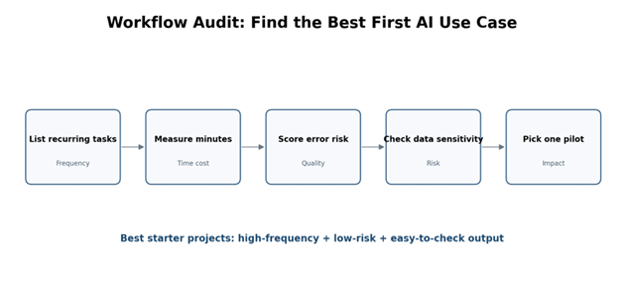
The fastest way to waste money on ai tools for small business is to begin with a product list. Begin with a workflow list instead. For one week, write down recurring tasks that feel repetitive, slow, inconsistent, or dependent on one person remembering to do them.
Useful candidates include answering the same customer questions, turning meeting notes into tasks, drafting social posts, cleaning lead lists, summarizing long email threads, creating product descriptions, preparing first-draft proposals, updating CRM fields, or moving information between forms and spreadsheets.
For each task, record four numbers: how often it happens, how many minutes it takes, how expensive a mistake would be, and how easy the output is to check. Your first AI pilot should be frequent, time-consuming, low-risk, and easy for a human to verify.
| Pro-Tip: Multiply minutes per task × monthly frequency × hourly labor cost. That gives you a rough monthly “manual cost” and a ceiling for what automation should be worth. |
Use a simple impact-versus-risk score
Score each workflow from 1 to 5 for time saved, revenue impact, customer impact, data sensitivity, and error cost. High benefit with low sensitivity is your sweet spot. A draft social caption may be a great first use case; an autonomous system that approves refunds or gives regulated advice is not.
If a task contains payroll data, medical information, identity documents, payment details, confidential contracts, or unreleased product information, treat the security review as part of the project—not as a checkbox after launch.
2. Choose One Core AI Assistant
Most teams should standardize on one primary assistant before adding specialist products. That is the center of a practical ai tools for small business stack because the same workspace can handle drafting, summarization, spreadsheet analysis, research, planning, customer-response templates, and internal documentation.
ChatGPT Business, Claude Team, Gemini through Google Workspace, and Microsoft 365 Copilot each make sense in different environments. The deciding factor is often less about a benchmark and more about where your people already work. A Google-first company gains value from AI inside Gmail and Docs; a Microsoft-first company may gain more from Copilot directly in Office apps. Teams doing heavy document work may prefer a dedicated AI workspace alongside their existing office suite.
Create an approved prompt library
Do not ask every employee to invent prompts from scratch. Store a small set of approved templates for high-frequency work. A good template includes the role, objective, source material, constraints, desired format, brand voice, facts that must not be invented, and a final verification instruction.
For example, a proposal prompt can require the assistant to use only facts from an attached discovery brief, flag missing information, produce a one-page executive summary, and list every claim that needs human confirmation. This turns “prompting” into a repeatable business process rather than personal improvisation.
| Pro-Tip: Save prompts next to the SOP they support. The prompt should never be the only documentation of how a business-critical task works. |
3. Build an AI-Assisted Marketing Engine
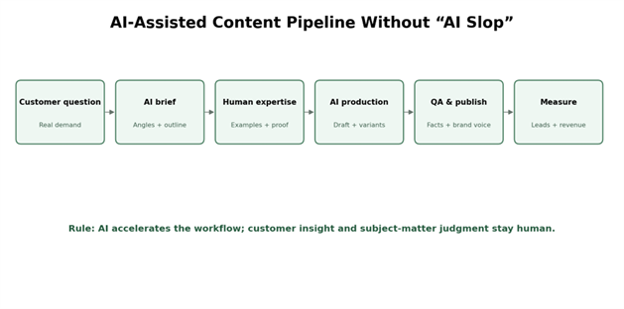
Marketing is one of the easiest places to get value from ai tools for small business, but it is also where low-quality automation becomes visible fastest. AI can speed up research, briefs, outlines, ad variants, social repurposing, email drafts, and content updates. It should not replace original examples, customer insight, fact-checking, or the final brand decision.
A strong workflow starts with real demand: sales calls, support tickets, search queries, product reviews, and customer objections. Feed those inputs into an AI assistant to group themes, identify common questions, and propose content angles. Then add your company’s experience, screenshots, data, expert commentary, and proof before drafting the final asset.
Use Canva for production, not strategy
Canva can dramatically reduce the time required to produce social graphics, pitch slides, short videos, and resized campaign assets. The budget-saving move is to create a small brand kit and a handful of approved layouts first. Once those building blocks exist, AI-assisted creative features are far less likely to generate off-brand output.
For SEO content, the same principle applies: let AI accelerate research organization and first drafts, but build the page around firsthand usefulness. Add comparison logic, decision criteria, real workflows, original screenshots, and limits. Search visitors can tell when a page was produced to fill space instead of answer a business problem.
| Pro-Tip: Turn one strong source asset into five outputs: a long article, an email, three social posts, a short video script, and a sales enablement snippet. Repurposing usually creates more ROI than asking AI to invent five unrelated ideas. |
4. Improve Lead Response and Customer Service
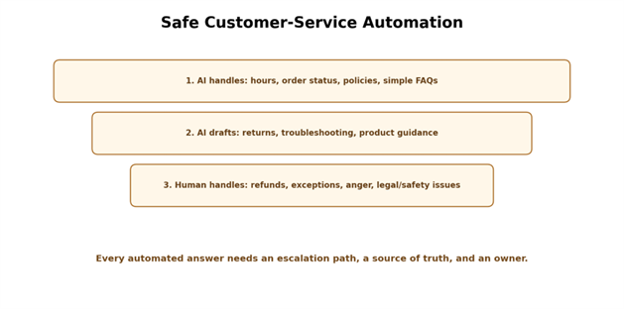
Some of the highest-value ai tools for small business reduce the delay between a customer asking a question and your business responding. A CRM assistant can summarize a contact history, suggest a reply, identify the next action, or prepare follow-up. A support agent can answer approved FAQs, collect basic details, and escalate exceptions.
Start with a “green list” of questions AI is allowed to answer automatically: opening hours, delivery estimates, appointment availability, standard return policy, basic product specifications, and order-status instructions. Create a “red list” that always requires a person: refunds above a threshold, legal threats, safety complaints, payment disputes, custom contract changes, and anything involving regulated advice.
Design the handoff before the chatbot
Automation fails when a system cannot recognize that it is stuck. Define escalation triggers such as repeated questions, negative sentiment, unsupported requests, missing account data, or any request on the red list. The handoff should carry the conversation summary and relevant customer details so the human does not make the customer repeat everything.
If you use HubSpot Breeze or another CRM-native assistant, advantage comes from context: the system can work from customer records rather than a blank chat. That convenience raises the importance of permissions, field hygiene, and clear ownership of CRM data.
| Pro-Tip: Automate acknowledgement before resolution. A fast, accurate “we received this and here is what happens next” response can improve customer experience without letting AI make a risky final decision. |
5. Automate the Repetitive Work Between Apps
A general AI assistant generates output; an automation platform moves work. That distinction is crucial when evaluating ai tools for small business. Zapier and similar tools can watch for a trigger, pass information through an AI step, apply rules, and update the next system automatically.
A simple example: a website form creates a lead, AI classifies the request by service and urgency, the workflow adds the record to the CRM, assigns an owner, drafts a personalized acknowledgement, posts a notification to the sales channel, and schedules a follow-up task if nobody responds within a set window.
The best automation is boring, predictable, and observable. Avoid giant workflows with fifteen actions on day one. Build one path, test it with real edge cases, add error alerts, then extend it.
Use a human approval step for costly actions
When an AI step can send money, publish publicly, change a customer record, delete data, or contact a large audience, insert approval. This is especially important when the preceding input comes from customers, email, or an external form.
Also set hard limits. Cap the number of records processed in one run, restrict what applications the automation account can access, and use a dedicated service account where possible. A workflow should fail safely rather than turn one bad input into 500 bad actions.
| Pro-Tip: Add an “automation log” table with date, trigger, result, owner, and error status. It becomes your fastest troubleshooting tool when someone asks, “Why did the system do that?” |
6. Capture Meetings, Decisions, and Knowledge
Meeting assistants such as Otter can remove the manual job of taking notes and make decisions searchable. The valuable output is not the transcript itself; it is the structured follow-through: decisions, action items, owners, due dates, and unresolved questions.
Create a standard post-meeting workflow. The note tool generates a summary, a person reviews it, approved action items are copied to the project system, and long-term knowledge is moved into a shared wiki or SOP. If everything stays inside raw meeting transcripts, you have created a new archive rather than a better operating system.
Build a source-of-truth hierarchy
Decide which system wins when information conflicts. For example: signed contract over CRM note, current policy page over old meeting transcript, product database over sales email. AI systems are much safer when the business has clear authoritative sources.
Notion Business or another knowledge platform can be useful when your team needs searchable policies, project context, and internal answers. Keep ownership visible: every critical policy page should have an owner and a review date.
7. Protect Data and Set AI Rules Before You Scale
The most important selection criterion for ai tools for small business is not whether the demo looks clever. It is whether your business can use the tool with acceptable privacy, security, reliability, and legal risk. Business plans often provide stronger administration and data controls than consumer accounts, but you still need to configure them correctly.
Create a one-page AI use policy. Define approved tools, prohibited data, when human review is required, who can connect new data sources, how customer-facing output is checked, and how incidents are reported. The policy should be short enough that employees actually read it.
For a more formal framework, use the NIST AI Risk Management Framework as a reference for governing, mapping, measuring, and managing AI risk. The U.S. Small Business Administration also recommends starting small, testing lower-cost options, and considering both benefits and risks. The FTC’s AI resources are worth reviewing when claims, advertising, customer communications, or AI-powered services could create deceptive-practice concerns.
Create a “never paste this” data list
Examples may include passwords, private keys, full payment card data, government ID numbers, highly confidential acquisition plans, restricted HR records, and any client information your contracts prohibit from being shared with third-party processors. Your exact list depends on your industry and agreements.
Then make the safer path easy. Provide approved team accounts, secure connectors, redacted templates, and clear examples of what employees can use. Policies fail when the prohibited option is convenient and the approved option is difficult.
8. Run a 30-Day Rollout Instead of a Company-Wide Big Bang
A controlled rollout makes ai tools for small business easier to evaluate and easier to stop. The goal of the first month is not “AI transformation.” It is proof that one or two workflows save measurable time without creating unacceptable rework or risk.
Week 1: Baseline and select
Pick one team and one workflow. Measure current cycle time, volume, error rate, customer response time, or cost per output. Document the current SOP. Choose the smallest tool set that can address the bottleneck.
Week 2: Configure and test
Set permissions, create prompt templates, define approved data, test ten to twenty real examples, and record failure modes. Deliberately test awkward inputs: incomplete information, angry customer language, duplicate records, unusually long files, and requests outside the process.
Week 3: Limited production
Use the new workflow on a limited share of live work with human review. Track time saved and corrections required. If staff spend as long fixing AI output as they previously spent doing the work, the workflow is not ready.
Week 4: Decide: keep, improve, or cancel
Compare the pilot with the baseline. Calculate software cost, labor saved, quality changes, revenue influence, and risk. Keep only what produces useful evidence. Canceling a tool after a disciplined test is a successful decision, not a failed AI project.
Common Mistakes to Avoid
Mistake 1: Buying overlapping tools
Small teams often end up paying for three products that all summarize, draft, and chat with documents. Map capability overlap before renewal. One strong core assistant plus a focused specialist is usually easier to govern than a pile of redundant subscriptions.
Mistake 2: Automating a broken process
If your lead stages are unclear, your product data is outdated, or nobody owns the customer inbox, AI will accelerate inconsistency. Fix the underlying process first, then automate it.
Mistake 3: Measuring usage instead of results
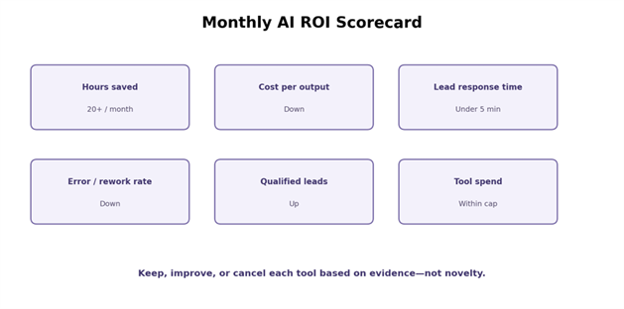
Prompts sent, logins, and generated words are activity metrics. Better metrics include hours saved, response-time improvement, qualified leads, conversion rate, error rate, rework time, and cost per completed output.
Mistake 4: Letting AI publish unchecked facts
Generative systems can produce confident errors. Require source checks for prices, policies, statistics, legal statements, product claims, medical or financial topics, and anything that could materially affect a customer decision.
Mistake 5: Ignoring access after the pilot
Pilots create accounts, API keys, connectors, shared files, and permissions. If the pilot ends, remove them. If it expands, document them. Orphaned integrations are both a security problem and a troubleshooting problem.
Advanced Tips and Next-Level Hacks
Create a small-business AI operating system
Once two or three workflows prove useful, turn your ai tools for small business stack into a managed operating system. Maintain an inventory with tool owner, purpose, connected data, billing owner, renewal date, approved users, and primary KPI. This simple spreadsheet prevents shadow AI and subscription creep.
Standardize reusable assets: prompt templates, brand instructions, approved knowledge sources, escalation rules, automation naming conventions, and QA checklists. The goal is not more AI; it is repeatable work that survives staff changes.
Route tasks to the cheapest acceptable method
Not every task needs the most powerful model or a premium agent. Use deterministic rules for simple routing, spreadsheets for stable calculations, templates for repeated copy, and AI for work that truly benefits from language understanding or flexible reasoning. This reduces both cost and unpredictability.
| Pro-Tip: If a task can be solved with an IF/THEN rule, use the rule. Reserve AI for ambiguity. |
Build evaluation sets for recurring AI work
Save a small collection of representative inputs and the outputs you consider acceptable. Whenever you change a prompt, model, tool, or knowledge source, rerun the set. This turns quality control from “it seems better” into a repeatable comparison.
Use AI to improve SOPs after failures
When a workflow fails, do more than fix the one record. Add the failure mode to the SOP, test case, or escalation rules. Over time, the business becomes more resilient because every mistake improves the process that follows.
Troubleshooting and Maintenance Guide
Problem: AI output is generic or off-brand
Give the system examples, not adjectives. Instead of saying “sound professional,” provide two approved emails, your target audience, banned phrases, preferred sentence length, and the action the reader should take. Add a final instruction to identify where the draft lacks source material.
Problem: the assistant invents facts
Narrow the source set. Ask it to use only attached or linked business documents, require citations or quoted source snippets, and tell it to answer “not found” when evidence is missing. Human verification is still required for material claims.
Problem: automation creates duplicates
Add a unique identifier and a lookup step before record creation. Use idempotent logic where possible: the same trigger should not create a second customer, invoice, or task if it is processed again.
Problem: monthly AI cost keeps rising
Review seat utilization, automation task counts, agent credits, premium model usage, and inactive integrations. Move low-value users to free or lighter tiers, consolidate overlapping tools, and set usage alerts. A tool should have an owner and a KPI before renewal.
Problem: employees stop using the tool
The workflow may be adding steps instead of removing them. Watch one employee complete the task end to end. If they must copy and paste between six windows, manually repair formatting, or hunt for the right prompt, simplify the integration rather than scheduling more training.
Monthly maintenance checklist
- Review active users and seats
- Check failed automations and escalation logs
- Re-test high-risk prompts and customer-facing flows
- Confirm key knowledge pages are current
- Review vendor product or pricing changes
- Compare KPI trend with the pre-AI baseline
- Remove unused connectors, accounts, and API keys
Frequently Asked Questions
What are the best AI tools for a small business?
The best ai tools for small business usually include one secure general assistant, one automation platform, and only the specialist tools needed for your biggest recurring bottlenecks. For many teams, that means an assistant such as ChatGPT, Claude, Gemini, or Copilot plus Zapier, then a focused tool for CRM, design, meetings, or knowledge management.
How much should a small business spend on AI tools?
Start with a small fixed budget tied to one or two use cases. A solo operator can often test useful workflows with free tiers or a few subscriptions. A team should compare monthly software cost with documented labor saved, faster lead response, reduced outsourcing, or revenue impact.
Can AI replace employees in a small business?
AI is better treated as a workflow multiplier than a blanket replacement strategy. It can remove repetitive drafting, classification, summarization, note-taking, and data-moving tasks, while people remain responsible for judgment, exceptions, relationships, accountability, and quality control.
Which business tasks should not be fully automated with AI?
High-stakes decisions, legal or regulated advice, sensitive HR actions, large financial transactions, safety-critical instructions, irreversible deletions, and unusual customer disputes should retain meaningful human review unless your organization has a rigorously validated and compliant system.
How can a small business use AI safely?
Use approved business accounts, limit sensitive data, enforce permissions, document allowed use cases, keep human review for material decisions, log automations, and review vendor privacy and security terms. Use risk-management resources such as NIST AI RMF as a reference.
How do I know whether an AI tool is worth keeping?
Compare it with a baseline. Track hours saved, cycle time, error and rework rate, response time, qualified leads, conversion, customer satisfaction, and total software cost. Keep the tool when the measured business value exceeds its subscription, training, review, and risk-management costs.
When comparing ai tools for small business, score each option on one business outcome rather than on the number of features in the demo. A narrower tool that reliably removes a recurring bottleneck can outperform a broader platform nobody uses consistently.
The most sustainable way to expand ai tools for small business is to add them only after the previous workflow has a baseline, an owner, and a measurable result. This keeps experimentation connected to operating value instead of software novelty.
Conclusion: Build a Smaller, Better AI Stack
The winning approach to ai tools for small business is not to collect every new app. It is to choose a few dependable tools, connect them to well-defined processes, set clear data and review rules, and measure the result against the old way of working.
Start with one repetitive workflow this week. Baseline the time it takes, test one tool, and review the results after 30 days. Which task in your business would you automate first—and what result would make the experiment worth keeping?
editor's pick
latest video
news via inbox
Nulla turp dis cursus. Integer liberos euismod pretium faucibua


