
Best Free Budgeting Apps 2026: Free Money Management Tools
Budgeting fails when the system takes more effort than the money problem it is supposed to solve. The Best free budgeting apps 2026 can remove that friction by showing where your money goes, giving every dollar a job, flagging recurring charges, or creating a shared view for a household—without forcing you into another monthly subscription.
This guide compares genuinely useful free tiers, explains what each app leaves behind a paywall, and shows exactly how to build a budget you can maintain in ten minutes a week. You will also learn how to avoid the “free trial” trap, choose between automatic bank sync and manual entry, and troubleshoot the most common reasons a mobile budget stops matching real life.
What Are the Best Free Budgeting Apps in 2026?
| The Best free budgeting apps 2026 include Rocket Money for automated spending visibility, Empower for a free financial dashboard, Goodbudget for envelope budgeting, EveryDollar for zero-based planning, NerdWallet for an all-in-one money snapshot, and Honeydue for couples. The best choice depends on whether you value bank sync, manual control, shared budgeting, or investment tracking. |
A useful budgeting app should help you make a decision—not simply display yesterday’s transactions. Consumer.gov describes a budget as a plan for how you will spend money each month; that planning loop is more important than any dashboard animation. See the federal budgeting basics.
Best Free Budgeting Apps 2026: At-a-Glance Comparison
| App | Best for | Free type | Bank sync | Key limitation | Availability note |
| Rocket Money | Automated spending + subscriptions | Permanent free tier | Yes | Free tier limits custom category budgets; premium adds deeper controls | U.S.-centric financial connections |
| Empower | Financial dashboard + investments | Free dashboard | Yes | More tracking/analysis than strict envelope budgeting | Best where supported financial institutions connect |
| Goodbudget | Envelope budgeting | Free forever | No on free tier | 10 regular + 10 “more” envelopes; 1 account; 2 devices | Web, iPhone, Android |
| EveryDollar | Zero-based budgeting | Free forever | No on free tier | Manual transactions on free; bank connect is premium | Mobile app is U.S.-only; web may be usable internationally |
| NerdWallet | Spending, bills, net worth, credit | Free basic account | Yes | Designed as a broad financial hub, not a strict envelope system | Primarily U.S.-focused |
| Honeydue | Couples and shared money | 100% free app | Yes | Built for couples; sharing choices matter more than solo controls | Supports institutions across 5 countries |
Essential Tools & Materials Breakdown: Your Budgeting Setup Kit
You do not need special equipment to use the Best free budgeting apps 2026, but you do need a small set of reliable inputs. Treat this like a home project: gather the materials before you start, or you will spend the setup session hunting for numbers and abandon the job halfway through.
| Tool / material | Why you need it | Estimated cost | Skill |
| Smartphone or computer | Runs the budgeting app and gives you a larger screen for initial setup | $0 if you already own one | Beginner |
| Last 30–90 days of statements | Reveals real spending patterns instead of guesses | $0 | Beginner |
| List of recurring bills | Prevents annual/quarterly costs from ambushing the budget | $0 | Beginner |
| Monthly take-home income | Sets the actual ceiling for spending and saving | $0 | Beginner |
| Debt minimums and interest rates | Helps separate required payments from accelerated payoff | $0 | Beginner |
| Two-factor authentication method | Protects an account that may contain linked financial data | $0 | Beginner |
| 10-minute weekly calendar reminder | Turns budgeting into maintenance rather than a monthly rescue mission | $0 | Beginner |
| 💡 Quick Hack: Do not build your first budget from memory. Export or scan the last two full months of transactions and use averages for groceries, fuel and other variable spending. A budget based on actual behavior needs fewer painful corrections later. |
How We Evaluated the Apps
A free budgeting app is valuable only if the no-cost version remains useful after the onboarding glow fades. We prioritized permanent free access, clarity of limits, ease of transaction capture, quality of spending views, cross-device access, data export or portability, shared-budget support, and whether the app helps a user make forward-looking decisions.
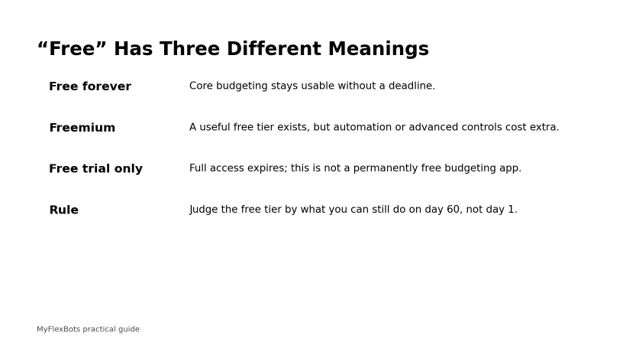
We also separated “free forever” from “free trial.” YNAB, for example, currently offers a 34-day trial and then charges for continued access, so it can be an excellent budgeting system without qualifying as a permanent free app. PocketGuard likewise advertises a seven-day trial for its current paid product. That distinction protects readers from installing an app that becomes unusable just as the first month of budgeting begins.
- Rocket Money — Best for Automatic Spending Visibility
Rocket Money is a strong starting point for people who want the app to do most of the transaction sorting. In a practical Best free budgeting apps 2026 shortlist, it stands out for low-effort spending visibility. Its free tier includes subscription tracking, upcoming bill tracking, net-income tracking, spend tracking, transaction categorization and custom budgeting with a limited number of custom category budgets. That makes it useful for answering two immediate questions: “Where did my money go?” and “Which recurring charges are quietly draining cash?”
The trade-off is customization. Rocket Money’s free plan is intentionally narrower than its paid tiers, so people who want a large number of detailed category budgets, automated savings goals or expanded financial features will encounter the premium wall. The free version is therefore best used as a high-signal dashboard: watch the categories that routinely run hot and use the subscription list as a monthly cleanup tool.
Official source: check current features and terms
- Empower — Best Free Financial Dashboard
Empower is less like a digital envelope and more like a financial control panel. The free Personal Dashboard can connect financial accounts, track spending, analyze investments and support retirement planning. If your bigger problem is fragmented information—checking at one bank, retirement accounts somewhere else and credit cards in a third place—consolidated visibility may be more useful than strict category policing.
Because the product is broad, you still need to decide how you want to budget. Use Empower to establish your monthly cash-flow baseline, then define a few spending ceilings and savings targets you will review weekly. This approach works particularly well for users whose finances are already fairly stable but who want better visibility into net worth, fees and long-term progress.
Official source: check current features and terms
- Goodbudget — Best for Envelope Budgeting Without Bank Sync
Goodbudget turns the classic envelope method into a web and mobile system. The free plan is genuinely free forever and currently includes 10 regular envelopes, 10 additional envelopes, one account, two devices, one year of history and debt tracking. It is an excellent fit for people who learn by actively assigning money rather than passively watching transactions arrive.
The deliberate friction is the point. Automatic bank sync is a premium feature, so free users generally enter or manage money manually. That sounds old-fashioned, but manual entry can build awareness fast: a restaurant purchase becomes a choice against the Dining envelope, not an anonymous line in a feed you will categorize next weekend.
Official source: check current features and terms
- EveryDollar — Best for Free Zero-Based Budgeting
EveryDollar’s free version lets you create a monthly zero-based budget. For readers comparing Best free budgeting apps 2026 through a zero-based lens, the manual free tier is unusually complete. It lets you, customize unlimited budget categories and lines, manually track transactions, create sinking funds, split transactions and set bill due dates. The core method is simple: plan income, assign it across categories until the amount left to budget reaches zero, then track spending against the plan.
Bank connection is a premium feature, so the free experience is intentionally manual. The mobile app is only available through U.S. app stores, while Ramsey notes that people outside the United States may still be able to use the free browser version. That availability caveat matters for a global audience; do not recommend the mobile app as universally downloadable.
Official source: check current features and terms
- NerdWallet — Best for an All-in-One Free Money Snapshot
A basic NerdWallet account is free and can link financial accounts to track spending and income, show upcoming bills, monitor net worth and provide a TransUnion VantageScore 3.0 for eligible users. It is a practical choice for someone who wants budgeting to sit beside credit and broader money-management information rather than live in a dedicated envelope system.
The advantage is convenience; the limitation is philosophy. NerdWallet is a financial hub, not a strict “give every dollar a job” method. If you choose it, create explicit monthly targets for only the categories that tend to drift—groceries, eating out, transport, shopping and entertainment—then use the broader dashboard to monitor cash flow and bills.
Official source: check current features and terms
- Honeydue — Best Free Budgeting App for Couples
Honeydue is designed around shared money rather than adapting a solo app for two people. The app is free, supports account connections across thousands of institutions in several countries, coordinates bills, allows in-app discussion around transactions and lets each partner control what is visible.
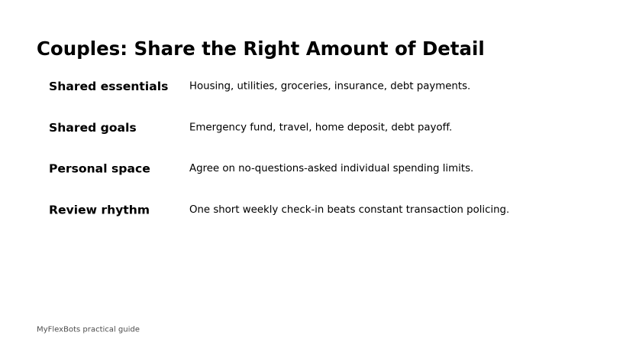
That privacy control is important. A healthy shared budget does not require both people to expose every personal transaction. Couples can agree to share balances and household categories while keeping some personal spending separate. The app becomes a communication layer: who pays which bill, how shared goals are progressing and whether the household plan still reflects reality.
Official source: check current features and terms
| Pro-Tip: If you are comparing apps, use the same 20 real transactions in each candidate. Time how long categorization, correction and review take. The app that looks best in a screenshot may be the slowest one to maintain. |
Comprehensive Step-by-Step Guide: Set Up a Budgeting App That Actually Sticks
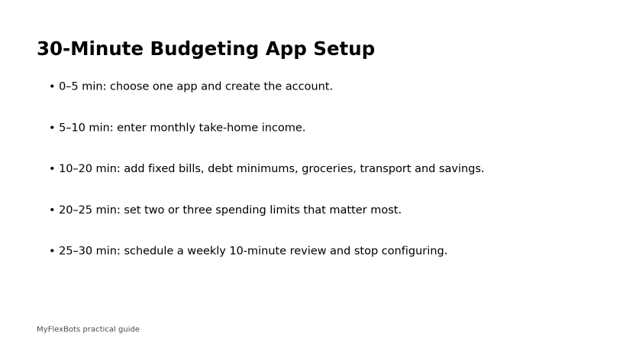
The Best free budgeting apps 2026 only work when the budget beneath them is realistic. Use the sequence below to create a system that survives irregular bills, overspending and the occasional month when life ignores your spreadsheet.
Decide Whether You Want Automation or Awareness
Bank sync saves time, but it can also turn budgeting into passive observation. Manual entry takes more effort, yet it forces you to notice each spending decision. Choose automation if you routinely forget transactions or use several accounts. Choose manual entry if your main goal is to change habits and your spending volume is manageable.
Automatic-sync fit: Rocket Money, Empower, NerdWallet, Honeydue.
Manual-first fit: Goodbudget and EveryDollar free tiers.
Hybrid approach: sync accounts, but manually review every transaction once a week.
Calculate Reliable Monthly Income
Use take-home income, not gross salary. If income changes month to month, calculate a conservative baseline from the last six to twelve months and budget from the lower dependable number. Treat bonuses, overtime and irregular freelance income as money to assign only after it arrives.
Regular salary: use net pay expected during the budgeting month.
Variable income: build the core budget around a conservative floor.
Multiple earners: list each income stream separately so timing is visible.
Lock In Non-Negotiable Expenses
Enter housing, utilities, insurance, debt minimums, childcare, required transport and other essentials before discretionary spending. For bills that change, start with a recent average plus a small buffer. The goal is not perfect prediction; it is preventing optional spending from consuming money already needed for obligations.
Mark due dates for bills that can trigger late fees.
Separate debt minimums from extra debt-payoff goals.
Do not forget annual fees, vehicle registration, school costs or insurance renewals.
Build Sinking Funds for Irregular Costs
A sinking fund turns a predictable “surprise” into a monthly expense. If car insurance costs $600 every six months, budgeting $100 a month is more accurate than pretending the bill exists only twice a year. Use sinking funds for repairs, gifts, travel, annual subscriptions, medical deductibles and school expenses.
List every non-monthly expense you paid in the last year.
Divide the expected annual cost by 12.
Keep the money in a separate savings bucket if the app does not support fund balances.
Set Only a Few Behavioral Targets
Do not create thirty micro-categories on day one. Most households have three to five flexible categories that determine whether the month works: groceries, dining out, transport, shopping and entertainment are common examples. Set realistic targets there first; leave low-risk categories broad until you have a reason to split them.
Choose the categories you most often regret, not the categories that look tidy.
Use last month’s actual spend as the starting point.
Reduce a target gradually—10% is easier to sustain than an arbitrary 50% cut.
Add Savings as a Planned Expense
Savings should not be whatever happens to remain on the last day of the month. Add emergency savings, near-term goals and retirement contributions as planned line items. This mirrors the practical guidance from federal financial education resources: a spending plan should include saving, not treat it as an accident.
Automate transfers shortly after payday when possible.
Name goals specifically: “$1,500 emergency buffer” beats “save more.”
Keep near-term emergency money accessible and separate from everyday spending.
Create a Ten-Minute Weekly Review
A monthly budget without a weekly review is like steering by looking in the rear-view mirror. Pick one fixed day. Categorize uncategorized transactions, check upcoming bills, compare category balances with the days remaining and make one or two adjustments before small problems become expensive ones.
Reconcile refunds, reimbursements and transfers.
Move money intentionally between categories when priorities change.
Check whether a recurring charge appeared that you no longer use.
Close the Month and Roll Forward
At month end, compare planned and actual spending, but do not grade yourself like a school exam. The useful question is why the plan and reality differed. A grocery category that runs 12% high for three straight months probably needs a higher baseline; a category that is consistently underused may be absorbing money better assigned to savings or debt.
Keep notes on unusual months so you do not “correct” for one-off events.
Adjust recurring targets only after you see a pattern.
Carry sinking-fund balances forward rather than resetting them to zero.
| 💡 Quick Hack: Use a “safe-to-spend until Sunday” number for your most flexible category. Divide the remaining monthly amount by the number of weeks left. A weekly number is easier to act on than a large monthly balance. |
For households managing money together, agreement on visibility matters as much as app choice. Honeydue explicitly allows different sharing levels, which can help a couple build a shared plan without turning the budget into surveillance.
Common Mistakes to Avoid
- Confusing a free trial with a free app
A trial can be useful for evaluation, but it is not a permanent budget solution. YNAB currently gives new users 34 days of full access before a paid subscription is required. Check what happens after the trial before you migrate a month of categories and history.
- Creating too many categories
Over-detailed budgets create maintenance work without changing behavior. Start broad. Split a category only when the distinction would lead to a different decision.
- Ignoring irregular expenses
Annual subscriptions, repairs, school fees and insurance renewals are not emergencies simply because they are infrequent. Convert them into monthly sinking-fund contributions.
- Trusting automatic categorization blindly
Apps misclassify transfers, refunds, payment apps, warehouse stores and mixed purchases. Review at least weekly so “shopping” does not absorb groceries or a credit-card payment does not look like new spending.
- Setting fantasy targets
A budget that assumes you will suddenly spend half as much on food is not ambitious; it is inaccurate. Start from real behavior, reduce gradually and redesign routines that drive the spending.
| Pro-Tip: When a category repeatedly fails, change the environment before changing the number. Meal-plan before grocery shopping, remove saved cards from shopping apps, or cancel the delivery membership that makes impulsive ordering frictionless. |
Advanced Tips and Next-Level Budgeting Hacks
Use a two-account structure for cash-flow control
Keep fixed bills and core savings in one checking/savings path and discretionary spending in another account or virtual bucket. The app then becomes a monitoring layer rather than the only barrier between rent money and weekend spending.
Budget by payday when cash timing is tight
A monthly budget can look balanced while the checking account goes negative on the 12th. That is why any Best free budgeting apps 2026 setup should be tested against payday timing, not just month-end totals. Map each paycheck to the bills and expenses due before the next paycheck. The CFPB’s cash-flow tools are useful when timing, not total monthly income, is the main problem.
Track a “true monthly cost” for subscriptions
Divide annual subscriptions by 12 and add them to your monthly cost of living. A $120 annual service is not “free” for eleven months; it is a $10 monthly commitment paid in advance.
Create a 24-hour rule for unplanned purchases
Instead of banning discretionary spending, create a delay. Add the item to a wish list and revisit it the next day. The rule removes urgency while preserving choice.
Measure savings rate, not just category compliance
A perfect grocery category does not matter if the household never builds a buffer. Track the percentage of take-home income going to emergency savings, long-term goals and debt reduction, then improve it gradually.
| 💡 Quick Hack: Put a calendar reminder seven days before every major annual renewal. That gives you time to shop around, cancel or negotiate before the charge hits instead of treating the renewal as irreversible. |
Troubleshooting & Maintenance Guide
Even the Best free budgeting apps 2026 can show the wrong picture when accounts disconnect, transactions duplicate, refunds land late or a couple categorizes shared purchases differently. Troubleshooting should protect the budget’s decision-making value, not chase perfect bookkeeping for its own sake.
Problem: The app balance does not match the bank
Check pending transactions, transfers, cash withdrawals and duplicate imports first. Confirm whether the app displays current balance, available balance or a calculated balance based on imported transactions. If a linked account is stale, reconnect it only after checking that the app will not duplicate history.
Problem: Spending categories look wildly wrong
Search for large merchants that sell multiple types of products, payment processors, peer-to-peer transfers and reimbursements. Create rules where the app supports them, but keep a weekly exception review for mixed purchases.
Problem: The budget says money is available, but the account is short
Your plan may include future income that has not arrived or ignore bill timing. Switch temporarily to payday-based planning and assign only money already received to expenses due before the next paycheck.
Problem: Manual entry becomes exhausting
Reduce category detail and use one weekly batch-entry session. If transaction volume is still too high, move to an app with bank sync rather than abandoning budgeting completely.
Problem: A partner stops using the app
Shrink the shared workflow. Agree on three numbers—shared bills funded, shared goal funded and flexible household spending remaining. One person can maintain detail while both review the same summary.
Problem: You overspend a category every month
Decide whether the target is unrealistic or the habit needs redesign. Raise the target if the spending is necessary; change routines if the spending does not reflect your priorities. Repeated failure is data, not a reason to stop budgeting.
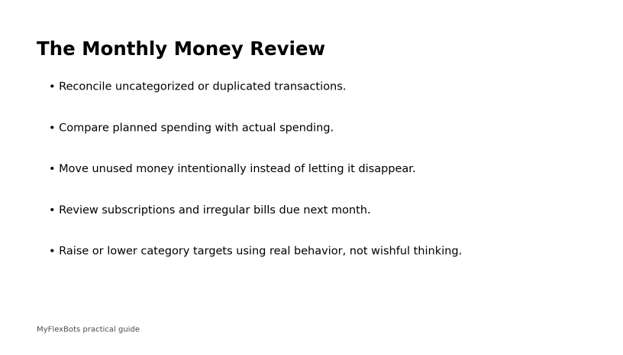
Maintenance is simple: ten minutes weekly, twenty to thirty minutes at month end, and a deeper review every quarter. The quarterly review is where you compare subscriptions, insurance, debt interest, savings goals and recurring services. The FDIC’s Money Smart material reinforces the value of tracking income and expenses and building a spending-and-saving plan around priorities. Explore FDIC Money Smart resources.
Security and Privacy: What to Check Before Linking Your Bank
A budgeting app can be convenient without deserving unlimited trust. Security should be part of every Best free budgeting apps 2026 comparison, especially when bank accounts are linked. Before linking accounts, review the app’s current security page, the financial-data connector it uses, the permissions requested, the process for unlinking accounts and deleting data, and whether multi-factor authentication is available. Use a unique password and protect the email account tied to the budgeting app with MFA as well.
Download apps only from official stores or the company’s verified website.
Never give a budgeting app your bank password through an unexpected email or text link.
If an app only needs read access, be cautious about granting payment or transfer permissions.
When you stop using an app, unlink financial institutions and follow the provider’s data-deletion process.
Review regional availability and privacy terms; bank connectivity often differs by country.
Which Popular Budgeting Apps Are Not Actually Free Forever?
Search results often mix permanent free apps with trial-only products. For this Best free budgeting apps 2026 guide, that distinction is intentional. YNAB offers a 34-day trial and then lists paid monthly or annual subscriptions. PocketGuard’s current pricing page promotes a seven-day trial followed by paid plans. Both may be useful products, but neither should be described as a permanent free budgeting app.
Sources: YNAB 34-day trial • PocketGuard pricing
Frequently Asked Questions
What is the best free budgeting app for beginners?
For beginners who want automation, Rocket Money is easy to understand because it categorizes spending and surfaces recurring charges. Among the Best free budgeting apps 2026, it requires less manual upkeep than envelope-style tools. If you want to learn zero-based budgeting through deliberate manual entry, EveryDollar is a strong alternative. The best beginner choice is the one you can maintain every week without paying for features you do not need.
Is there a completely free budgeting app with no subscription?
Yes. Goodbudget has a permanent free plan with defined limits, EveryDollar has a free version you can use indefinitely, and Honeydue states that its core app is free. Empower also offers its Personal Dashboard free. Features and regional availability can change, so verify the current plan before investing time in setup.
What free budgeting app connects to my bank?
Rocket Money, Empower, NerdWallet and Honeydue offer bank or financial-account connection features in their free experiences, subject to supported institutions and regions. Goodbudget’s automatic bank sync and EveryDollar’s bank connection are paid features, so their free plans are better for users comfortable with manual entry.
What is the best free budgeting app for couples?
Honeydue is purpose-built for couples, with shared account visibility, bill coordination and choices over what each partner shares. Goodbudget can also work well for a household that prefers envelope budgeting and is comfortable with the free plan’s device and account limits.
Are free budgeting apps safe to link to a bank account?
No financial app is risk-free. Use providers with clear security documentation, enable multi-factor authentication, use unique passwords, review connection permissions and remove access when you stop using the service. If linking accounts makes you uncomfortable, a manual-entry app can still provide an effective budget.
Do I need a budgeting app if I already use a spreadsheet?
No. A spreadsheet can be excellent if you update it consistently. Apps mainly reduce friction through mobile entry, bank sync, bill reminders, automatic categories and shared access. Use an app only if it makes the budgeting behavior easier or more reliable than your current spreadsheet.
How often should I check a budgeting app?
A weekly 10-minute review is enough for many households. Check more often if cash flow is tight or income is irregular, and perform a month-end review to adjust targets, roll sinking funds forward and prepare for irregular bills due next month.
Conclusion: Pick the App You Will Still Use in Three Months
The Best free budgeting apps 2026 are not the apps with the longest feature lists. They are the ones that reduce the specific friction between you and a useful money decision. Rocket Money emphasizes automatic visibility, Empower gives you a broad dashboard, Goodbudget makes envelope planning tangible, EveryDollar teaches zero-based budgeting, NerdWallet combines budgeting with a wider financial view, and Honeydue focuses on household collaboration.
Choose one app, import or enter one month of real numbers, set only a few meaningful targets and schedule a weekly review. If the system takes longer to maintain than the decisions it improves, simplify it. A small budget you trust beats an elaborate one you avoid.
editor's pick
latest video
news via inbox
Nulla turp dis cursus. Integer liberos euismod pretium faucibua


