
Best Gaming Chairs 2026: The Fit-First Buying Guide
A gaming chair can look perfect in a product photo and still feel wrong after 45 minutes. The usual reason is not foam quality or brand prestige. It is fit: the seat is too deep, the armrests fight the desk, or the lumbar curve lands in the wrong place.
This guide to the best gaming chairs 2026 is built around that problem. We compare six current standouts, explain what each adjustment actually does, and show you how to measure your body and desk before spending $250, $650, or more than $2,000 on a chair.
Our shortlist uses current manufacturer specifications, August 2026 pricing, ergonomics guidance, warranty information, and practical ownership factors. Prices change often, so treat dollar figures as a research-date snapshot rather than a promise.
Quick Answer: What Is the Best Gaming Chair Right Now?
| Featured snippet answer The best gaming chairs 2026 combine correct body fit, adjustable lumbar support, usable armrests, stable tilt, breathable materials, and a warranty that matches the price. For most buyers, Secretlab TITAN Evo is the strongest all-round pick; Razer Iskur V2 NewGen leads for lumbar support, while Corsair TC100 Relaxed is the value choice. |
Our 2026 Shortlist at a Glance
Our best gaming chairs 2026 shortlist favors fit and usable adjustment over decorative features. A chair can have premium foam and still be a bad buy if your feet float above the floor or its armrests keep you too far from the desk.
| Category | Chair | Price checked | Why it stands out | Best for |
| Best overall | Secretlab TITAN Evo | From about $574 | Three sizes; 4-way L-ADAPT lumbar; 4D armrests; deep recline | Buyers who want a proven, highly configurable all-rounder |
| Best lumbar support | Razer Iskur V2 NewGen | $649.99 | HyperFlex adaptive lumbar; cooling-focused EPU leather; dual-density foam | Long sessions and users who care most about lower-back adjustment |
| Best office-style design | Fractal Design Refine | About $549 | Synchro-tilt; adjustable seat depth; lumbar height/depth; mesh or fabric | Work/gaming rooms where racing-chair styling feels out of place |
| Best for big & tall | AndaSeat Kaiser 4 6D | $549 list | L and XL sizes; pop-out lumbar; 6D armrests; 5-year warranty | Taller or heavier users who need a wider fit range |
| Best budget pick | Corsair TC100 Relaxed | $269.99 list | Roomy seat; 90-160° recline; 2D armrests; fabric or leatherette | Budget-minded buyers who still want a reputable brand and wide seat |
| Best premium ergonomic | Herman Miller x Logitech G Embody | $2,255 list | BackFit; pressure-distributing seat; cooling foam; 12-year warranty | All-day desk users who prioritize ergonomics and long ownership |
Price note: listed prices were checked against manufacturer or current retail information during August 2026. Sales, colorways, regional taxes, shipping, and availability can change.
The 6 Chairs We Would Put on a 2026 Shortlist
- Secretlab TITAN Evo — Best Overall
For a buyer who wants one chair that can handle gaming, work, and relaxed sitting, the Secretlab TITAN Evo remains the safest all-round recommendation in the best gaming chairs 2026 field. Secretlab lists Small, Regular, and XL sizing, a 4-way L-ADAPT lumbar system, 4D armrests, a magnetic head pillow, and a deep recline. Its current comparison page lists the TITAN Evo from roughly the high-$500 range.
Why it works: the size choice matters as much as the feature list. A Small and an XL chair should not simply use the same seat pan with a taller gas lift. Secretlab shapes each size around a different user range, which reduces the chance of buying a chair that is too deep or too wide.
Strong all-round adjustability
Three size choices
Magnetic headrest is easier to position than a strapped pillow
Large ecosystem of replacement and accessory parts
💡 Quick Hack: If your budget is tight, buy the standard upholstery and correct size before paying extra for a licensed design. Fit changes comfort; artwork does not.
Official model page: Secretlab TITAN Evo
- Razer Iskur V2 NewGen — Best for Lumbar Support
Razer launched the Iskur V2 NewGen in January 2026 and priced it at $649.99 in the U.S. The headline feature is its HyperFlex lumbar system, which combines adaptive movement with manual adjustment. Razer also changed the surface material for better heat control and uses a dual-density cold-cured foam seat.
This is the chair to inspect first if lower-back support is your top priority. The best gaming chairs 2026 should let you move the lumbar support to your back, not force your spine to match a fixed bulge. That is where the NewGen design has a clear advantage over basic chairs that rely on a loose pillow.
Adaptive, adjustable lumbar support
Cooling-focused upholstery
4D armrests
Wide shoulder and seat architecture
💡 Quick Hack: Do not crank lumbar depth to the maximum on day one. Start shallow, sit for 15–20 minutes, then increase support one small step at a time.
Official model page: Razer Iskur V2 NewGen
- Fractal Design Refine — Best Office-Style Gaming Chair
Fractal Design took a different route with Refine. Instead of copying a racing seat, it borrows from task-chair design: adjustable seat depth, lumbar height and depth, 4D armrests, and a synchro-tilt mechanism that moves the back and seat together. Fabric and mesh versions have typically sat around $549.
Refine makes sense in a room that doubles as a home office. The mesh version is particularly attractive in warmer spaces, while the padded fabric version gives a more traditional cushioned feel. The trade-off is that its motion system feels more like a premium office chair than a lay-flat gaming recliner.
Synchro-tilt instead of car-seat style recline
Seat-depth adjustment
Mesh and fabric choices
Clean Scandinavian-influenced design
Official model page: Fractal Design Refine
- AndaSeat Kaiser 4 6D — Best for Big and Tall Buyers
The Kaiser 4 6D is one of the easier chairs to shortlist when body size is the main constraint. AndaSeat lists L for roughly 150–180 cm users under 120 kg and XL for roughly 181–210 cm users in an 80–180 kg range. Current list pricing is $549, with promotions sometimes lowering selected variants.
The seat is paired with a pop-out lumbar system, 6D armrests, a magnetic head pillow, and a five-year warranty. Bigger chairs are not automatically better, though. A seat that is too wide can push armrests too far from the body, while a seat that is too deep can prevent shorter users from reaching the backrest.
💡 Quick Hack: If you are between sizes, compare seat depth and minimum seat height before max weight. The ability to reach the floor and use the lumbar support correctly matters every day.
Official model page: AndaSeat Kaiser 4 6D
- Corsair TC100 Relaxed — Best Budget Gaming Chair
Corsair’s TC100 Relaxed is the practical budget pick. Its current U.S. list price is $269.99, and sale pricing can drop lower. You still get a steel seat frame, Class 4 gas lift, a 90–160° back angle, a wide 54 cm seating surface, fabric or leatherette, and a 120 kg / 264 lb rated capacity.
Where does the lower price show? The armrests are 2D rather than 4D or 6D, the included lumbar support is a pillow rather than an integrated mechanical system, and the overall adjustment range is simpler. If those limits match your body and desk, this can be better value than paying twice as much for adjustments you will never use.
Strong value from an established brand
Wide relaxed seat
Fabric option for better breathability
Steep recline for breaks
Official model page: Corsair TC100 Relaxed
- Herman Miller x Logitech G Embody — Best Premium Ergonomic Pick
At a $2,255 U.S. list price, the Embody Gaming Chair lives in another budget tier. The value case is not a huge recline angle or gamer styling. It is the BackFit system, pressure-distributing seat structure, 15–18 inch adjustable seat depth, 16–20.5 inch seat-height range, 300 lb capacity, and a 12-year warranty.
Herman Miller says the gaming version adds an extra seat-foam layer and copper-infused cooling foam while keeping the core Embody ergonomic architecture. For someone who spends eight or more hours at the same desk for work and play, long warranty coverage and replacement support can matter more than the sticker shock suggests.
💡 Quick Hack: Do the ownership math. A $2,255 chair kept for 12 years is about $188 per year before resale value. That does not make it cheap, but it is a better comparison than putting it next to a $250 chair on first-day price alone.
How We Ranked These 2026 Gaming Chairs
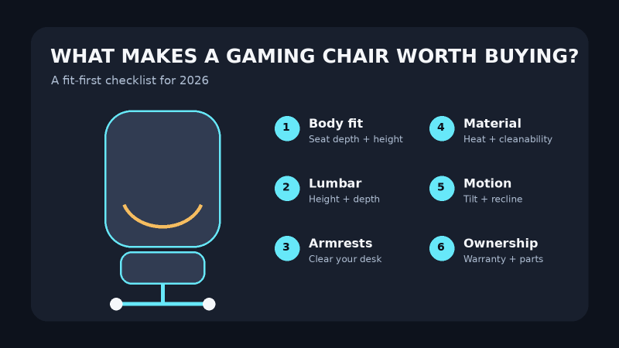
A good chair is a fit system, not a cushion on wheels. We rank features in the order they affect daily use: body fit, lumbar placement, armrest usability, movement, material, stability, warranty, and price. Styling is a tiebreaker, not a starting point.
Fit range: minimum/maximum seat height, seat depth, width, and recommended user range.
Lumbar control: whether support can move in height, depth, or dynamically with the user.
Armrest usefulness: height, width, front/back position, angle, and whether the chair can get close to the desk.
Motion: tilt behavior, recline range, tension control, and locking positions.
Heat management: mesh, fabric, perforation, and foam construction.
Ownership: warranty length, replaceable parts, return window, assembly, and realistic cleaning.
This approach also lines up with OSHA chair ergonomics guidance, which emphasizes back support, seat fit, armrests, adjustability, and a stable five-leg base. For product durability context, BIFMA seating and ergonomics standards are useful reference points.
Essential Tools & Materials Breakdown
You do not need special equipment to choose a chair well. The cheap tools below prevent expensive fit mistakes and help with setup and maintenance after delivery.
| Tool / material | Typical cost | Skill level | What it prevents |
| Tape measure | $5–$15 | Easy | Wrong seat depth, height, desk clearance |
| Bathroom scale | Usually already owned | Easy | Buying below the rated user capacity |
| Straight ruler / book | Free–$5 | Easy | Estimating knee clearance and seat-depth gap |
| Footrest (optional) | $20–$50 | Easy | Dangling feet when desk height forces a higher seat |
| Microfiber cloth | $5–$10 | Easy | Abrasive cleaning damage |
| Small vacuum / soft brush | $20–$60 or already owned | Easy | Dust in mesh, seams, and caster tracks |
| Correct hex keys / tools | Usually included | Easy | Loose fasteners and stripped bolts |
Step-by-Step: How to Choose a Gaming Chair That Actually Fits
This is the part most buying guides rush. The best gaming chairs 2026 are only “best” inside the body size, desk height, climate, and budget they were designed to serve. Work through these steps before you compare colorways.
Set a Real Budget, Including Ownership
Use three price bands as a starting point: roughly $200–$350 for a solid budget chair, $500–$700 for premium gaming designs, and $1,000+ for high-end ergonomic task chairs. Then add shipping, return costs, replacement arm pads, and any floor protection you need.
💡 Quick Hack: If two chairs fit equally well, favor the one with the longer useful warranty and available spare parts. A cheap chair that needs full replacement after two years can cost more than a midrange chair kept for five.
Measure Your Body and Desk
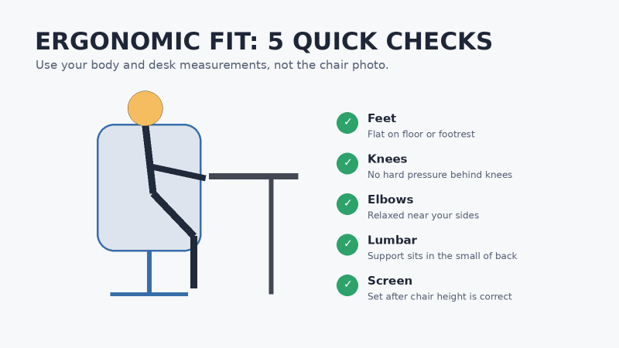
Sit on a firm chair with your feet flat. Measure from the floor to the crease behind your knee for a rough seat-height target. Then measure from your back to the back of your knee. Your chair seat should support most of the thigh without pressing hard into the knee crease.
Next, measure the underside of your desk. A great chair can become a bad workstation if thick armrests stop it from sliding close enough to the keyboard. This is why width-adjustable or removable armrests are more useful than flashy armrest materials.
For a wider workstation check, see the Cornell computer workstation ergonomics guidelines. Cornell also notes that a slightly reclined working posture can reduce static muscle loading compared with forcing an upright 90-degree pose all day.
Match Seat Height Before Anything Else
Start with the lowest and highest seat-height specifications. You need a setting that lets your feet rest flat while your thighs stay roughly level and your shoulders remain relaxed at the desk. If your desk is fixed and too tall, a footrest can be a smarter fix than buying an extra-tall chair.
A chair that cannot go low enough is especially frustrating for shorter users. It creates a chain reaction: feet dangle, pressure builds under the thighs, the pelvis rolls, and you may lean forward away from the backrest.
Check Seat Depth and Front-Edge Pressure
Seat depth is the forgotten spec. Too deep, and you either lose lumbar contact or the seat edge presses into the backs of your legs. Too shallow, and your thighs lose support. An adjustable sliding seat pan is one of the most useful premium features because it lets the same chair fit more leg lengths.
💡 Quick Hack: If a chair has no seat-depth adjustment, compare the published depth against a chair you already find comfortable. This five-minute comparison is more useful than reading another 100 customer reviews.
Treat Lumbar Support as a Positioning Tool
More lumbar pressure is not always better. You want the support to meet the natural inward curve of your lower back without pushing your ribs forward. Height adjustment is essential if the lumbar curve otherwise lands too high or too low.
Integrated systems such as Razer’s adaptive lumbar, Secretlab’s 4-way support, Fractal’s height/depth control, and Embody’s BackFit architecture solve this in different ways. A pillow can still work, but it moves more easily and is harder to tune precisely.
Make the Armrests Serve the Desk
Armrests should let the shoulders relax and elbows stay close to the body. They should not force your forearms outward or keep you too far from the keyboard. Height is the minimum adjustment. Width becomes important if you have narrow or broad shoulders, while front/back movement helps under deep desks.
Do not assume 6D is automatically better than 4D. A well-positioned 2D armrest can beat a loose, wobbly 6D design. Range, stability, and desk compatibility matter more than the marketing number.
Choose Upholstery for Heat and Cleaning
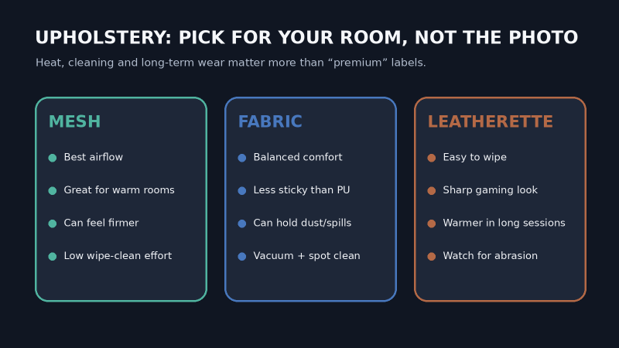
For buyers comparing the best gaming chairs 2026 in warm rooms, upholstery can matter as much as foam. Mesh moves the most air. Fabric tends to feel less sticky than leatherette. Leatherette is easy to wipe but can trap more heat during long sessions.
Mesh: strongest airflow, little spill absorption, firmer feel, and dust can collect in the weave.
Fabric: comfortable and quieter against clothing, but it needs vacuuming and careful spot cleaning.
Leatherette: easiest everyday wipe-down, strong visual finish, but heat and surface abrasion are the key long-term concerns.
💡 Quick Hack: If your room regularly runs warm, spend on breathable upholstery before spending on an RGB accessory. Heat discomfort will push you out of a chair faster than almost any cosmetic feature.
Understand Tilt vs Recline
Gaming chairs often advertise huge recline angles because the number is easy to market. For long work and gaming blocks, smooth movement is usually more useful. A synchro-tilt chair changes the seat and back angle together, while a traditional racing-style chair may keep the seat flatter and move the backrest separately.
If you watch movies or take breaks in the chair, deep recline is useful. If you spend most of the day typing, a stable upright zone plus controlled rocking can matter more.
Read Warranty and Return Terms Before Checkout
A chair is heavy, awkward to re-box, and expensive to return. Look for the return window, who pays return shipping, whether assembly changes return eligibility, and how damaged parts are handled. Warranty length is helpful, but warranty scope matters more.
Herman Miller’s Embody Gaming Chair is notable for a 12-year warranty. AndaSeat advertises five years on Kaiser 4. Corsair lists two years for TC100 Relaxed. These differences matter if you expect daily, multi-hour use.
Assemble, Then Tune One Variable at a Time
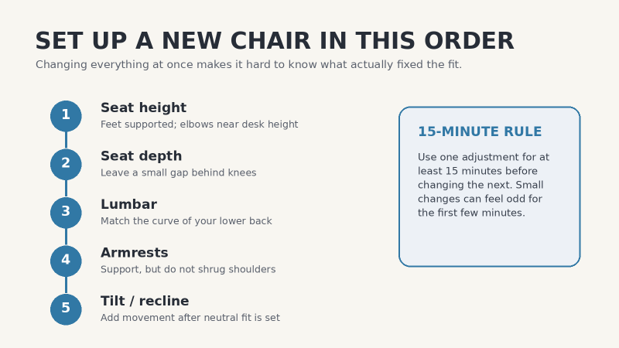
Build the chair on a clean surface, protect hard floors, and do not fully improvise tool sizes. Cross-threaded bolts and overtightened plastic covers are common assembly mistakes. After the chair is stable, tune it in a fixed order: seat height, seat depth, lumbar, armrests, then tilt or recline.
5 Common Gaming-Chair Mistakes to Avoid
Most bad reviews of the best gaming chairs 2026 come from two different problems: the product is genuinely poor, or the product is wrong for the buyer. These five checks reduce the second problem.
- Buying by height and weight only
Two people at the same height can have different leg and torso proportions. Check seat depth, minimum height, backrest shape, and armrest spacing as well as the weight rating.
- Choosing the widest seat “for comfort”
Extra width can move the armrests too far out and make the chair feel unsupportive. Buy enough room to move, not the widest possible shell.
- Treating lumbar pressure like a strength setting
Maximum lumbar depth is not a badge of good posture. The correct setting is the one that supports your natural curve without forcing you forward.
- Ignoring desk clearance
Armrests that hit the desk can make you lean forward for hours. Measure the desk before buying, especially with thick tabletops, keyboard trays, or drawers.
- Throwing away packaging immediately
For a large chair, original packaging can make an early return far easier. Keep boxes and protective foam until you are sure the fit works and the chair has no defects.
Advanced Tips and Next-Level Hacks
Once you have narrowed the best gaming chairs 2026 to two or three models that fit, small choices can improve comfort without increasing your budget much.
💡 Quick Hack: Use a footrest to solve a desk-height mismatch. If the desk forces the seat higher than your legs prefer, supporting the feet is cheaper than replacing a good chair.
💡 Quick Hack: Create two saved sitting modes: an “active” setup for keyboard/mouse play and a slightly reclined “controller” setup. Your back gets movement without random slouching.
💡 Quick Hack: Put the money into adjustment range before luxury upholstery. A correct $550 fabric chair usually beats an $900 special-finish version that fits exactly the same.
💡 Quick Hack: For shared setups, prioritize fast, obvious controls. A chair with perfect adjustment that nobody bothers to reset is not actually ergonomic for multiple users.
💡 Quick Hack: Check replacement caster and arm-pad availability before buying. These are high-wear parts and can extend useful chair life for little money.
Gaming Chair vs Ergonomic Office Chair: Which Is Better?
There is no automatic winner. Gaming chairs often provide deeper recline, head pillows, bold styling, and wider availability around $250–$700. Premium office chairs usually put more engineering into synchronized movement, pressure distribution, long warranties, and lower-profile designs.
The crossover is growing. Fractal Refine looks like a task chair with gaming proportions. Embody Gaming is an office chair tuned for gaming. Razer and Secretlab are adding more sophisticated lumbar systems. Choose by fit and movement, not the category printed on the box.
Troubleshooting and Maintenance Guide
Even the best gaming chairs 2026 can feel wrong if setup drifts or fasteners loosen. Work through the symptom first; do not replace parts at random.
Lower-back soreness after 30–60 minutes
Reduce lumbar depth one step.
Move lumbar support slightly lower or higher.
Recheck seat depth; if the seat is too deep, you may be sitting forward away from the backrest.
Add short movement breaks instead of forcing one posture for hours.
Pressure behind the knees
Lower the seat if your feet do not rest flat.
Shorten adjustable seat depth.
Use a footrest if desk height prevents lowering the chair.
Make sure the seat front edge is not digging into the leg.
Shoulder or neck tension
Lower armrests if they make you shrug.
Move armrests inward if your elbows flare outward.
Bring mouse and keyboard closer.
Adjust monitor after the chair is set, not before.
Chair feels hot or sticky
Use a breathable fabric cover only if it does not interfere with lumbar shape.
Improve room airflow.
Wear smoother, breathable clothing for long sessions.
Choose fabric or mesh next time if heat is a recurring issue.
Wobble or clicking
Check visible fasteners with the correct tool.
Inspect whether play comes from armrests, tilt mechanism, or casters before tightening everything.
Do not overtighten bolts into plastic or soft threaded inserts.
Contact the manufacturer if the tilt mechanism or gas lift develops abnormal play.
Chair slowly sinks
Confirm the height lever is not being pressed by another component.
If the gas cylinder cannot hold height, treat it as a part failure rather than a posture problem.
Use the warranty or an approved replacement cylinder; do not modify a pressurized gas lift.
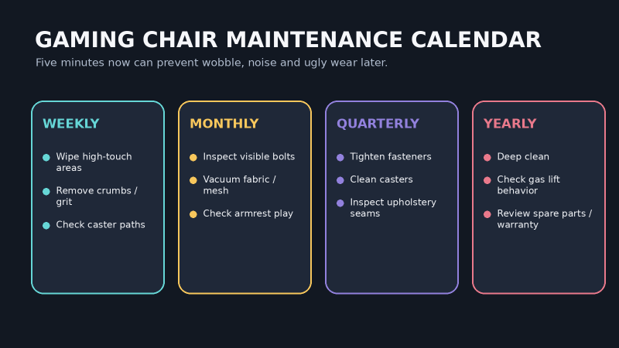
Simple Maintenance Schedule
Weekly: wipe high-touch surfaces and remove grit from the seat and caster path.
Monthly: vacuum fabric or mesh, inspect armrest play, and check visible bolts for obvious loosening.
Every 3–6 months: clean caster axles, inspect seams, and retighten fasteners only to the manufacturer’s recommended feel/torque if specified.
Yearly: deep clean with material-safe products, check gas-lift behavior, review warranty status, and replace worn caster or armrest components when approved parts are available.
| Safety note Do not open, drill, heat, or attempt to rebuild a pressurized gas-lift cylinder. Replace a failed cylinder with the correct approved part or use manufacturer service. |
Frequently Asked Questions
Which gaming chairs are best for long sessions in 2026?
For long sessions, prioritize a chair that matches your leg length and desk height, provides adjustable lumbar support, and lets your arms relax near the keyboard. Secretlab TITAN Evo is a strong all-rounder; Razer Iskur V2 NewGen is stronger for lumbar tuning; Embody Gaming is the premium ergonomic option.
Is a gaming chair better than an office chair?
Not by default. Gaming chairs often offer deeper recline and gamer-focused styling, while ergonomic office chairs may provide better synchronized movement and longer warranties. The better chair is the one that fits your body, desk, and sitting habits.
How much should I spend on a good gaming chair?
A sensible range is about $200–$350 for reputable budget models and $500–$700 for premium gaming chairs with better lumbar and armrest systems. Above $1,000, you are often paying for higher-end ergonomics, materials, service, and longer warranty coverage.
Are gaming chairs good for back pain?
A chair cannot diagnose or treat back pain. Adjustable lumbar support and good fit can reduce awkward sitting positions, but persistent or severe pain deserves professional medical advice. Do not use a chair purchase as a substitute for evaluation of ongoing symptoms.
Should I choose mesh, fabric, or leatherette?
Choose mesh for maximum airflow, fabric for a soft and less sticky surface, and leatherette for easy wiping and a traditional gaming look. Climate and cleaning habits matter more than which material is marketed as premium.
How long should a gaming chair last?
Useful life varies with user weight, hours per day, materials, moving parts, and replacement-part availability. Warranty length is a useful ownership signal: current examples range from two years on the Corsair TC100 Relaxed to 12 years on Herman Miller’s Embody Gaming Chair.
Final Verdict: Buy for Fit, Then Features
The best gaming chairs 2026 are not a single shape or price. Secretlab TITAN Evo is our broadest all-round recommendation, Razer Iskur V2 NewGen is the lumbar specialist, Fractal Refine is the clean office/gaming crossover, AndaSeat Kaiser 4 6D serves larger users well, Corsair TC100 Relaxed covers the budget end, and Embody Gaming is the long-warranty premium choice.
Before you buy, measure your knee height, usable seat depth, desk clearance, and armrest needs. Then choose the simplest chair that fits those numbers and gives you room to adjust as your posture changes through the day.
Your turn: which matters most in your setup—lumbar support, breathability, a wider seat, deep recline, or long warranty coverage? Share your priority in the comments so MyFlexBots can expand the next update around real buyer needs.
editor's pick
latest video
news via inbox
Nulla turp dis cursus. Integer liberos euismod pretium faucibua


