
Best Password Manager Apps Free 2026: Top Picks
One forgotten password can derail an entire morning, while reusing the same password across shopping, email, and banking accounts can turn one breach into several. This guide to Best password manager apps free 2026 identifies genuinely useful free tools, explains their limits, and shows how to move your accounts into a safer system without paying a subscription.
A free password manager should not be judged by how impressive its premium plan looks. The real questions are whether the free tier saves enough logins, works on your devices, protects the vault properly, and makes secure habits easier than insecure shortcuts.
What Is the Best Free Password Manager in 2026?
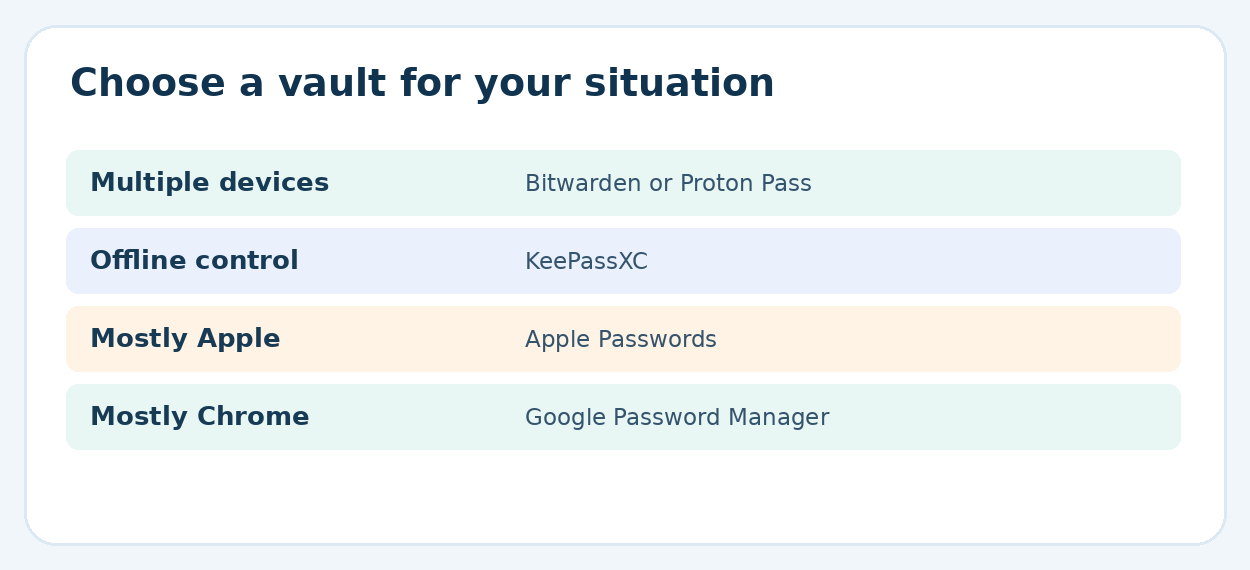
Bitwarden is the strongest all-round free choice for people who want unlimited stored logins and access across devices. Proton Pass is an excellent privacy-focused alternative with free email aliases. KeePassXC suits users who prefer an offline, locally controlled vault. Built-in Apple, Google, and Firefox tools work well within their ecosystems.
How We Compared the Free Plans
The recommendations evaluate publicly documented free features, supported platforms, restrictions on simultaneous use, migration methods, passkey capability, and account recovery expectations. They are editorial comparisons rather than claims that MyFlexBots independently penetration-tested encryption implementations or tested every device combination.
Features and free allowances can change without notice. Readers should check each provider’s official plan page before migrating a large vault, especially when they need shared vaults, file attachments, authenticator codes, or advanced security reports.
For readers comparing **Best password manager apps free 2026**, the table below shows both practical strengths and the catch in each free offer.
Top Free Password Managers at a Glance
| App | Best for | Free-plan strengths | Important limitation |
| Bitwarden | Best overall | Unlimited vault items; multi-device access | Some advanced 2FA and reports paid |
| Proton Pass | Privacy features | Unlimited logins/devices; 10 email aliases | Many advanced features paid |
| KeePassXC | Offline control | Free local encrypted database | Manual backup/sync responsibility |
| Google Password Manager | Chrome/Android users | Built into Google ecosystem | Less independent from platform |
| Apple Passwords | Apple users | Built in; passkeys and codes | Most seamless on Apple devices |
| Firefox Password Manager | Firefox users | Built-in browser autofill and sync | Browser-centric workflow |
| NordPass Free | Single-device users | Secure storage and autofill | No simultaneous multi-device access |
- Bitwarden — Best Overall Free Password Manager
Bitwarden earns the overall pick because its free individual plan provides unlimited logins, notes, identities, and payment cards, plus access on multiple devices. That covers the core requirements of a student, freelancer, or household member who uses a phone and laptop every day.
Its open-source approach and broad ecosystem are useful for readers who may switch operating systems later. Password generation and autofill remove the main reason people reuse weak credentials: convenience. Set up the browser extension on the computer and mobile autofill on the phone, then validate both with a low-risk account before importing everything.
The tradeoff is that some advanced protections and conveniences live in Premium. Free users should not assume bundled TOTP authenticator functionality, emergency access, or encrypted file attachments are included. Best password manager apps free 2026 rankings should always distinguish free essentials from paid extras.
Best for: Windows/Android/iOS/macOS combinations, power users, and anybody expecting to change devices. Official details:
Bitwarden personal plan features
- Proton Pass — Best for Privacy-Minded Beginners
Proton Pass combines an approachable vault with unlimited free logins across unlimited devices. The free plan includes a password generator, passkeys, alerts for reused or weak credentials, and 10 hide-my-email aliases, which can help reduce exposure of a primary inbox when creating accounts for shops or newsletters.
An alias is not a substitute for avoiding suspicious sites. It simply limits how often the real email address is handed out and can make unwanted messages easier to manage. Proton also makes clear that several advanced functions—including broader sharing and some monitoring capabilities—are paid.
Best for: people who frequently register new accounts and want both password storage and basic email privacy. Official details:
Proton Pass free-plan features
- KeePassXC — Best Free Offline Password Vault
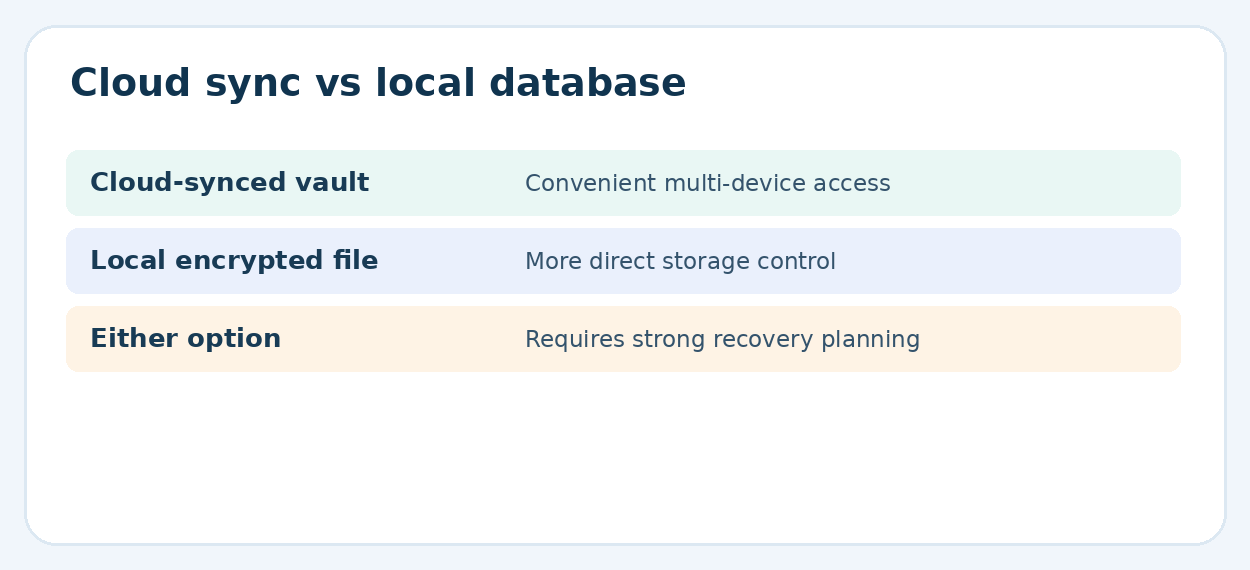
KeePassXC is a different kind of recommendation: rather than relying on a vendor-hosted account, it manages an encrypted database file controlled by the user. That can appeal to technically confident readers, those who travel with limited connectivity, and anyone who wants to choose their own storage and backup locations.
The freedom comes with responsibility. A misplaced master password, damaged database, or poorly managed copy could lock a person out. Keep separate encrypted backups, test recovery periodically, and avoid storing the only backup beside the laptop that could be lost. KeePassXC offers desktop apps and browser integration, but mobile usage requires careful selection of compatible third-party software.
Best for: offline-first desktop users and those comfortable maintaining backups. Official documentation:
- Google Password Manager — Best for Chrome and Android
Google Password Manager is built into Chrome and Android, which means many readers already own the basic tool they need. It stores logins, offers password suggestions, supports autofill, and makes Chrome sign-ins available across devices when synchronization is configured.
A dedicated vault may be more appropriate for someone who regularly jumps between competing browsers, uses shared collections, or wants a more independent workflow. For a person using Android and Chrome almost exclusively, however, the built-in option may avoid needless setup and another account to maintain.
Best for: straightforward Chrome and Android workflows. Official details:
- Apple Passwords — Best for iPhone and Mac Users
Apple Passwords consolidates passwords, passkeys, verification codes, and Wi-Fi credentials. On supported devices, it can generate strong passwords, suggest autofill, and warn about weak or compromised logins. Integration with iCloud Keychain keeps credentials available across signed-in Apple devices.
A Windows PC can also use iCloud Passwords through supported browsers, although the overall experience is particularly integrated with Apple products. People managing a household with different device brands may find a cross-platform standalone manager easier to standardize.
Best for: people whose primary devices are an iPhone, iPad, and Mac. Official details:
- Firefox Password Manager — Best for Firefox Loyalists
Firefox can save and autofill website logins, suggest strong passwords, and synchronize them using a Mozilla account. That makes it a practical no-cost choice for someone who consistently browses in Firefox and wants to reduce credential reuse without installing more software.
The main drawback is its browser-centered nature. Confirm that logins are protected by appropriate device security, consider Firefox Primary Password where available, and set up Mozilla account recovery options. For a family that uses different browsers, moving to a standalone tool may eventually be simpler.
Best for: readers already using Firefox on most devices. Official details:
- NordPass Free — Good Essentials, Important Device Limits
NordPass Free provides secure password storage, autosave, and autofill, but the vendor lists simultaneous multi-device access as a Premium capability. Although free data can sync, switching between devices can require signing in again. That distinction matters more than marketing phrases such as “cross-platform.”
It may still suit a reader who primarily logs in on one machine, but it is a weaker match for someone constantly alternating between office laptop, personal phone, and tablet. Compare the true free workflow, not just the installation compatibility.
Best for: a largely single-device routine. Official details:
Shopping for **Best password manager apps free 2026** does not require paid hardware, but recovery and MFA deserve deliberate planning.
Essential Tools and Setup Materials
| Item | Typical cost | Difficulty | Why it matters |
| Chosen free password manager | $0 | Beginner | Stores and generates unique credentials |
| Updated browser and OS | $0 | Beginner | Security patches and stable autofill |
| Authenticator app or security key | App: often $0; physical key: extra | Intermediate | Adds a second layer to vault and email |
| Recovery-code storage | Paper: minimal; offline storage varies | Beginner | Restores access after device loss |
| Encrypted backup location | Often $0 using existing storage | Intermediate | Essential for local vaults and exports |
| 15–20 minute audit window | $0 | Beginner | Finds password reuse and broken entries |
The simplest filter for **Best password manager apps free 2026** is your actual combination of phones, browsers, and computers.
Choose the Right Vault Before Installing Anything
Start by writing down every device used for sign-ins: phone, personal laptop, work desktop, tablet, and any shared computer. Mark the operating system and preferred browser beside each one. If both phone and desktop matter, eliminate free plans that interrupt concurrent use.
Next, determine whether passwords must work offline or whether automatic cloud sync is more important. A person with an unreliable connection might favor a local database; somebody who changes devices frequently will value reliable sync. Review how account recovery works before registering: a zero-knowledge service may be unable to decrypt a vault if all recovery methods are lost.
💡 Quick Hack: Run a “three-device test” before migrating: save a harmless test login on one device, retrieve it on another, and verify editing works on the third. This reveals frustrating free-tier restrictions early.
Even the **Best password manager apps free 2026** cannot compensate for an exposed master password and no recovery plan.
Create a Strong Vault Password and Secure Recovery
For services with a master password, use a long, unique passphrase that has never protected another account. Length matters: several unrelated words can be memorable without becoming predictable. Avoid birthdays, company names, pet names, or a familiar phrase with a number appended.
Enable multi-factor authentication on the password manager account where supported, preferably using a phishing-resistant method when available. Protect the email account tied to the vault as carefully as the vault itself, since password resets and security alerts often arrive there.
Store recovery codes separately from the only device carrying the app. A paper copy in a safe location may be better than a screenshot inside an unprotected photo library. Make sure trusted household members know where an emergency plan exists without circulating the master password in ordinary messages.
💡 Quick Hack: Write a sealed “account recovery card” containing the provider name, recovery method location, and support URL—not necessarily the secret itself—and revisit it twice a year.
Import Passwords Without Leaving Exports Behind
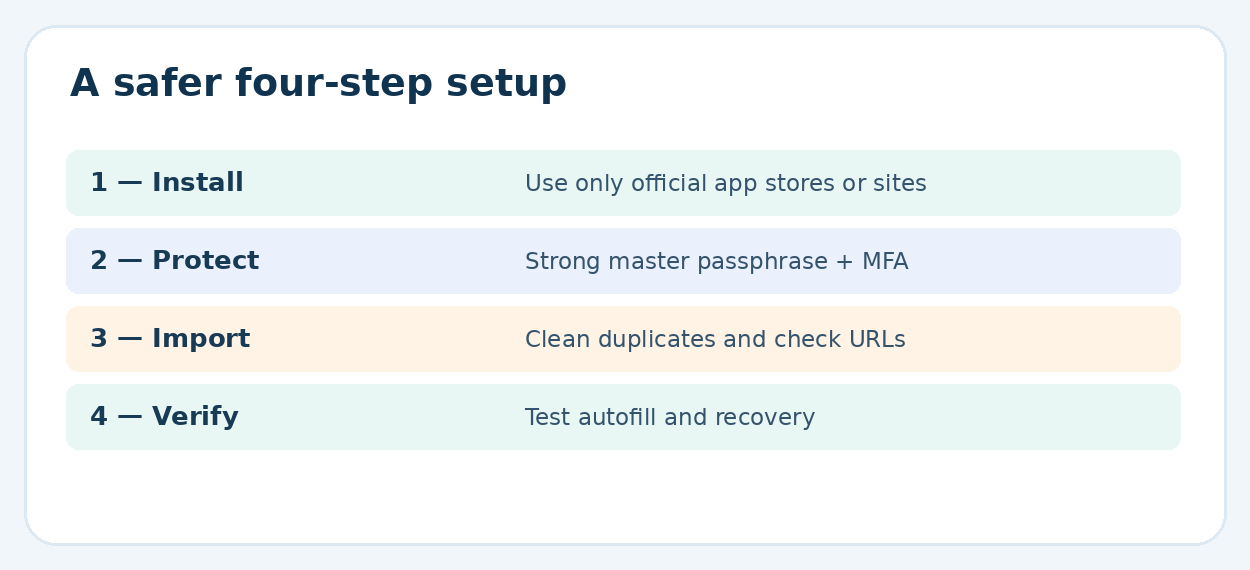
Most browsers can export saved credentials as a CSV file. Such files are commonly unencrypted plain text, meaning anyone who opens the file may see login details. Export only on a trusted device, close cloud-sharing folders, import promptly into the target password manager, then securely remove temporary copies as far as the operating system permits.
Import only one main source first, then inspect the results. Multiple browser exports can create duplicates, old passwords, and several URLs for the same account. Compare account counts and sample high-value accounts—primary email, banking, cloud storage, and social media—before assuming the transfer worked.
Do not immediately wipe browser-saved passwords. First verify the new vault works after a restart, that autofill finds expected logins, and that you can reach the vault on another device. Then disable unnecessary competing autofill systems to avoid selecting outdated credentials by accident.
💡 Quick Hack: Import five low-risk accounts first. If usernames, websites, and special characters land correctly, move the remaining entries in one batch.
The benefit of **Best password manager apps free 2026** grows when old duplicated passwords are actually replaced.
Replace Reused Passwords in Priority Order
A migration is only a storage change until the passwords themselves improve. Start with the primary email account, password manager account, financial services, domain registrars, and cloud storage. Next, update social accounts, online shopping, subscriptions, and forums. The most dangerous pattern is a single password reused across several important services.
Open the real site by typing its address or using a verified bookmark; avoid changing credentials from a link in an unexpected email. Generate a unique password with the manager, confirm the site accepted it, log out, and test a fresh login. Record any account that cannot accommodate modern password lengths and use the strongest allowed option.
💡 Quick Hack: Give every password reset a five-minute “proof of success”: log out, reopen the service in a private window, and confirm the vault proposes the new credential. This prevents a silent mismatch from surfacing during an emergency.
Enable Autofill on Computer and Phone
On desktop, install the extension only from the manager’s official website or a verified browser store page. Check requested permissions and pin the extension where practical. In a phone’s settings, select the intended password autofill provider and approve the permissions it needs. Exact menu names vary by operating-system release.
Test autofill on a regular sign-in page and on a site with a separate username step. Confirm the suggested account matches the genuine domain. A manager that refuses to fill on a suspicious lookalike site can be warning you about phishing, not malfunctioning.
On shared devices, avoid leaving the vault unlocked. Use a short auto-lock interval and biometric unlocking where appropriate. Biometrics improve convenience but do not replace a strong underlying account password or sound device security.
Understand Passkeys and Two-Factor Authentication
A passkey is designed to let the user sign in with a cryptographic credential, commonly unlocked using a device PIN or biometrics, instead of typing a conventional website password. Supported password managers can store or manage passkeys, but actual experience varies by platform, website, and browser. Keep existing recovery options up to date before switching an important account.
Two-factor authentication adds proof beyond a password. If available, favor security keys or authenticator methods over SMS when feasible, though any supported extra factor is generally better than using a password alone. For high-risk accounts, think through what happens if the phone holding authentication codes is lost.
💡 Quick Hack: Keep at least one independent sign-in recovery method for your primary email, rather than having every second factor available only inside the same locked vault.
Five Costly Mistakes Beginners Make
Choosing a “free trial” instead of a free tier
A trial can lock the vault behind a subscription after a deadline. Confirm the account remains usable without payment and check stored-item and device limits.
Reusing a master password
The vault’s protection weakens when its main password is already known elsewhere. Choose a new passphrase and secure the account with MFA.
Leaving unencrypted exports in Downloads
CSV migration files can leak every login. Keep exports temporary, delete all copies, and avoid uploading them into ordinary shared folders.
Keeping competing autofill managers active
An old browser entry may fill even after the new vault is correct. Test one main provider and retire stale entries only after verification.
Ignoring recovery until the phone is missing
Recovery codes, trusted devices, and offline backups are easiest to configure before an accident. Verify the plan while normal access works.
Advanced Tips and Next-Level Security Hacks
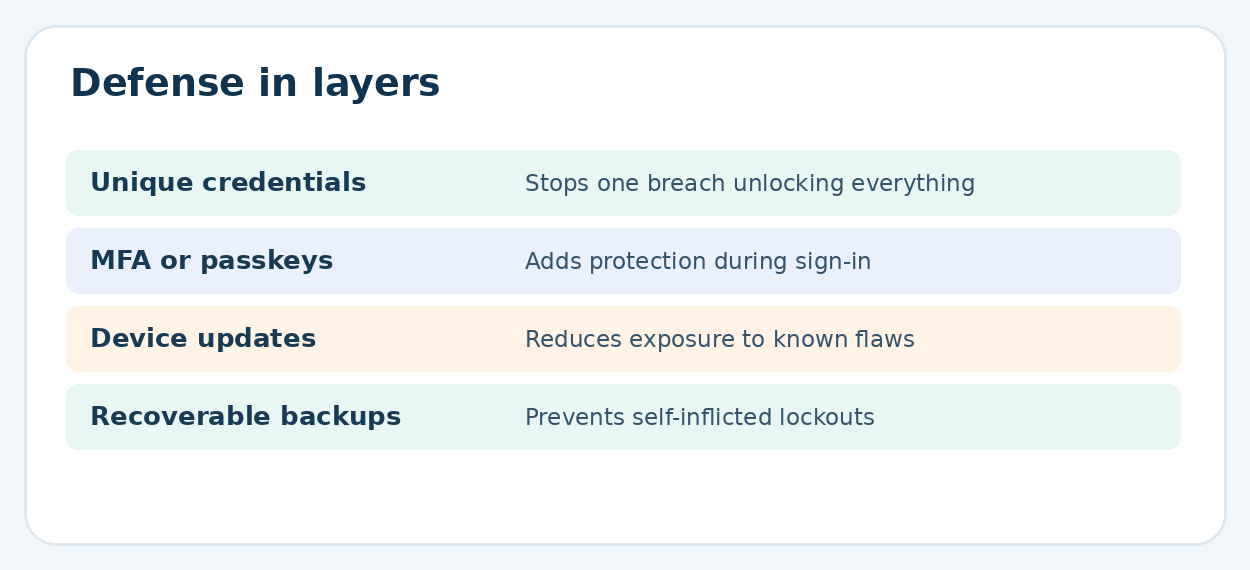
Pro-Tip: Separate identity tiers. Maintain distinct email addresses or aliases for critical financial accounts, everyday shopping, and newsletters. This reduces exposure when a low-trust service suffers a breach and helps sort suspicious mail. Proton Pass’s limited free aliases can be useful for the highest-noise categories.
Pro-Tip: Audit domain matching. When a manager suggests a password for an unfamiliar domain, stop and inspect the address. Attackers often create visually similar domains. Autofill is useful protection, but it is not a substitute for checking the real site.
Pro-Tip: Use a dedicated browser profile for money matters. Separate extensions and bookmarks reduce clutter and make it easier to notice unusual websites. Continue keeping the browser current; profiles are an organizational tool, not a security boundary against malware.
Pro-Tip: Organize high-value accounts. Tag or group finance, hosting, social media, work, and recovery entries. Save accurate recovery URLs and account notes without putting one-time recovery codes into unencrypted notes. This speeds up response when an account is locked.
Pro-Tip: Schedule a quarterly maintenance check. Look for reused credentials, removed devices, accounts you no longer need, compromised-password alerts, and outdated recovery phones. A short recurring review is more sustainable than a once-a-year complete overhaul.
Pro-Tip: Be careful with family sharing. Do not circulate a personal master password to share a streaming service. Use vendor-supported sharing where available, or a separate shared vault when its security and plan limits fit. A household needs a clear way to revoke access if circumstances change.
People reviewing **Best password manager apps free 2026** should also assess how quickly everyday autofill and sync problems can be resolved.
Troubleshooting: Fix Common Password Manager Problems
Autofill does not appear
First confirm the app or browser extension is installed, unlocked, and enabled as an autofill provider. Then check whether the saved entry matches the actual website address and whether an old manager is taking priority. Reload the page and test a different ordinary login site. On mobile, review the operating system’s password/autofill settings.
A saved password is rejected
Open the official website manually. Check whether the vault entry is a duplicate or whether the service requires an additional verification step. Attempt the site’s normal account recovery if the value is genuinely outdated; do not repeatedly rotate random passwords without verifying each successful change.
Passwords will not sync
Check network connectivity, account sign-in state, and whether the free plan supports the workflow on the active devices. Lock and unlock the vault, look for a manual sync command, and consult the provider’s service-status or support documentation. Do not delete a local vault before verifying that another device contains the latest changes.
You forgot the master password
Stop guessing if the provider has rate limits or defensive locks. Follow the official recovery flow immediately. With some end-to-end encrypted services, the company cannot restore encrypted data without previously established recovery methods; for local vaults, access depends on the database and its unlocking secrets. Beware of strangers promising a guaranteed unlock.
Your phone or laptop was stolen
Use another trusted device to secure the vault account and primary email, review active sessions, and follow the vendor’s device-revocation guidance. If the stolen device was unlocked or compromised, prioritize changing sensitive passwords and reporting related financial issues. A screen lock, full-disk encryption, and short vault timeout reduce exposure.
A breach warning appears
Go directly to the legitimate service rather than relying on an unsolicited alert link. Change that account’s password to a new unique value, revoke unknown sessions, check account recovery settings, and enable MFA. If the same password was reused elsewhere, replace every reuse—not just the breached site.
Maintenance Checklist for the Long Term
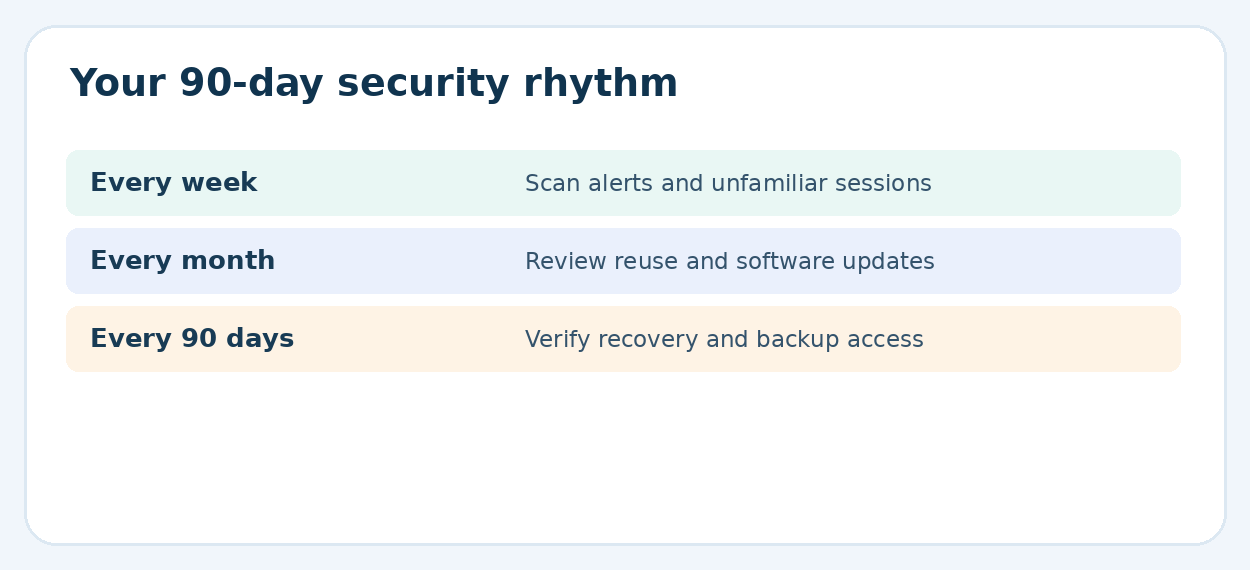
Weekly: review unexpected security notifications and new devices.
Monthly: check the highest-risk accounts for reused passwords and ensure browser/OS updates are applied.
Quarterly: test recovery information and remove accounts that are no longer needed.
After a device change: confirm sync or restore from an encrypted backup before retiring the old device.
After any breach: change affected passwords and review MFA, session history, and account recovery.
Frequently Asked Questions
Is a free password manager safe enough for banking?
A reputable free manager can substantially improve security when it uses a unique strong vault password and MFA, and when the device is kept updated. Banking accounts also deserve their own MFA, fraud alerts, and careful phishing checks. No manager removes every risk.
Which free password manager allows unlimited passwords?
Bitwarden and Proton Pass publicly offer unlimited logins on their free plans. KeePassXC supports a locally stored database without a subscription. Check current vendor terms before a large migration.
Can I use one free password manager on iPhone and Windows?
Yes. Cross-platform products such as Bitwarden and Proton Pass support both environments. Apple Passwords can also work with Windows through iCloud-related tools, but cross-platform convenience varies by setup.
What is better: browser passwords or a dedicated password manager?
Built-in options may be enough for a simple Chrome, Apple, or Firefox workflow. A dedicated manager becomes more useful when switching browsers and devices, seeking vendor-independent organization, or managing more complicated account collections.
What happens if a password manager company is hacked?
The impact depends on the product’s security architecture, account configuration, and incident specifics. Strong encryption and a unique master password can limit risks, but users should follow verified breach notices, rotate credentials when advised, and protect accounts with MFA.
Should passwords and authentication codes be stored together?
It can be convenient, but separating critical second factors may reduce the consequences of one vault compromise. The correct choice depends on the threat model and recovery plan; account security improves most when MFA is actually enabled and recoverable.
Final Verdict: Choose a Free Plan You Can Actually Maintain
For most people, Bitwarden delivers a practical balance of free storage, device flexibility, and everyday usability. Proton Pass is especially appealing when private email aliases and a modern interface are priorities. KeePassXC is an excellent fit for readers prepared to manage a local encrypted database carefully. Platform-native options remain sensible for people who stay inside one ecosystem.
The decisive advantage is not the longest feature list. It is a unique password for every important account, protected by a vault you can recover and use reliably. That is the lasting lesson from Best password manager apps free 2026: choose the simplest secure system you will maintain, then fix your most valuable accounts first.
editor's pick
latest video
news via inbox
Nulla turp dis cursus. Integer liberos euismod pretium faucibua


