
How to Create an Invoice: tep-by-Step Guide in 2026
You finished the work, the client is happy, and now one small document stands between you and getting paid. Learning how to create an invoice correctly is less about making a fancy PDF and more about eliminating the tiny ambiguities that cause approvals, accounting, and payments to stall.
This guide shows you exactly what to include, how to calculate totals, how to choose payment terms, how to send and track the invoice, and how to fix the most common billing problems. The method works for freelancers, consultants, agencies, contractors, creators, and small businesses, whether you use a spreadsheet, word processor, or dedicated invoicing app.
How to Create an Invoice: The 45-Second Answer
| ★ Featured Snippet: To create a professional invoice, add your business and customer details, assign a unique invoice number, list each product or service, calculate subtotal, taxes, discounts, and total due, state an exact payment deadline and accepted payment methods, review the document, then send it as a PDF or secure electronic invoice. |
Essential Tools & Materials Breakdown
Before you worry about design, gather the information that makes the invoice accurate. If you are learning how to create an invoice for the first time, this five-minute setup prevents most rework later.
| Tool / Material | What You Need | Estimated Cost | Skill Level |
| Business identity details | Legal/trading name, address, email, phone, tax or registration ID if required | $0 | Beginner |
| Client billing details | Correct legal/company name, billing address, accounts-payable email, PO/reference number | $0 | Beginner |
| Invoice template | Word, Google Docs, spreadsheet, or an invoicing app template | $0 to paid subscription | Beginner |
| Calculator or spreadsheet formulas | Quantity × rate, discounts, tax, totals, currency checks | $0 | Beginner |
| Payment setup | Business bank account, card/payment link, wallet, or check instructions | Depends on provider/fees | Beginner |
| Supporting records | Contract, quote, purchase order, time sheet, delivery note, acceptance email | $0 | Beginner |
| PDF export or e-invoice tool | Creates a stable, non-editable customer copy | $0 to paid subscription | Beginner |
| Recordkeeping folder/system | Stores issued, paid, void, and overdue invoice records | $0 to paid storage | Beginner |
Cost note: broad ranges are intentional. Software pricing and payment-processing fees change frequently, so choose tools based on workflow fit and current vendor terms rather than a static price quote.
Comprehensive Step-by-Step Execution Guide
Confirm What You Are Billing Before You Open a Template
The fastest way to send a wrong invoice is to begin typing from memory. Start with the source of truth: the signed proposal, purchase order, contract, approved estimate, time sheet, delivery record, or written change request.
When you know how to create an invoice from documented scope instead of memory, you reduce three common disputes: “that was not included,” “we agreed on a different rate,” and “our PO does not cover this charge.” Check the billing frequency too. A monthly retainer, milestone payment, deposit, reimbursement, and final balance each need different line-item wording.
Before moving on, confirm the client entity you must bill. Large companies may have a brand name everyone uses in conversation but a different legal company name or accounts-payable address. Ask for the billing contact and any mandatory PO, vendor, project, department, or cost-center reference.
| 💡 Quick Hack: Copy the milestone or deliverable name directly from the signed scope into the invoice. It shortens approval time because the reviewer can match the charge without translating your wording. |
Choose a Clean Invoice Numbering System
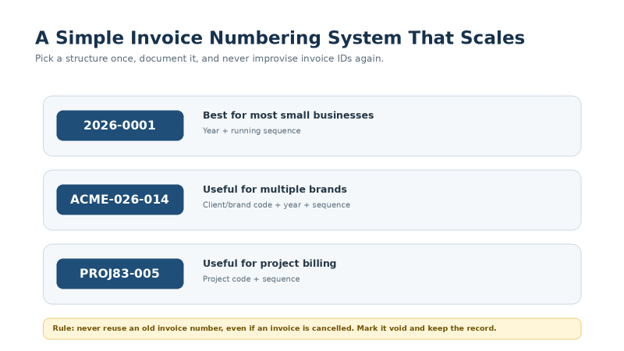
Every invoice should have a unique identifier. A simple format such as 2026-0001, 2026-0002, and 2026-0003 is easy to sort and explain. If you operate multiple brands or projects, a short prefix can help, but do not make the code so complicated that staff start inventing exceptions.
Never recycle a number because an invoice was cancelled. Keep the record, mark it void or cancelled, and issue a new invoice number if a replacement is required. Gaps and duplicates make reconciliation harder and can become a headache when a client asks for historical documentation.
Keep a one-line numbering rule in your bookkeeping SOP. For example: “YYYY-####, sequence resets each January.” The point is not the specific format; the point is consistency.
Add the Seller and Customer Information
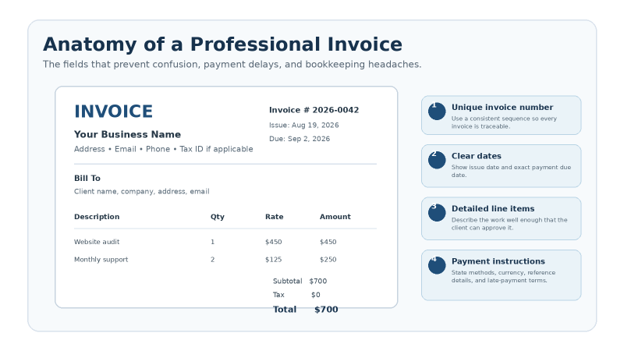
At the top of the invoice, show who is asking to be paid and who is responsible for paying. Include your business or trading name, contact details, and any tax, registration, or business number required in your jurisdiction. Then add the customer’s correct company or legal name, billing address, and contact.
A major part of how to create an invoice that passes accounts-payable review is matching the customer’s internal records. If their PO says “Northstar Holdings LLC” but your invoice says “Northstar Marketing,” the work may be approved yet the payment can still be rejected for a vendor mismatch.
For jurisdiction-specific requirements, check the rules that apply where you and your customer operate. For example, the UK government publishes a clear list of information certain invoices must include; other countries and tax systems have their own requirements.
Write Line Items That a Stranger Can Approve
Treat each line item as an approval-ready explanation, not as a private note. “Consulting – 10 hours” is better than “services,” and “August website maintenance retainer” is better than “monthly fee.” If billing products, include the product, quantity, unit price, and any relevant SKU or order reference.
If you are deciding how to create an invoice for project work, mirror the language used in the agreement. A line such as “Milestone 2 – approved wireframes and responsive prototype” gives the reviewer an immediate bridge back to the scope.
Group related items logically. Put reimbursable expenses in their own section or lines, and attach receipts if your agreement requires them. If a client expects detailed time entries, attach a timesheet rather than stuffing twenty tiny rows into the invoice itself.
| ✓ Pro-Tip: Keep the legal name, AP email, PO rules, tax status, and payment-run notes for each repeat client so you do not ask the same questions every month. |
Calculate Subtotal, Discounts, Tax, Credits, and Total Due
Invoice math should be boring, transparent, and reproducible. Calculate each line as quantity multiplied by rate, then sum the lines into a subtotal. Apply discounts and taxes in the order required by your agreement and local rules, subtract any deposit or credit already received, and show the final balance due prominently.
Do not manually type totals when a spreadsheet or invoicing app can calculate them. One changed quantity can leave an old subtotal or tax amount behind if the document has no formulas. If you must use Word, do the math in a calculator or spreadsheet first and copy the verified figures once.
Be careful with currency. If the customer is international, display the currency code such as USD, GBP, EUR, AED, or PKR rather than relying only on a symbol. If exchange-rate conversion is involved, state who bears conversion or bank charges if that has been agreed.
Set Payment Terms That Remove Guesswork
Your invoice should tell the customer exactly when and how to pay. “Net 15” may be common in business, but “Due September 2, 2026” is clearer. You can include both. Also list accepted payment methods, the payment reference to use, and the account or payment-link details needed to complete the transaction.
A practical rule for how to create an invoice that gets processed quickly is to place the due date near the total, not buried in fine print. If you offer an early-payment discount, require a deposit, or charge late fees, those terms should agree with the contract and local law; an invoice is a poor place to surprise a customer with brand-new terms.
For recurring clients, standardize terms during onboarding. Asking “Who receives invoices, what reference must appear, and what is your normal payment run?” can save more time than any visual design improvement.
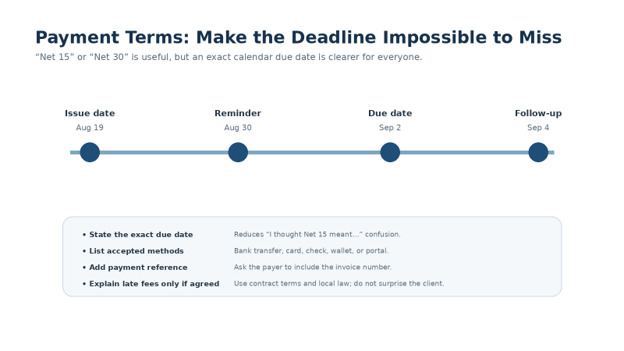
| 💡 Quick Hack: A bold exact date near “Amount Due” is harder to miss than a payment term buried in the footer. |
Add Notes, Payment Instructions, and Useful References
Use the notes area for information that helps the payer finish the job: bank or payment-link instructions, a thank-you line, project reference, PO number, tax note, or a concise description of included supporting documents. Keep it operational rather than promotional.
Never place sensitive credentials on an invoice. A bank account number or approved payment link may be appropriate; passwords, card credentials, private access keys, and unnecessary personal data are not. If your payment instructions change, confirm the change through a trusted channel because invoice and payment-detail fraud is a real business risk.
When payment is by bank transfer, ask the payer to include the invoice number in the transfer reference. That tiny habit can turn a mystery deposit into a one-click reconciliation.
Step 8: Review, Export, Send, and Record the Invoice
Before sending, perform a sixty-second quality check. Confirm the client name, invoice number, issue date, due date, line-item math, tax treatment, total, currency, payment details, and attachments. Then export a PDF or use a secure e-invoicing system so the customer receives a stable version.
The final step in how to create an invoice is not clicking Send; it is creating a record of what you sent. Save the issued copy, note the sent date and recipient, and track status such as sent, viewed, due, overdue, paid, partially paid, void, or disputed.
Consistent records help with bookkeeping and tax support. The IRS, for example, provides business recordkeeping guidance and points businesses toward supporting documents and reliable record systems. Requirements differ by jurisdiction, so retain records according to the rules that apply to your business.
| 💡 Quick Hack: Client, invoice number, math, due date, payment details. If all five are correct, most preventable invoice failures disappear. |
Simple Invoice Example You Can Copy
Here is a simple example you can copy into a document or spreadsheet. The numbers are intentionally plain so you can see how the pieces fit together.
| Description | Qty | Rate | Amount |
| Website performance audit | 1 | $450.00 | $450.00 |
| Technical fixes | 3 hours | $75.00 | $225.00 |
| Reporting and handoff | 1 | $125.00 | $125.00 |
| Subtotal | $800.00 | ||
| Tax | $0.00 | ||
| Deposit received | -$200.00 | ||
| Amount due | $600.00 | ||
Example payment terms: “Due September 2, 2026. Please include invoice number 2026-0042 in the bank-transfer reference.”
Common Mistakes to Avoid
Beginners often focus on making the document look professional, but the failures that delay payment are usually operational. Even if you already understand how to create an invoice, check these five errors before you hit Send.
- Vague line items — “Professional services” forces the approver to investigate. Use descriptions that tie directly to the project, period, deliverable, or quantity.
- Missing or inconsistent invoice numbers — Duplicates and random formats make both your books and the client’s records harder to reconcile. Use one sequence and keep voided numbers in the history.
- No exact due date — Terms such as “Net 30” alone can be interpreted inconsistently. Add the calendar date as well.
- Sending to the project contact instead of accounts payable — The person who approved the work may not be the person who enters invoices. Ask for the billing address and AP email during onboarding.
- Changing payment or late-fee terms after the work is done — Payment terms work best when agreed before delivery. Match your invoice to the contract instead of using it to introduce surprises.
Advanced Tips / Next-Level Hacks
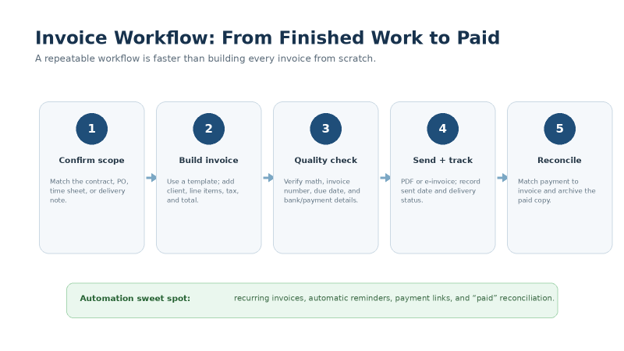
Once the basics are reliable, the next improvement is speed and visibility. The strongest systems treat invoicing as a repeatable workflow connected to sales, delivery, banking, and bookkeeping instead of a one-off document task.
If you frequently teach teammates how to create an invoice, turn your best invoice into a locked master template. Protect the fields that should not change, highlight the fields that must change, and add a pre-send checklist to the template itself.
For recurring retainers and subscriptions, use scheduled recurring invoices where appropriate. For milestone work, trigger invoice preparation from an approved milestone or delivery checklist. For time-based services, standardize time-entry categories so invoice descriptions are consistent from month to month.
Dedicated invoicing software can also add payment links, automatic reminders, status tracking, and reconciliation. If you are comparing tools, link this workflow to your broader small-business software stack rather than buying features in isolation.
| 💡 Quick Hack: Use automatic reminders for routine nudges, but switch to a personal message when an invoice is disputed, materially overdue, or blocked by a process issue. |
| ✓ Pro-Tip: Ask clients to include the invoice number in bank transfers or payment notes. It can save hours of reconciliation over a year. |
Troubleshooting & Maintenance Guide
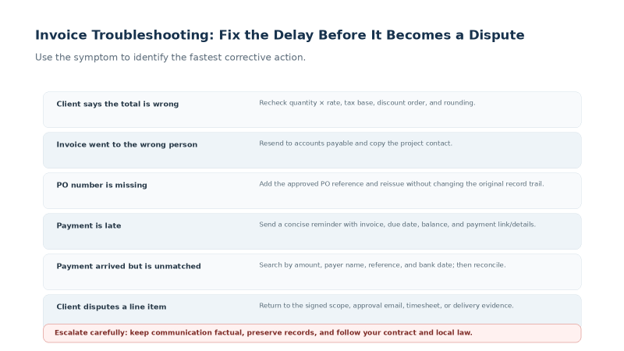
Knowing how to create an invoice is only half the job; the other half is diagnosing what happened when the normal payment flow breaks. Use the symptom below to choose the next action instead of sending the same generic reminder repeatedly.
The client says the invoice total is wrong
Recalculate line-by-line: quantity × rate, subtotal, discount, taxable amount, tax, deposit/credit, and final balance. If the error is yours, issue the corrected document according to your bookkeeping process and preserve the original audit trail rather than silently overwriting history.
The invoice was sent to the wrong person
Forward it to the correct accounts-payable contact, copy the project owner if appropriate, and ask whether the due date should be based on the original delivery date or the date AP received a valid invoice. Record the answer.
A PO or reference number is missing
Get the approved reference before repeatedly resending. Some systems reject invoices automatically when a mandatory PO, vendor ID, department code, or contract number is absent.
The invoice is overdue
Send a concise reminder that includes invoice number, issue date, due date, balance, a copy of the invoice, and payment instructions. Keep the tone factual. Escalate according to the agreed contract and local law rather than improvising threats or penalties.
The customer disputes a charge
Return to evidence: the signed scope, approval email, time sheet, delivery confirmation, change request, or purchase order. Separate genuine scope ambiguity from a simple billing error, then document the resolution.
A payment arrived but you cannot match it
Search using amount, payer name, transfer reference, payment date, currency, and bank memo. For future invoices, request that the payer include the invoice number in the payment reference.
Long-Term Invoice Maintenance
Invoice maintenance is really record maintenance. Use one folder or system for issued invoices, one consistent status field, and a monthly reconciliation routine that compares open invoices with bank or payment-platform activity.
The SBA emphasizes the importance of disciplined financial management for small businesses. In practical terms, an invoice process should feed accurate sales and receivables information into whatever bookkeeping system you use rather than living in a disconnected folder.
Create a monthly review: identify overdue balances, partial payments, credit notes, void invoices, missing client references, and recurring invoices that need to stop or change. A ten-minute review every week is usually cheaper than reconstructing three months of billing history at tax time.
Authoritative references: IRS business recordkeeping guidance • SBA guide to managing your finances • UK invoice requirements
Frequently Asked Questions
What information should a basic invoice include?
At minimum, include a unique invoice number, seller details, customer details, issue date, description of goods or services, quantities or rates where relevant, subtotal, taxes or discounts if applicable, total due, payment due date, and payment instructions. Legal and tax requirements vary by jurisdiction, so check local rules.
How to create an invoice for the first time without software?
Start with a simple Word, Google Docs, or spreadsheet template. Add your business and client information, use a unique invoice number, create a table for descriptions and amounts, calculate the total carefully, state the exact due date and payment method, export to PDF, and save a copy.
Can I make an invoice in Word or Google Docs?
Yes. A word processor works well for low invoice volume if you use a consistent template and verify calculations separately. A spreadsheet is safer when you need formulas. Dedicated invoicing software becomes more valuable when you need recurring invoices, reminders, payment links, multi-user workflows, or accounting integrations.
What is the difference between an invoice and a receipt?
An invoice requests payment and usually shows what is owed and when it is due. A receipt acknowledges that payment has been received. For a paid invoice, you can update the status to paid and, if needed, provide a receipt or paid copy according to your normal process.
Should I put payment terms like Net 15 or Net 30 on an invoice?
Yes, if those terms were agreed. For clarity, add an exact due date as well. If the contract says Net 15, the invoice can say “Terms: Net 15 – Due September 2, 2026.” Avoid adding new late fees or conditions that were not previously agreed or permitted.
How long should I keep invoices?
Retention periods depend on your jurisdiction, tax situation, contracts, and industry. Keep issued invoices and supporting payment records in a reliable system and follow the record-retention requirements that apply to your business. Government tax authorities often publish specific recordkeeping guidance.
Conclusion
A professional invoice is a tiny operational system: it identifies the transaction, proves what was billed, tells the customer exactly what to do next, and gives your bookkeeping process a clean record to reconcile. Once you know how to create an invoice with a repeatable checklist, billing becomes faster, easier to delegate, and far less likely to trigger payment delays.
Start with the simplest template that captures the right information, then add automation only when volume justifies it. Which part of invoicing causes you the most friction right now: line-item descriptions, payment terms, late follow-up, or choosing invoicing software? Share it in the comments.
editor's pick
latest video
news via inbox
Nulla turp dis cursus. Integer liberos euismod pretium faucibua


